
iLoungeiLounge
  • News
    • Apple
      • AirPods Pro
      • AirPlay
      • Apps
        • Apple Music
      • iCloud
      • iTunes
      • HealthKit
      • HomeKit
      • HomePod
      • iOS 13
      • Apple Pay
      • Apple TV
      • Siri
    • Rumors
    • Humor
    • Technology
      • CES
    • Daily Deals
    • Articles
    • Web Stories
  • iPhone
    • iPhone Accessories
  • iPad
  • iPod
    • iPod Accessories
  • Apple Watch
    • Apple Watch Accessories
  • Mac
    • MacBook Air
    • MacBook Pro
  • Reviews
    • App Reviews
  • How-to
    • Ask iLounge
Font ResizerAa
iLoungeiLounge
Font ResizerAa
Search
  • News
    • Apple
    • Rumors
    • Humor
    • Technology
    • Daily Deals
    • Articles
    • Web Stories
  • iPhone
    • iPhone Accessories
  • iPad
  • iPod
    • iPod Accessories
  • Apple Watch
    • Apple Watch Accessories
  • Mac
    • MacBook Air
    • MacBook Pro
  • Reviews
    • App Reviews
  • How-to
    • Ask iLounge
Follow US

Reviews

Reviews

Review: Squiggles by Squires Studios

Last updated: May 13, 2021 6:56 am UTC
By Charles Starrett
Review: Squiggles by Squires Studios

This review originally appeared within iLounge’s iOS Gems series within the compilation article, iPhone Gems: Every Drawing Application, Reviewed. Additional details may be found in the original article.


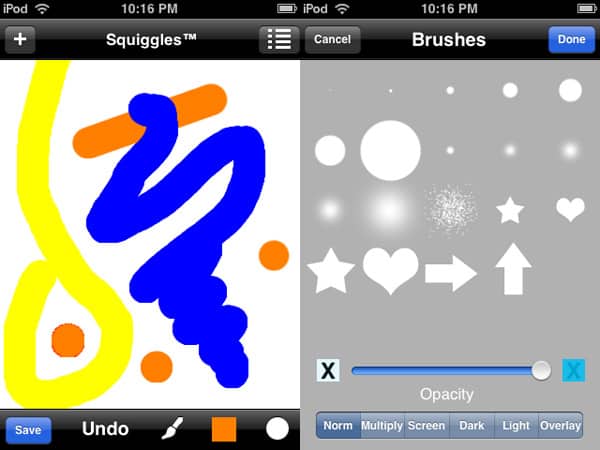
Squiggles ($5) is a highly ambitious drawing application that simply tries to do too much. Unlike many of the other applications in its price range, Squiggles doesn’t offer any sort of built-in gallery, instead letting giving users a main drawing screen and a number of buttons which access options such as saving the drawing to the photo library, creating a new drawing—which replaces the current one, although it asks if you’d like to save first—accessing settings, tools, colors, and brushes, and undoing the last stroke.

Review: Squiggles by Squires Studios

Users can also clear the screen by shaking.

Squiggles offers an impressive list of tool options, including brush, eraser, clone tool, stamp, overlay image, and text buttons, a variety of basic filters, including brightness and contrast adjustments, and a section for layer control. The brushes/overlay/stamp selections are equally robust, with controls given for the opacity and blend mode for each brush. The settings menu allows the user to toggle the ask on shake, smart shape, load cropped, cursor, and smoothing features on and off, along with a slider to adjust the smoothing and a button that lets the user set a finger offset for more accurate drawing.


Review: Squiggles by Squires Studios

Despite all these features, Squiggles lacks simple features such as zoom and multiple undo, and its handling of certain features, such as layers, makes them all but unusable.

A re-thought menu system, a more clear way of letting the user know exactly what layer they are on and what will and will not be editable at a given time, a slightly lower price, and a more attractive overall interface would do a lot to make Squiggles better. It’s not terrible as it is, but it’s not outstanding either, and it lacks the polish and ease of use found in its direct competition. With some improvement, it could certainly become a powerful app; it currently falls slightly short of our recommendation.



Latest News
The AirPods Pro 3 is $20 Off
1 Min Read
Exynos 2600 Chip 2nm Process Revealed by Samsung
1 Min Read
New Celebrity Ad Campaign Featuring Travis Scott Released by Beats
1 Min Read
Australia Getting Hypertension Notification Feature
1 Min Read
The 14-inch MacBook Pro with M5 Chip 16GB RAM/512GB is $250 Off
1 Min Read
Noise and Static on AirPods Pro 3 Still Unfixed
1 Min Read
New iMac with 24-inch OLED Display May be Brighter With 600 Nits
1 Min Read
The 15-inch M4 MacBook Air 256GB Is $250 Off
1 Min Read
Internal Kernel Debug Kit from Apple Reveals Tests for a MacBook with A15 Chip
1 Min Read
Apple Currently In Talks With Suppliers for Chip Assembly & Packaging of iPhones in India
1 Min Read
Apple Allows Easier Battery Replacement For M5 MacBook Pro with 14-inch Display
1 Min Read
The Apple Watch SE 3 44mm GPS is $50 Off
1 Min Read

iLounge logo

iLounge is an independent resource for all things iPod, iPhone, iPad, and beyond. iPod, iPhone, iPad, iTunes, Apple TV, and the Apple logo are trademarks of Apple Inc.

This website is not affiliated with Apple Inc.
iLounge © 2001 - 2025. All Rights Reserved.
  • Contact Us
  • Submit News
  • About Us
  • Forums
  • Privacy Policy
  • Terms Of Use
Welcome Back!

Sign in to your account

Lost your password?








