
iLoungeiLounge
  • News
    • Apple
      • AirPods Pro
      • AirPlay
      • Apps
        • Apple Music
      • iCloud
      • iTunes
      • HealthKit
      • HomeKit
      • HomePod
      • iOS 13
      • Apple Pay
      • Apple TV
      • Siri
    • Rumors
    • Humor
    • Technology
      • CES
    • Daily Deals
    • Articles
    • Web Stories
  • iPhone
    • iPhone Accessories
  • iPad
  • iPod
    • iPod Accessories
  • Apple Watch
    • Apple Watch Accessories
  • Mac
    • MacBook Air
    • MacBook Pro
  • Reviews
    • App Reviews
  • How-to
    • Ask iLounge
Font ResizerAa
iLoungeiLounge
Font ResizerAa
Search
  • News
    • Apple
    • Rumors
    • Humor
    • Technology
    • Daily Deals
    • Articles
    • Web Stories
  • iPhone
    • iPhone Accessories
  • iPad
  • iPod
    • iPod Accessories
  • Apple Watch
    • Apple Watch Accessories
  • Mac
    • MacBook Air
    • MacBook Pro
  • Reviews
    • App Reviews
  • How-to
    • Ask iLounge
Follow US

Reviews

Reviews

Review: Spigen SGP Diary for iPad (3rd-Generation)

Last updated: May 17, 2021 10:16 am UTC
By Nick Guy
Review: Spigen SGP Diary for iPad (3rd-Generation)

Folios have become the most common style of iPad case over the past two years, and depending on what you’re looking for, one of the dozens of new designs might be an ideal fit for your tablet. A folio places your iPad inside of a fabric, leather, or plastic enclosure that looks like a folder, generally opening to reveal a holder for the iPad on one side, and screen-covering lid with a stand or stand support on the other. Today, we’re separately rounding up three different categories of folios for the third-generation iPad — updates to past iPad 2 models we’ve covered, “new” options that are highly similar to ones we’ve covered before, and then truly new models that are distinctive in at least a couple of ways. This review is part of the “new but highly similar” case roundup, looking at Diary ($65) from Spigen SGP.


Review: Spigen SGP Diary for iPad (3rd-Generation)

We’ve seen a strange trend pop up in certain cases recently, first with the iPhone and now the iPad: some companies are using adhesive material to hold the device in place, rather than taking the time to design and implement a proper shell or frame.

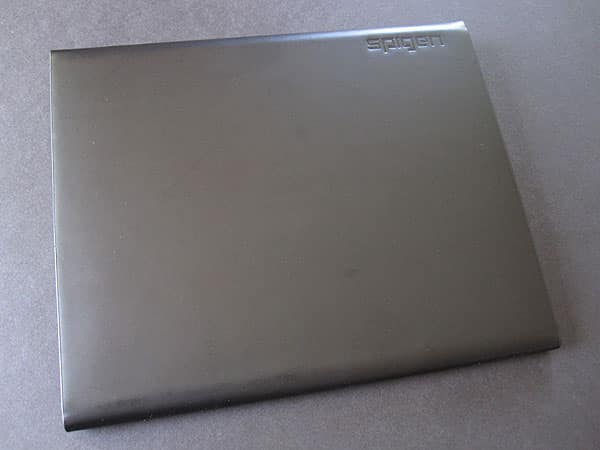
The most recent of these designs is Diary, which comes in black or dark brown versions. This third-generation iPad folio is made of real, flat leather with a non-grip surface coating the inside, plus a magnetic snap that reaches around from the front to hold it shut. On the right side of the interior is a 2.5” wide, 6” long strip of foam jelly adhesive, which comes with a sheet of plastic to keep it from getting dirty and losing its stickiness.


Review: Spigen SGP Diary for iPad (3rd-Generation)

Review: Spigen SGP Diary for iPad (3rd-Generation)

To install the iPad, you line its back up with the camera hole, press it in place, and it’ll stay put until you pull it off—a solution that works, but just doesn’t look particularly great, and has other consequences, such as leaving the top and bottom entirely exposed.

However, unlike some of the cases we’ve seen with a similar design, Diary’s back folds, allowing the tablet to stand in a variety of landscape viewing angles; the lid’s non-slip inner lining generally holds the iPad in the position you leave it in. Similarly, Diary’s use of a magnet-sealed side flap removes another of the issues common to adhesive- and elastic-style folios, namely their exposure of the iPad’s long edge.


Review: Spigen SGP Diary for iPad (3rd-Generation)

Review: Spigen SGP Diary for iPad (3rd-Generation)

While Diary isn’t the simplest of the adhesive-style folios we’ve tested, it’s the most expensive, a fact that’s supposed to be justified almost entirely by Spigen SGP’s use of real leather for the outside of this case; most use artificial leather, and then, materials that look and feel a lot like this—Spigen selected an extra fine grain leather rather than a heavily-textured, floater-style version. The inclusion of stand and side protection features do help Diary to eclipse its similarly minimalist rivals in features, but the price tag remains hard to justify for something that still falls short of $40-$50 cases in protection. Overall, Diary is just a little below our recommendation level: the materials are nice, but we can’t in good conscience suggest that readers spend $65 on something so simple.



Latest News
The 14-inch MacBook Pro with M5 Chip 16GB RAM/512GB is $250 Off
1 Min Read
Noise and Static on AirPods Pro 3 Still Unfixed
1 Min Read
New iMac with 24-inch OLED Display May be Brighter With 600 Nits
1 Min Read
The 15-inch M4 MacBook Air 256GB Is $250 Off
1 Min Read
Internal Kernel Debug Kit from Apple Reveals Tests for a MacBook with A15 Chip
1 Min Read
Apple Currently In Talks With Suppliers for Chip Assembly & Packaging of iPhones in India
1 Min Read
Apple Allows Easier Battery Replacement For M5 MacBook Pro with 14-inch Display
1 Min Read
The Apple Watch SE 3 44mm GPS is $50 Off
1 Min Read
20th Anniversary iPhone May Launch in Two Years
1 Min Read
Better Image Generation Capabilities and Apple Music Integration Coming to ChatGPT
1 Min Read
A20 Pro Chip Coming to Next Gen iPad Mini OLED
1 Min Read
Amazon has the AirTag 4 Pack Marked $29 off
1 Min Read

iLounge logo

iLounge is an independent resource for all things iPod, iPhone, iPad, and beyond. iPod, iPhone, iPad, iTunes, Apple TV, and the Apple logo are trademarks of Apple Inc.

This website is not affiliated with Apple Inc.
iLounge © 2001 - 2025. All Rights Reserved.
  • Contact Us
  • Submit News
  • About Us
  • Forums
  • Privacy Policy
  • Terms Of Use
Welcome Back!

Sign in to your account

Lost your password?








