
We were seriously excited when Speck’s PixelSkin HD Wrap for the third-generation iPad ($50) arrived in our office. The previous edition was one of the best rated cases for the iPad 2, earning a high recommendation when we reviewed it last April. This new version exhibits more changes than just the small revisions we’re used to from Speck. An almost identical rear shell is matched with a redesigned front cover. While it’s an improvement in some ways, the quality slips in others.

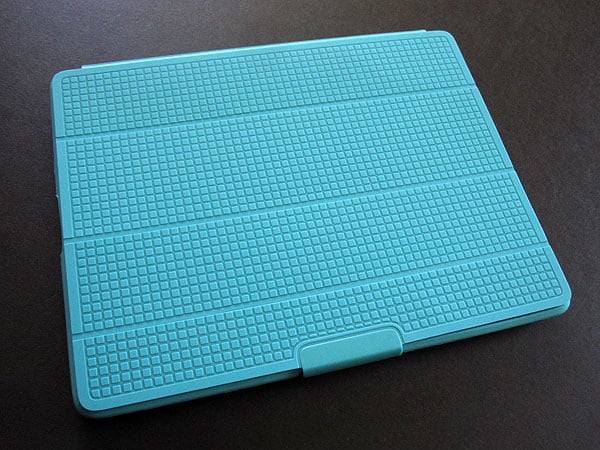
Like before, the folio-style PixelSkin HD Wrap comes in a variety of bright colors. Speck chose to keep the shell from its previous case, although it seems just a bit looser than before.
The majority of the semi-soft back has a glossy finish, overlaid with a matte grid pattern that provides a nice feel and an eye-catching appearance, while the rest of the frame is composed of that same matte plastic material. There’s button coverage and the holes are well-sized, but the iPad slides around just the slightest bit. This can bring the openings just a little off-center; it’s most noticeable around the microphone. The shell rises up and over the iPad’s display to form a small protective lip, but we were surprised by how easily the long edges pulled away.


While Speck didn’t make any real changes to the back, it significantly changed the front cover between generations. Before, the lid was divided into three sections. It folded into a triangular stands for viewing and typing—much like Apple’s Smart Cover—with a small tab fitting into a cutout to hold it in place.
Instead of magnets, it used a thin strip of micro-suction material to stay shut.


Now, it’s split into four columns. Gone are the tab and strip; they’ve been replaced by a plastic clip to hold the cover shut and a visibly embedded magnet to wake and sleep the tablet. To get a typing angle, one still folds the cover into a triangle. It’s important to hold the shape until the case is down on a flat surface though, or else it will pop right out. For video viewing, the lid must be folded back on itself with the clip grabbing onto the bottom edge of the case. Doing so pulls at the plastic edge and while the iPad isn’t any less protected, it’s not the kind of thing you want to see from a case.











