
When Soundfreaq released SFQ-01 Sound Platform as its first iOS speaker last year, we found the boxy but stylish unit atypically impressive for a company’s first entry into the iPod and iPhone speaker market. Priced at $200 and designed to dock with or stream Bluetooth audio from either iPods or iPhones, Sound Platform also worked with iPads using Bluetooth, but couldn’t charge them. This month, Soundfreaq debuted two new and truly iPad-ready speakers: the $130 SFQ-02 Sound Step and the $160 SFQ-02RB Sound Step Recharge. We’re only reviewing Sound Step Recharge here today: it adds an integrated six-hour rechargeable battery to the Sound Step, but is otherwise extremely similar, giving iPod, iPhone, and iPad users alike an affordable and versatile new option for docked or wireless listening.
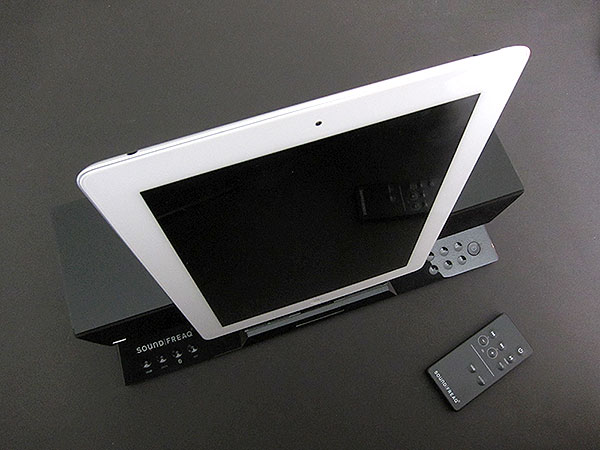
Though their designs obviously demonstrate that they’re members of the same family, Sound Step Recharge is smaller than the Sound Platform, with an inch less of depth at 5”, a 3.5” height versus 5.9”, and only a little extra width at 13” versus 11.8”. Since it reduced the unit’s physical size, Soundfreaq also had to make changes to the speakers, replacing Sound Platform’s twin 2.75” drivers with two roughly 1.8” speakers and an approximately 2.5” down-firing subwoofer. Thanks to some highly unusual engineering choices, including nesting the subwoofer inside a boxy compartment within Sound Step’s back, the speakers still manage to produce nicely balanced sound while still leaving room for the rechargeable battery, an FM radio, Bluetooth 2.1 wireless hardware, and a collection of mostly capacitive touch controls.

Also unusual is an extra USB port on the back, enabling two-device users to simultaneously recharge an iPad at full speed on the 2.1-Amp front Dock Connector, and an iPhone on the back by using a self-supplied Dock Connector cable. There are also composite video-out and auxiliary audio-in ports, neither with included cabling.

Before discussing anything else about Sound Step Recharge, we need to pause for a moment to praise Soundfreaq for all of the little things it has done correctly in this design. The unit’s left- and central-faced orange-lit indicator lights are stylish and elegant, as are the simple controls off to the left and right front sides. Sound Step Recharge works perfectly to dock iPads, including ones inside some—possibly most—cases, and works equally well with iPhones and iPods, as well. And the rechargeable battery works properly, too, enabling the system to operate regardless of whether it’s plugged into a wall or used elsewhere around your home or office. Soundfreaq doesn’t include a carrying case to exploit the unit’s portability, and it’s certainly not as thin or easy to bag as Logitech’s similarly-priced S715i, but its use of concave buttons and use of a bottom storage compartment to hold its included Infrared remote control will help to prevent accidents if you’re going to carry it around.

Beyond aesthetic and design considerations, we also really liked almost everything about Sound Step Recharge’s performance as a speaker.
Whether it’s operating in docked or Bluetooth wireless mode, Sound Step’s renditions of songs sound extremely similar: the audio is midrange and mid-treble focused, with just enough mid-bass and treble to sound detailed and respectably full for the price, though heavy bass fans may find it lacking in the thump department. Stereo separation is a little wider than the 13” chassis width, and the peak volume levels are small room-filling—dangerous at close distances, and better than we’d have expected from such a small system. We were able to get clean, uninterrupted Bluetooth signals from an iPad 2 at an impressive distance of 60 feet away before the audio began to experience hiccups, and generally found the unit’s audio performance to be great given the price and other features in the package.

FM radio tuning is handled somewhat unusually by Sound Step Recharge. Soundfreaq includes a relatively clean FM tuner with a detachable antenna wire in the back, but doesn’t include any LCD or LED lights on the unit to tune stations. The only obvious way to access a tuner is to use the free Soundfreaq Bluetooth remote application that the company automatically asks you to download when you attach an iOS device, but without that, you’ll find the instruction manual confusing as to how to access a screenless tuning feature using the included Infrared remote.

Stations sounded very good when we could tune them in, and there are 20 presets to aid with tuning, but the feature hasn’t been as well-implemented for use without the app as it should have been.











