
At a time when companies such as Altec Lansing were developing the earliest portable iPod speaker systems, Sonic Impact was working on ways to trump them. Altec’s classic four-driver array became the basis for classic inMotion series fold-up speakers, and Sonic Impact wisely went further with its gray and white i-Fusion model, adding a rechargeable 15-hour battery and hard carrying case to the formula. When speakers with remote controls and black iPods became more popular, i-F2 was released, packing a remote and new all-black coloration at the same $150 price.
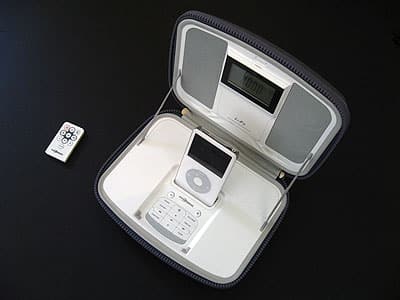
Now there’s i-F3 ($180), and once again, Sonic Impact has kept the basic formula the same while adding a couple of new twists at a $30 premium. You still get a hard, zippered, included hand strap-optional case with four speaker drivers inside, alongside an iPod dock, a 15-hour rechargeable Lithium-Ion battery, and an Infrared remote control. Interestingly, the color has shifted back to the gray ballistic nylon exterior and mostly white interior of i-Fusion. And there’s still a full-sized iPod (not iPhone)-sized storage compartment between the speakers, and a remote-sized compartment next to the dock, so you can pack everything up for easy carrying on the road. Fully new are a digital alarm clock and an FM radio, which Sonic Impact has sandwiched into the old design.

To accomplish that feat, each of i-F3’s plastic surfaces has become more complicated. The dual-alarm digital clock is mounted on the front of the iPod-ready compartment, unusually red-backlit with a 4-position dimmer.
And the battery and remote compartment has shifted behind the iPod dock, making room on i-F3’s bottom front for an array of 15 buttons that are used for volume, track, clock, radio and alarm settings. Some of these buttons are mirrored on the included new ten-button remote control, now with mute, radio preset, and input/function toggles, which add on to i-F2’s prior volume, track, play/pause and power buttons.

On one hand, we can understand what Sonic Impact is trying to accomplish with i-F3—unlike Altec’s latest FM radio-equipped portable iPod speaker iM600, it’s not trying to eliminate the need for last year’s model, or radically redesign its unique case-slash-speaker shell. But as functional and practical as the case—still with rubber-sealed power and auxiliary inputs on the side, minus the pass-through Dock Connector and plus an FM antenna port—may remain relative to its peers, it’s starting to look a bit old, and we’re not totally blown away with the new interior industrial design.

Gone are the chrome interior accents that both prior models featured, replaced by more bland speaker grilles with prominent bottom-mounted vents. The clock face, which consumes a large amount of i-F3’s top real estate, doesn’t look that hot, and uses lots of too-small labels and icons. Though we aren’t fans of the red backlight, the clock is easier to see from the front, and read from the side than the ones on Sonic Impact’s i-P23s. In all, we’d call it a little better than “fine,” but not good or great.
Similarly, i-F3’s new buttons are somewhat less than ideally sensitive, requiring deep presses, and they’re also less than ideally labeled.
Up and down arrow icons turn out to be for radio presets, while an “exit/disp” button turns off the currently ringing alarm. Track buttons can also be used to manually adjust the FM radio stations, and time setting requires a bit of exploration—press “time.set” to start, then “enter” once you’ve picked 12- or 24-hour time, then a track button to switch from changing hours to changing minutes. It’s not as easy as it could be, but once it’s done, it’s done, until you need to set an alarm, which is also more a bit unwieldy.

The good news about the alarms are that there are two, and each lets you toggle between iPod, radio, and buzzer modes independently. As with Sonic Impact’s i-P23, however, that’s pretty much all the control you get: the buzzer stays at a fixed volume level, and the iPod and radio alarms are at the system’s last-used level, as well, without becoming lower. Put another way, if you went to sleep with quiet music, you’ll be woken up with quiet music, too. But i-F3 can also be cranked up very loud, equivalent to its top competitors, and though it still distorts at the top of its 31-level volume range, the drivers do a good job of keeping up with whatever volume you select.
Another high point for i-F3 is the quality of its FM radio reception. Sonic Impact’s tuner does a pretty good job of producing clean sound without assistance, and even better if you plug in an included, optional external antenna wire that can be repositioned for superior reception. It’s undercut by .1-increment (read: slower than necessary) manual tuning and two oddities of its preset system: the radio re-awakens from another input mode only to the most recent preset it touched, rather than the last station it was on, and double-counts presets as additional stations while you’re manually tuning.











