
iLoungeiLounge
  • News
    • Apple
      • AirPods Pro
      • AirPlay
      • Apps
        • Apple Music
      • iCloud
      • iTunes
      • HealthKit
      • HomeKit
      • HomePod
      • iOS 13
      • Apple Pay
      • Apple TV
      • Siri
    • Rumors
    • Humor
    • Technology
      • CES
    • Daily Deals
    • Articles
    • Web Stories
  • iPhone
    • iPhone Accessories
  • iPad
  • iPod
    • iPod Accessories
  • Apple Watch
    • Apple Watch Accessories
  • Mac
    • MacBook Air
    • MacBook Pro
  • Reviews
    • App Reviews
  • How-to
    • Ask iLounge
Font ResizerAa
iLoungeiLounge
Font ResizerAa
Search
  • News
    • Apple
    • Rumors
    • Humor
    • Technology
    • Daily Deals
    • Articles
    • Web Stories
  • iPhone
    • iPhone Accessories
  • iPad
  • iPod
    • iPod Accessories
  • Apple Watch
    • Apple Watch Accessories
  • Mac
    • MacBook Air
    • MacBook Pro
  • Reviews
    • App Reviews
  • How-to
    • Ask iLounge
Follow US

Reviews

Reviews

Review: Solid Line Products RightShift Keyboard Case for iPad 2

Last updated: May 17, 2021 1:25 pm UTC
By Nick Guy
Review: Solid Line Products RightShift Keyboard Case for iPad 2

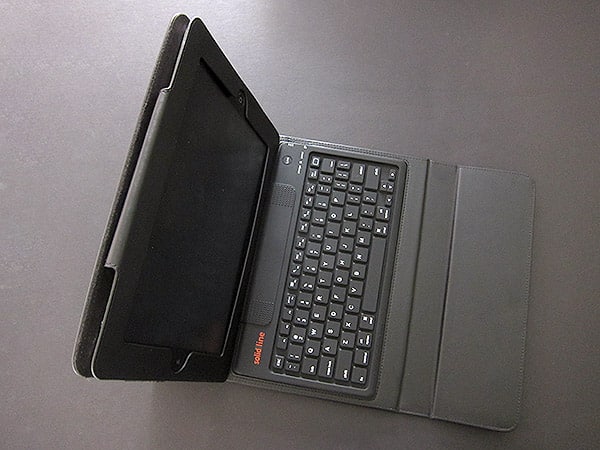
We’ve tested quite a few keyboard cases for the original iPad, and not surprisingly, many of them have since been redesigned to fit the iPad 2. For the most part, manufacturers seem to have been satisfied with their original designs, and Solid Line Products’ RightShift ($99) is a continuation of one we’ve seen before — it’s almost identical to the previously-reviewed Accessory Workshop tyPad Gen II Case + Wireless Keyboard for the original iPad. But it does have a few differences worth noting below.

Review: Solid Line Products RightShift Keyboard Case for iPad 2

RightShift comes from a family of keyboard cases that all look and work mostly the same—tyPad Gen II, Sena Cases’ Keyboard Folio, and Kensington’s KeyFolios all use the same general keyboard and are likely made in the same factory. Here, the folio-style case is made of padded faux leather that feels fine, but it’s certainly synthetic. A flap on the left side is used to hold the case shut and also functions as a wrist rest, just as with tyPad Gen II.


It uses magnets rather than the Velcro we have previously seen, but they notably aren’t used to trigger the screen lock feature of the iPad 2. The flap does cover the rear camera when closed, but when the case is open, there’s no obstruction.


Review: Solid Line Products RightShift Keyboard Case for iPad 2

The keyboard works generally as it’s supposed to; it properly connects to an iPad 2 to become a physical replacement for the tablet’s on-screen virtual keyboard. Bluetooth wireless pairing is a very easy process. As with the other cases, it uses a “link” button that puts it into discoverable mode. The iPad 2 recognizes the accessory almost instantly, and requires only a four-digit pairing code to complete the syncing.


A rechargeable battery inside provides 90 hours of continuous typing, falling into a low-power sleep mode when not in use; you recharge the battery with an included cable.


Review: Solid Line Products RightShift Keyboard Case for iPad 2

Review: Solid Line Products RightShift Keyboard Case for iPad 2

By comparison with tyPad Gen II, some of the keys have been rearranged—for the better, in our opinion. The number row has narrower minus and backspace keys that make room for a plus key. Moved from the bottom row are the backslash and quotation keys, the former to the right edge of the third row and the latter between the colon and enter keys. Although they are smaller than most people will be used to, the positions are much better, especially for touch typists. We had no major issues with keys sticking or missing inputs, which was a real positive for a rubber-style keyboard.


Review: Solid Line Products RightShift Keyboard Case for iPad 2

Review: Solid Line Products RightShift Keyboard Case for iPad 2

On the other hand, the keyboard did not sit quite flat.


Latest News
The 14-inch MacBook Pro with M5 Chip 16GB RAM/512GB is $250 Off
1 Min Read
Noise and Static on AirPods Pro 3 Still Unfixed
1 Min Read
New iMac with 24-inch OLED Display May be Brighter With 600 Nits
1 Min Read
The 15-inch M4 MacBook Air 256GB Is $250 Off
1 Min Read
Internal Kernel Debug Kit from Apple Reveals Tests for a MacBook with A15 Chip
1 Min Read
Apple Currently In Talks With Suppliers for Chip Assembly & Packaging of iPhones in India
1 Min Read
Apple Allows Easier Battery Replacement For M5 MacBook Pro with 14-inch Display
1 Min Read
The Apple Watch SE 3 44mm GPS is $50 Off
1 Min Read
20th Anniversary iPhone May Launch in Two Years
1 Min Read
Better Image Generation Capabilities and Apple Music Integration Coming to ChatGPT
1 Min Read
A20 Pro Chip Coming to Next Gen iPad Mini OLED
1 Min Read
Amazon has the AirTag 4 Pack Marked $29 off
1 Min Read

iLounge logo

iLounge is an independent resource for all things iPod, iPhone, iPad, and beyond. iPod, iPhone, iPad, iTunes, Apple TV, and the Apple logo are trademarks of Apple Inc.

This website is not affiliated with Apple Inc.
iLounge © 2001 - 2025. All Rights Reserved.
  • Contact Us
  • Submit News
  • About Us
  • Forums
  • Privacy Policy
  • Terms Of Use
Welcome Back!

Sign in to your account

Lost your password?










