
We thought briefly about holding off on reviewing Leaf Trombone: World Stage ($1) for our Weird and Small Apps roundup later this week, but we can’t: this app, originally previewed at Apple’s iPhone OS 3.0 event, is far too cool to wait on. Developer Smule has taken the iPhone and iPod touch — already cool devices — and raised them to all-new levels of amazement with this one-dollar piece of software, enabling users not only to play an instrument, but also to sit as a member of an Idol-style three-judge panel to comment on and rate other users’ performances. To call Leaf Trombone brilliant, fun, and amazingly executed is fully accurate; the only things this app could benefit from are greater stability and a wider variety of instruments to play.
Leaf Trombone is, at the core, a musical instrument simulator: a leaf appears on the right side of the screen with an overlapping indicator for where your finger is currently sitting on the instrument; you tap the screen and/or use a connected microphone to play music. In touch mode, you merely tap or hold your finger down on a certain marked portion of the leaf to create short and long notes, while in the iPhone and iPod touch 2G’s wind mode, you both touch the leaf at marked places and blow air either quickly or more consistently into the device’s microphone to play. A connected microphone or mic-equipped headset will work on the second-generation touch, while the iPhone and iPhone 3G can both use their own or attached mics, all three devices registering only the sound of blowing air. Plus and minus arrows on the screen let you shift keys, while a settings menu lets you choose the base key, as well as how much your finger motions will impact the pitch.

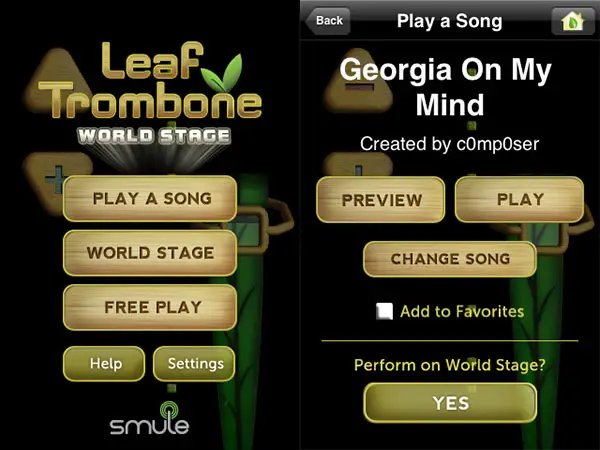
Initially, users are presented with three major choices: play a song, join the “World Stage,” or free play, the first and last of which are basically the same save for on-screen prompting and a little background music that are offered in the “play a song” mode. Here, a wheel spins on the bottom left of the screen to provide a background beat for some songs, while 3-D leaves float out as either pulse-like short notes or longer, drawn-out notes to let you know how to properly perform.
Free play mode removes the background music and the 3-D leaves, letting you play as well or poorly as you can without guidance.

The plusses and minuses of these play modes are sort of interesting. It quickly becomes obvious that playing the leaf trombone properly can yield some nice enough results, but that this isn’t exactly the most beautiful instrument on the planet: Smule’s earlier Ocarina and plenty of other wind instruments might well sound more pleasing. In fact, there are times when the “play a song” mode’s background music is easier to enjoy than what you’re playing; the leaf trombone can sound whiny, and in the wrong hands, like listening to something you haven’t heard since grade school. But the process of learning how to play is actually fun, and the app includes not only a “popular” songs category but a collection of user-submitted tracks and a search feature to help you find things that interest you. Thanks to a free web-based composition tool, one gets the sense that the collection of music will only grow over time; it’s already neat as-is.

From our perspective, the killer feature of Leaf Trombone is found in the second part: the World Stage. Here, you have the opportunity to live out your American Idol-style fantasies as either a judge, a performer, or a member of the audience. Performing is exactly like the play a song mode, as you’re given the opportunity to choose a song you like, then get prompted with the notes to play.
Interestingly, you don’t get judged in real time: instead, the song is recorded as you play, and at the end, you’re allowed to either submit the song to be judged, or withhold it. In either case, performing in this mode costs you a “leaf token;” you get limited tokens, and thus only a few opportunities to be judged, to start.

Judging mode is really, really smart. You need create a username—no password—and then the app lets you serve as a member of a three-judge panel, listening to someone else’s performance and making various comments as it progresses, earning a leaf token when you’ve finished. As the performance goes on, you can pick emoticons to represent your feelings, and type short messages to the two other listeners and performer, who are all listening to the same just previously-recorded track at the same time. At the end, you have the chance to rate the performance from 1 to 10, then make a final comment. The interactivity between judges as the song is playing can be incredibly fun, and a reason that even people without musical performance talent will enjoy this application. If you’re not the judgmental type and just want to listen to someone else play, you can see a list of previously performed tracks, pick one, and then watch as a recorded version of someone else’s performance gets played back, including comments and the rating from judges.











