
Pros: Fun and creative way to truly customize your iPod. Perfect fit.
Cons: One test sheet provided, three would have been just right.
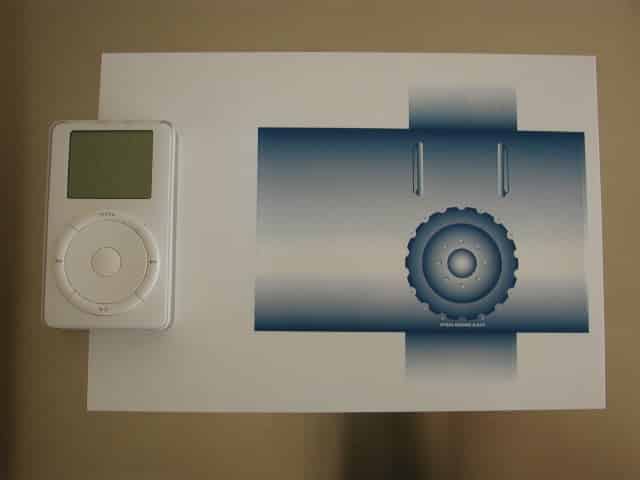
What is a BodyMask? No, it’s not a spa treatment for the iPod, but a simple yet clever product that allows anyone with a computer, printer and graphics software to design their own customized iPod sticker. It seems, whenever there is a new product debut here in the states, especially Apple related, some individual or company in Japan is already thinking up innovative, fun and/or creative accessories. The BodyMask is one of those fun and creative accessories.
Time To Design
As soon as I received the BodyMask, I immediately went to PowerDesign and downloaded their BodyMask template. It will make your life easier when trying to design your own sticker. I would have much rather had an EPS formatted template rather than a GIF. An EPS template would allow you to place the template on top of your design in the Layers palette in Adobe Illustrator (or similar software) and see your design while making sure your art is within the template boundaries. The GIF did not allow this, because it’s on a white background, so placing the template in the top-most Layer in the Layers palette would cover your art.
If your design has a large background or pattern, make sure it overlaps the outer edges of the GIF template. This is the outer most edges of the die-cut shape in the GIF template.
This way when you peel the sticker off the sheet, the design has gone beyond the edges of the die-cut and you get a borderless image.
Test Your Design
I finished the design and began to test for alignment. PowerDesign provided me with one test sheet for printing the design before printing it onto the final sticker sheet. Go to your local Kinkos and make several copies of the test sheet if you need to test your design several times before the final printing.
When your ready to print the final design onto the BodyMask sticker sheet, make sure to set your Page Setup (on a Mac) or Printer Property (on a PC) to accept B5 paper. The Epson, Canon BJ series and HP ink jet printers are listed as recommended for printing. There are instructions provided on the test sheet, so be sure to read them.
After printing the final design, I made close inspection of the alignment and it was perfect. The edges of my art work were exactly at the edges of the die-cut edges on the sticker sheet. Now it came time to apply the sticker to my iPod. Wipe the iPod of any dust or grime with a clean cloth, especially finger prints.
Apply Your Design
Before applying your design, place the protective film for the LCD screen.
When you’re ready, choose a corner of the sticker that matches the iPod’s faceplate and apply it first. Press the corner down as you move little by little across the faceplate. Smooth the sheet as you move along, making sure not to trap any air bubbles. The idea is to place the front portion of the sticker to the iPod’s faceplate first. After that’s done, I carefully applied the top, bottom, right side, and the remaining left side. More likely than not, you will have air bubbles trapped underneath the sticker sheet. Use your fingernail and gently smooth the bubbles out to the edges as best you can.


The sheet is very tacky, so handle it with the utmost care. Once you apply it to your iPod it’s semi-permanent. If you need to remove it for any reason you can’t apply it again.











