
iLoungeiLounge
  • News
    • Apple
      • AirPods Pro
      • AirPlay
      • Apps
        • Apple Music
      • iCloud
      • iTunes
      • HealthKit
      • HomeKit
      • HomePod
      • iOS 13
      • Apple Pay
      • Apple TV
      • Siri
    • Rumors
    • Humor
    • Technology
      • CES
    • Daily Deals
    • Articles
    • Web Stories
  • iPhone
    • iPhone Accessories
  • iPad
  • iPod
    • iPod Accessories
  • Apple Watch
    • Apple Watch Accessories
  • Mac
    • MacBook Air
    • MacBook Pro
  • Reviews
    • App Reviews
  • How-to
    • Ask iLounge
Font ResizerAa
iLoungeiLounge
Font ResizerAa
Search
  • News
    • Apple
    • Rumors
    • Humor
    • Technology
    • Daily Deals
    • Articles
    • Web Stories
  • iPhone
    • iPhone Accessories
  • iPad
  • iPod
    • iPod Accessories
  • Apple Watch
    • Apple Watch Accessories
  • Mac
    • MacBook Air
    • MacBook Pro
  • Reviews
    • App Reviews
  • How-to
    • Ask iLounge
Follow US

Reviews

Reviews

Review: Seidio Luma, Surface + Tetra for iPhone 6/6s and iPhone 6/6s Plus

Last updated: May 19, 2021 9:30 pm UTC
By Phil Dzikiy
Review: Seidio Luma, Surface + Tetra for iPhone 6/6s and iPhone 6/6s Plus

Seidio’s Luma, Surface, and Tetra cases are all available for both iPhone 6/6s and iPhone 6/6s Plus. All three cases offer solid protection and button coverage, but their builds are quite different. Luma ($30) is a clear polycarbonate-and-TPU case with a cover for the LED flash — this cover allows the entire case to light up during notifications, if the iPhone is adjusted to proper accessibility settings. Surface ($30-$40) takes a thin, soft shell, and puts it in a two-piece hard matte slider shell case. Tetra ($35) is another of the “bumper-and-back” cases we’ve gotten used to seeing — it uses a clear back to show off the iPhone, while protecting the edges with a locking aluminum bumper.


The kickstand-laden Surface comes in a variety of colors, while Tetra’s bumpers come in brown, rose gold, or gold.
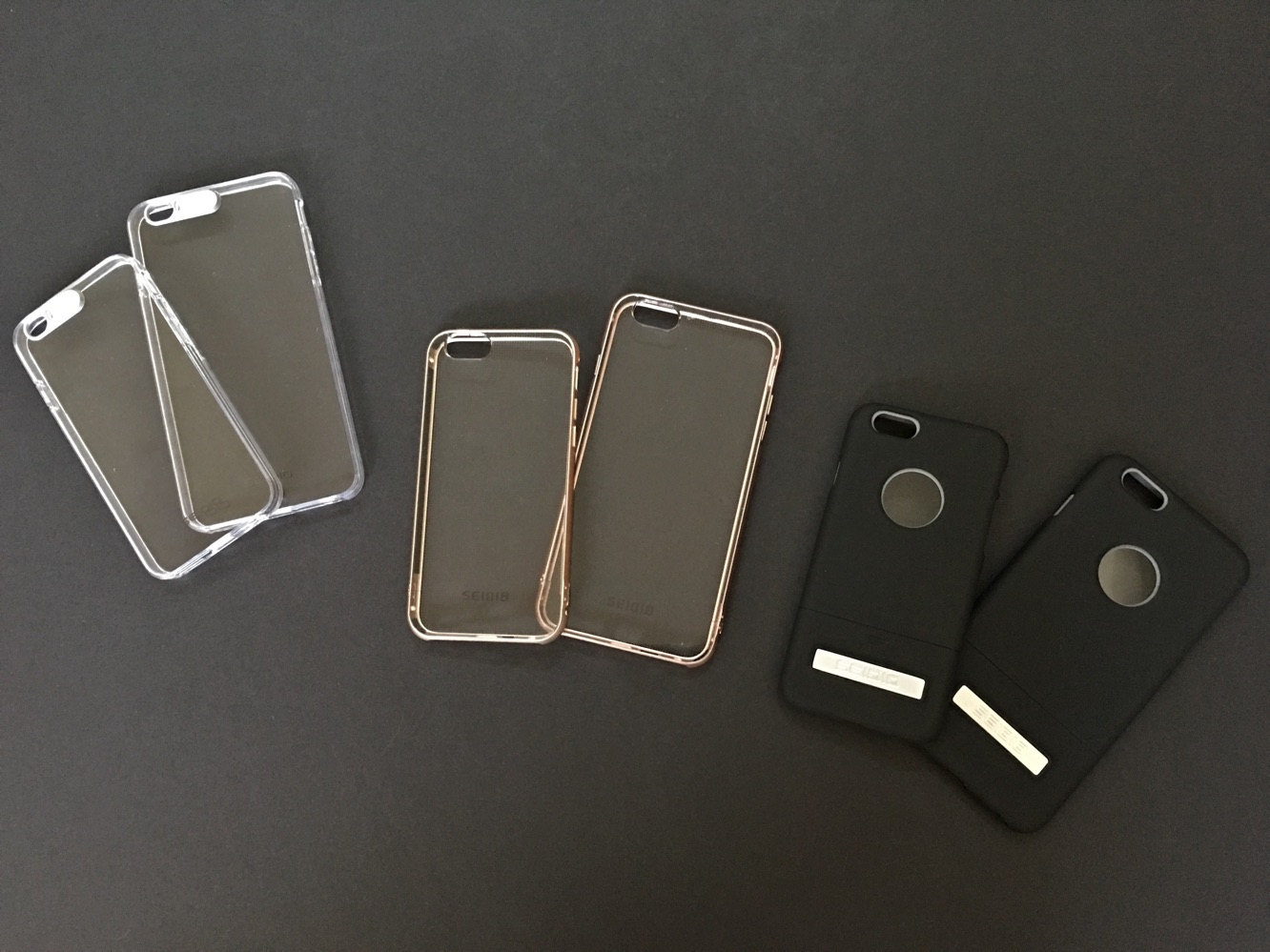
Review: Seidio Luma, Surface + Tetra for iPhone 6/6s and iPhone 6/6s Plus

Luma is a straightforward case, except for its LED flash alert feature, which is of course its main selling point. If you turn on LED flash alerts in Settings > General > Accessibility > LED Flash for Alerts, and you set the camera flash set to auto, and you’re disconnected from an Apple Watch … Luma’s flash cover will cause the alert light to quickly light up the case. Some will find it to be a neat future while others could care less. Visual iPhone case notifications aren’t a new idea, but the sliding cover — the flash can be exposed for photos — is an easy enough way of making it happen. Luma comes with a small screwdriver and a variety of colored plates, in case you want to change the color of your flash alert.


Review: Seidio Luma, Surface + Tetra for iPhone 6/6s and iPhone 6/6s Plus
{Image3}
Review: Seidio Luma, Surface + Tetra for iPhone 6/6s and iPhone 6/6s Plus

Surface has a bit of an odd design, and the result is a bit odd at times, as well.

For iPhone 6/6s, we tried removing the case and putting it back on the iPhone 6s over and over, and the result was always strange, too-touchy volume controls. Sometimes the controls would get stuck and blast the volume to full after pressing the button just once. Not ideal, to say the least. Our testing for the iPhone 6/6s Plus case revealed no such issues, but we did find the case a bit slick — being so large to accommodate Apple’s biggest phone, we could see Surface slipping out of one’s hand often.

Review: Seidio Luma, Surface + Tetra for iPhone 6/6s and iPhone 6/6s Plus

The aluminum framed Tetra should be a stronger, better version of plastic bumper-and-back cases we’ve seen, but again, we encountered some button issues. Tetra 6/6s’ volume controls felt a bit sharp — almost like the edges could cut you if you moved your hand too quick — and the 6/6s Plus controls felt a bit vague and floaty.

Review: Seidio Luma, Surface + Tetra for iPhone 6/6s and iPhone 6/6s Plus

It’s a mixed bag here from Seidio.


Latest News
The 14-inch MacBook Pro with M5 Chip 16GB RAM/512GB is $250 Off
1 Min Read
Noise and Static on AirPods Pro 3 Still Unfixed
1 Min Read
New iMac with 24-inch OLED Display May be Brighter With 600 Nits
1 Min Read
The 15-inch M4 MacBook Air 256GB Is $250 Off
1 Min Read
Internal Kernel Debug Kit from Apple Reveals Tests for a MacBook with A15 Chip
1 Min Read
Apple Currently In Talks With Suppliers for Chip Assembly & Packaging of iPhones in India
1 Min Read
Apple Allows Easier Battery Replacement For M5 MacBook Pro with 14-inch Display
1 Min Read
The Apple Watch SE 3 44mm GPS is $50 Off
1 Min Read
20th Anniversary iPhone May Launch in Two Years
1 Min Read
Better Image Generation Capabilities and Apple Music Integration Coming to ChatGPT
1 Min Read
A20 Pro Chip Coming to Next Gen iPad Mini OLED
1 Min Read
Amazon has the AirTag 4 Pack Marked $29 off
1 Min Read

iLounge logo

iLounge is an independent resource for all things iPod, iPhone, iPad, and beyond. iPod, iPhone, iPad, iTunes, Apple TV, and the Apple logo are trademarks of Apple Inc.

This website is not affiliated with Apple Inc.
iLounge © 2001 - 2025. All Rights Reserved.
  • Contact Us
  • Submit News
  • About Us
  • Forums
  • Privacy Policy
  • Terms Of Use
Welcome Back!

Sign in to your account

Lost your password?










