
This review originally appeared within iLounge’s iOS Gems series within the compilation article, iPhone Gems: All 22 Wallet Apps, Reviewed. Additional details may be found in the original article.
Like 1Password, SecretBook ($10) is another application that serves as an iPhone extension of a popular Mac desktop app. The Mac version of the SecretBook desktop app is one of the more popular Mac-based choices for data entry and has been on the Mac software scene for a few years now. The iPhone version is simply an extension of this, syncing with your main SecretBook database on your Mac via Wi-Fi.
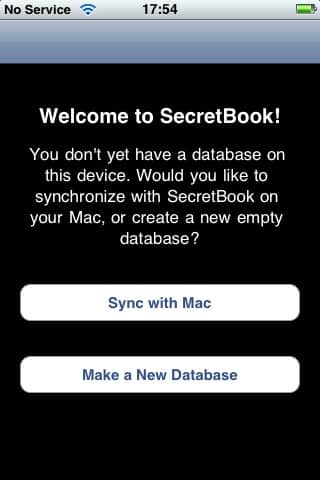
SecretBook can be run either with or without the desktop companion app. When you first start SecretBook on your iPhone, it asks whether you want to sync with SecretBook on your Mac, or create a standalone database on your iPhone.
This choice is somewhat permanent; if you decide to create a local database you will not be able to later sync it up to your Mac should you decide to purchase the SecretBook desktop app without reinstalling the iPhone application and losing all of your data in the process. This is in contrast to 1Password, which does not provide this either-or choice, but merely a sync option for whatever data you actually have in the iPhone version.
Note that if you choose to synchronize with the desktop SecretBook database, you will need to enter your desktop password into the SecretBook for iPhone app, which then becomes the password you will use to access SecretBook on the iPhone. No separate PIN or password is available on the iPhone itself—the desktop password is used and if you decide to change the password on the desktop, you will need to re-enter it on the iPhone the next time you sync, and this will then be the new password used on the iPhone as well. In fact, if you are synchronizing with the desktop version of SecretBook, you cannot change the password on the iPhone version at all—you must change it on the desktop and then sync your database back to your iPhone.
By itself, the SecretBook iPhone app is absolutely nothing special. A basic folder structure is available, and fields are customizable in the sense that each and every new item begins as a blank slate that you have to add your own custom fields to—no templates are provided for different item types, so every new item is a custom item.

Note that the Mac desktop version does provide field templates for basic categories such as banking, credit cards, licenses and web sites, however even if you are syncing with your Mac version, these field templates do not appear anywhere in the iPhone app except for within those existing items that were originally created with them on the desktop.
As a standalone application, SecretBook seems absurdly overpriced at $10, however it should be noted that the Mac version of SecretBook sells separately for $25, bringing the total cost of a two-part solution to $35. By contrast, although the 1Password iPhone app is free, the 1Password desktop application will cost you $40 by itself. That having been said, however, while SecretBook is an excellent app on the Mac desktop, the iPhone version is seriously anemic by comparison. If you’re an existing user of SecretBook looking to carry your data around with you for reference purposes, then it could well be worth the $10 asking price. However, it’s far too limited and feature-poor to be even worth considering as a standalone app.











