
iLoungeiLounge
  • News
    • Apple
      • AirPods Pro
      • AirPlay
      • Apps
        • Apple Music
      • iCloud
      • iTunes
      • HealthKit
      • HomeKit
      • HomePod
      • iOS 13
      • Apple Pay
      • Apple TV
      • Siri
    • Rumors
    • Humor
    • Technology
      • CES
    • Daily Deals
    • Articles
    • Web Stories
  • iPhone
    • iPhone Accessories
  • iPad
  • iPod
    • iPod Accessories
  • Apple Watch
    • Apple Watch Accessories
  • Mac
    • MacBook Air
    • MacBook Pro
  • Reviews
    • App Reviews
  • How-to
    • Ask iLounge
Font ResizerAa
iLoungeiLounge
Font ResizerAa
Search
  • News
    • Apple
    • Rumors
    • Humor
    • Technology
    • Daily Deals
    • Articles
    • Web Stories
  • iPhone
    • iPhone Accessories
  • iPad
  • iPod
    • iPod Accessories
  • Apple Watch
    • Apple Watch Accessories
  • Mac
    • MacBook Air
    • MacBook Pro
  • Reviews
    • App Reviews
  • How-to
    • Ask iLounge
Follow US

Reviews

Reviews

Review: Secret Safe v1.2 by Samurai Code Monkey

Last updated: May 16, 2021 5:07 pm UTC
By Jesse Hollington
Review: Secret Safe v1.2 by Samurai Code Monkey

This review originally appeared within iLounge’s iOS Gems series within the compilation article, iPhone Gems: All 22 Wallet Apps, Reviewed. Additional details may be found in the original article.


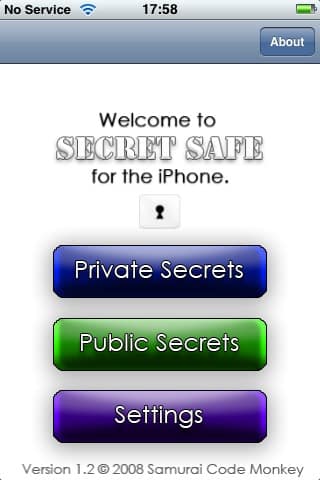
Secret Safe ($10) is another wallet app that is designed for storage of a multitude of different item types, ranging from credit card information and passwords to drivers licenses and emergency number information; it even stores such esoteric items as TV calibration settings. Secret Safe takes a slightly different approach from other applications by actually designating two distinct storage areas: a public area is available, and does not require a password for storing non-sensitive information such as emergency phone numbers, automobile information, general notes, and the like.

Review: Secret Safe v1.2 by Samurai Code Monkey

When starting Secret Safe, you are given a choice of entering either the Private or Public areas.

Entering the private area will prompt you for your password, or to create a password the first time you access it, while the public area does not require a password. One feature of Secret Safe that we found interesting is that the password entry dialog shows a password strength indicator, offering the user some visual feedback as to how strong their password is. This approach is definitely preferable to apps such as Safe which simply force the user into using a minimum-length password, since the user can use a shorter, less secure password, but the application will make it reasonably clear that the password choice is relatively weak.


Review: Secret Safe v1.2 by Samurai Code Monkey

Beyond the available item types, Secret Safe does not provide any customizable fields or any kind of folder/category structure, although items are grouped and sorted within the main application screen by item type.

This is a fixed organization that cannot be changed, although Secret Safe does provide a full-text search, allowing you to quickly find an item based on any of the fields in that item, including hidden fields.


Review: Secret Safe v1.2 by Samurai Code Monkey

Despite the fixed-field layout, Secret Safe does provide contextually-appropriate fields wherever possible, so numeric fields show a numeric entry, date fields show a date browser, and masked/hidden fields are fully supported for information such as passwords and PINs. Further, field validation and formatting is also provided where appropriate, such that credit numbers, for instance, show as four distinct four-digit groupings rather than a single long number.


Review: Secret Safe v1.2 by Samurai Code Monkey

For configuration options, Secret Safe provides the ability to adjust the font size and move your items between the private and public areas. Note that as the settings screen indicates, information in the “Public Secrets” area is not encrypted in any way, which is not unreasonable, although the name “Public Secrets” seems to be an oxymoron.

For users looking for a simple, straightforward app in which to store a variety of different information types, Secret Safe would be a great choice but for its $10 asking price, which puts it in the same price category as best-of-breed apps like eWallet.



Latest News
The 14-inch MacBook Pro with M5 Chip 16GB RAM/512GB is $250 Off
1 Min Read
Noise and Static on AirPods Pro 3 Still Unfixed
1 Min Read
New iMac with 24-inch OLED Display May be Brighter With 600 Nits
1 Min Read
The 15-inch M4 MacBook Air 256GB Is $250 Off
1 Min Read
Internal Kernel Debug Kit from Apple Reveals Tests for a MacBook with A15 Chip
1 Min Read
Apple Currently In Talks With Suppliers for Chip Assembly & Packaging of iPhones in India
1 Min Read
Apple Allows Easier Battery Replacement For M5 MacBook Pro with 14-inch Display
1 Min Read
The Apple Watch SE 3 44mm GPS is $50 Off
1 Min Read
20th Anniversary iPhone May Launch in Two Years
1 Min Read
Better Image Generation Capabilities and Apple Music Integration Coming to ChatGPT
1 Min Read
A20 Pro Chip Coming to Next Gen iPad Mini OLED
1 Min Read
Amazon has the AirTag 4 Pack Marked $29 off
1 Min Read

iLounge logo

iLounge is an independent resource for all things iPod, iPhone, iPad, and beyond. iPod, iPhone, iPad, iTunes, Apple TV, and the Apple logo are trademarks of Apple Inc.

This website is not affiliated with Apple Inc.
iLounge © 2001 - 2025. All Rights Reserved.
  • Contact Us
  • Submit News
  • About Us
  • Forums
  • Privacy Policy
  • Terms Of Use
Welcome Back!

Sign in to your account

Lost your password?








