
iLoungeiLounge
  • News
    • Apple
      • AirPods Pro
      • AirPlay
      • Apps
        • Apple Music
      • iCloud
      • iTunes
      • HealthKit
      • HomeKit
      • HomePod
      • iOS 13
      • Apple Pay
      • Apple TV
      • Siri
    • Rumors
    • Humor
    • Technology
      • CES
    • Daily Deals
    • Articles
    • Web Stories
  • iPhone
    • iPhone Accessories
  • iPad
  • iPod
    • iPod Accessories
  • Apple Watch
    • Apple Watch Accessories
  • Mac
    • MacBook Air
    • MacBook Pro
  • Reviews
    • App Reviews
  • How-to
    • Ask iLounge
Font ResizerAa
iLoungeiLounge
Font ResizerAa
Search
  • News
    • Apple
    • Rumors
    • Humor
    • Technology
    • Daily Deals
    • Articles
    • Web Stories
  • iPhone
    • iPhone Accessories
  • iPad
  • iPod
    • iPod Accessories
  • Apple Watch
    • Apple Watch Accessories
  • Mac
    • MacBook Air
    • MacBook Pro
  • Reviews
    • App Reviews
  • How-to
    • Ask iLounge
Follow US

Reviews

Reviews

Review: sebNews by Sebastian Schimansky

Last updated: May 13, 2021 6:56 am UTC
By Charles Starrett
Review: sebNews by Sebastian Schimansky

This review originally appeared within iLounge’s iOS Gems series within the compilation article, iPhone Gems: Every RSS Reader, Reviewed. Additional details may be found in the original article.


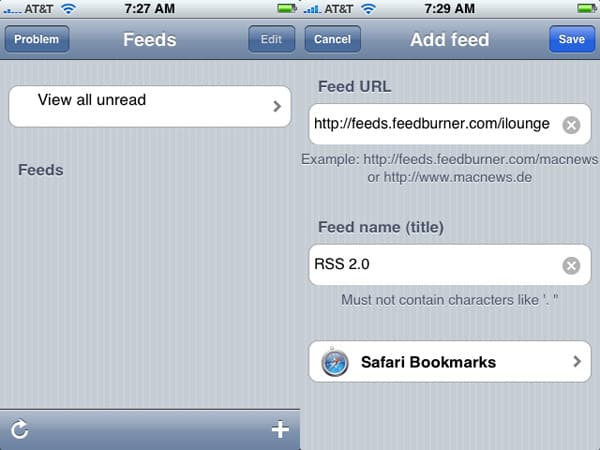
sebNews ($4) is a fairly simple RSS reader. The main feeds view offers users an edit button for deletion of feeds, a button to view all unread items, a refresh button, a list of feeds, a “problem” button that lets users reinstall the app’s database should they experience difficulties, and an add feed button.
Review: sebNews by Sebastian Schimansky

Users may add feeds by entering a URL (feed auto-discovery is offered) or by selecting a site from their Safari bookmarks — a smart option. Tapping on a feed brings up a list of entries listed in small text. Buttons at the bottom allow the user to select all or unread items, mark all items as read, delete feed items or the entire feed, and refresh, while a search button at the top lets users search the feed for a particular word, a feature that is carried over into the main unread items view.


Review: sebNews by Sebastian Schimansky

In the individual item view, the date and title are listed below the navigation bar, with the summary underneath and a row of buttons on the bottom for previewing the entry in the built-in browser, opening it in Safari, or closing the entry and returning to the prior view.

A menu in the iPhone’s Settings app offers toggles for showing feeds that have already been read, and for autorefreshing of feeds. The application offers no syncing options, no offline browsing, and no flagging, all features that would be appreciated in a reader app that costs $4. It’s not necessarily bad, but it’s not outstanding in any way, and with better options available for less money, it falls short of our recommendation.



Latest News
The Apple Watch Series 11 42mm GPS is $100 Off
1 Min Read
Apple Launching A New Education Hub In India Teaching Robotics and Swift Programming
1 Min Read
Women’s and Men’s Golf Added to Apple Sports
1 Min Read
Apple Adding Civilization VII and Other Games To Apple Arcade
1 Min Read
AirPods 4 ANC Is $59 Off
1 Min Read
Apple Using 2NM Process For Their M6 and A20 Chip
1 Min Read
iPhone 18 Models Will Not Have a Big Redesign
1 Min Read
Launch of MacBook Pro M5 Pro and M5 Max Models is Approaching
1 Min Read
Get the iPad Mini 7 256GB Wi-Fi at $99 Off
1 Min Read
Mozilla Now Allows Turning AI Features Off
1 Min Read
Barcelona Passeig de Gràcia Apple Store Temporarily Closing
1 Min Read
Apple’s Plans to Enter the Smart Glasses Market is Changing the Industry
1 Min Read

iLounge logo

iLounge is an independent resource for all things iPod, iPhone, iPad, and beyond. iPod, iPhone, iPad, iTunes, Apple TV, and the Apple logo are trademarks of Apple Inc.

This website is not affiliated with Apple Inc.
iLounge © 2001 - 2025. All Rights Reserved.
  • Contact Us
  • Submit News
  • About Us
  • Forums
  • Privacy Policy
  • Terms Of Use
Welcome Back!

Sign in to your account

Lost your password?








