
Ever since Apple enabled third-party apps to access files that weren’t stored inside iOS devices, developers have released external storage options for iPads, iPhones, and iPod touches — most of them portable and/or wireless. Two years ago, Western Digital released the 1- to 3-Terabyte My Book Live as a wall-tethered wireless hard drive, and Kingston debuted the fully portable, 16-64GB flash-based Wi-Drive; more recently, G-Technology offered G-Connect as a 500-Gigabyte semi-portable alternative in the middle. Seagate now has an option that competes directly against all of these products with Wireless Plus ($200), which blends the compact size of G-Connect with the battery-powered operability of Wi-Drive and the no-compromises storage capacity of My Book Live. It is, in one word, impressive.
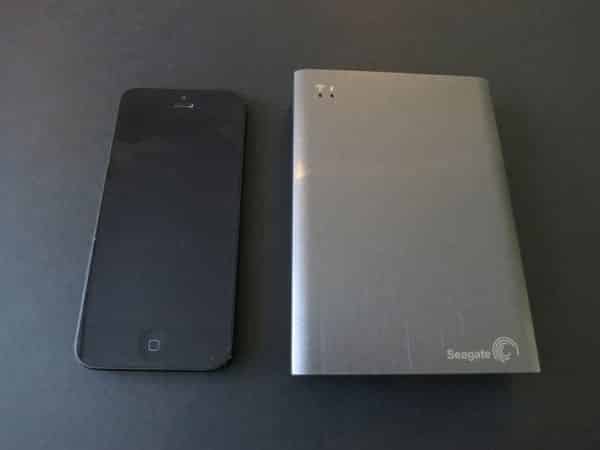
Currently available in a 1-Terabyte capacity—as much storage as the hard disks inside current iMacs—Wireless Plus is roughly the same size as G-Connect: at 3.5” wide, 5” deep and 0.7” tall, it’s actually a bit smaller in two dimensions and less than 0.1” wider. Seagate achieves this feat with a smart trick; while G-Technology built an Ethernet port and micro-USB connector directly into G-Connect, Seagate ends Wireless Plus’s back with a black plastic cap that pops open to reveal a wide proprietary connector. Included in the package is a USB adapter that attaches to the connector, extending the unit’s depth by just under 1/2” while adding a USB 3.0 port. A USB 3.0 cable is in the box, as are a separate “power only” cable and wall adapter that can be connected to Wireless Plus when you’re not using USB or the integrated rechargeable battery. The goal is to let users keep the USB components near a computer, relying fully upon wireless connectivity and only occasional wall power while away. Even if this isn’t the way you plan to use the device, the ability to go cable-free in two different ways is appreciated.

Wireless Plus isn’t just small; it’s also quite handsome.
While Seagate uses an all-plastic enclosure, it took a different route from the classic Apple-style bright white plastic, which is fairly scuffable. Wireless Plus has a brushed gunmetal-finished top with matte black plastic everywhere else, a color combination midway between Apple’s 2012-vintage “slate and black” devices and 2013’s “Space Gray” versions. Wireless and power indicator lights are found on the top, kitty corner from a Seagate logo, while a power button is located on the left side, directly across from a power input port on the right. Four small rubberized feet keep the unit still on a flat surface.

As suggested above, Wireless Plus is most noteworthy because it combines its rivals’ best features into a single product. It can establish its own Wi-Fi network using 802.11b/g/n, or join an existing network if you prefer. Additionally, the 10-hour rechargeable battery makes Wireless Plus completely mobile, freeing you from the need to worry about the wall adapter during typical day-to-day use; you can just plug it in to recharge at night when needed. It can also be used as a fully wired device, with formatting options for PC/Mac or pure Mac use, and a free Mac NTFS reader if you want the drive to be PC-readable. While Macally offers something similar to Wireless Plus in the $180, 750GB version of its WIFIHDD, it promises less than half the wireless battery life; the extended run time alone is a major benefit of Seagate’s package.

From an app perspective, Wireless Plus is similar to its rivals, though Seagate clearly has invested quite a bit of time and effort on its software and firmware. In our experience, iOS 7 made initial setup of the drive a little tricky, as we were forced to update the firmware twice, first to 2.1 and then 2.2, a process that was too complex by typical accessory standards.
But once that 15-minute process was complete, everything else became simple. Adding photos, audio files, and videos to Wireless Plus was as easy as plugging it into a computer’s USB port, then dragging and dropping files onto the drive; this can also be done wirelessly if you don’t mind waiting longer for transfers to finish. Seagate’s iOS app automatically locates the drive’s videos, photos, music, and documents—plus recently added files—to bring them all within one-tap access. It also provides nice thumbnails after it’s had a chance to cache them, and offers a regular file/folder-browsing interface, complete with simple integrated audio, video, and photo players.

In our testing, standard JPEG photos and MP3/AAC music played without any major issues regardless of Wireless Plus’s network settings, but much larger files—particularly videos—were a different story. Seagate accurately warns that the unit’s streaming performance is compromised when on an existing network, and enables you to switch back to Wireless Plus’s integrated network with incredible ease; you just navigate to the iOS device’s Wi-Fi menu and choose the Seagate Wireless network, which persists even after the drive has been added to another network.

Streaming was quick and painless through a direct wireless connection, but quite delayed by buffering on a shared network, just as Seagate’s in-app warning suggested. Even modestly-sized home videos took a long while to buffer and occasionally stopped in the middle, but on a direct wireless connection, they started playing almost instantly and ran smoothly. While the app doesn’t support RAW photos—no surprise—Seagate has come up with a smart automatic workaround to play FairPlay-protected video content. Click on a protected M4V video and the app automatically opens a specially-created Safari web link to play it.











