
iLoungeiLounge
  • News
    • Apple
      • AirPods Pro
      • AirPlay
      • Apps
        • Apple Music
      • iCloud
      • iTunes
      • HealthKit
      • HomeKit
      • HomePod
      • iOS 13
      • Apple Pay
      • Apple TV
      • Siri
    • Rumors
    • Humor
    • Technology
      • CES
    • Daily Deals
    • Articles
    • Web Stories
  • iPhone
    • iPhone Accessories
  • iPad
  • iPod
    • iPod Accessories
  • Apple Watch
    • Apple Watch Accessories
  • Mac
    • MacBook Air
    • MacBook Pro
  • Reviews
    • App Reviews
  • How-to
    • Ask iLounge
Font ResizerAa
iLoungeiLounge
Font ResizerAa
Search
  • News
    • Apple
    • Rumors
    • Humor
    • Technology
    • Daily Deals
    • Articles
    • Web Stories
  • iPhone
    • iPhone Accessories
  • iPad
  • iPod
    • iPod Accessories
  • Apple Watch
    • Apple Watch Accessories
  • Mac
    • MacBook Air
    • MacBook Pro
  • Reviews
    • App Reviews
  • How-to
    • Ask iLounge
Follow US

Reviews

Reviews

Review: Scosche MagicMount XL Dash/Window

Last updated: May 19, 2021 9:37 pm UTC
By Phil Dzikiy
Review: Scosche MagicMount XL Dash/Window

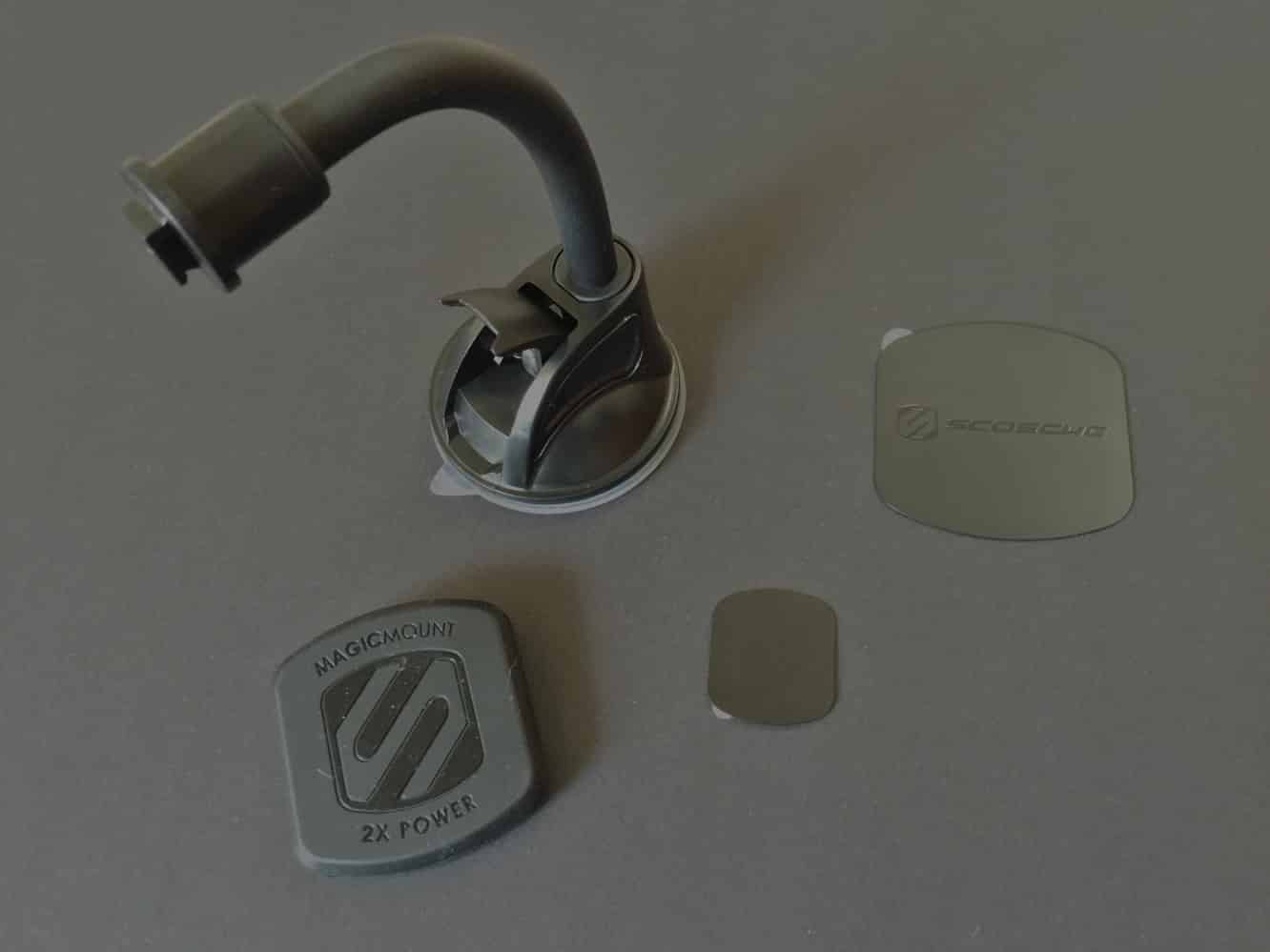
We first reviewed Scosche’s MagicMount system about a year ago, and the MagicMount XL Dash/Window ($35) is a new mount in the MagicMount XL series — a more powerful magnetic mounting system made to handle larger iPhones and iPads. As indicated by its name, XL Dash/Window is designed to go on a dashboard or window for use in the car, though Scosche notes that using the mount on a desk is another option. XL Dash/Window is a slightly bendable gooseneck mount with a powerful magnet on one end and a suction cup with sticky material on the other. The mount comes with two magnetic plates, a smaller 1.1″ x 1.26″ plate for iPhones and a larger 2.75″ x 2.9″ plate for iPads. Refer to our MagicMount review for the more basic details about the MagicMount system, as it all still applies here.

Review: Scosche MagicMount XL Dash/Window

As with the standard MagicMount system, the magnetic plates can be placed directly on the back of a device or case using 3M adhesive.

Another option is to place a magnet between the device and the case. Some trial-and-error will be required to figure out the best magnetic setup for your particular device/case combination. As was the case with the original system, MagicMount XL can easily handle smaller iPhones, and due to the more powerful magnets here, it works just as well on an iPhone 6 Plus.


Review: Scosche MagicMount XL Dash/Window

Mounting an iPad can be a bit trickier, but again, experimentation with the setup should enable users to find the right solution. Putting the magnet between an iPad Air and a case likely won’t work in most situations, so the better option is to either put the magnetic plate directly on the iPad or directly on the iPad’s case. We generally don’t recommend sticking a powerful magnetic plate on the back of the iPad — for the mount to properly hold the weight of an iPad Air 2, for instance, the adhesive must be applied firmly, so the powerful magnet doesn’t simply pull the plate off the device upon removal.


If it’s on the back of an iPad, you might have more than a little trouble removing it.

Review: Scosche MagicMount XL Dash/Window

While using MagicMount XL to mount an iPhone — including an iPhone 6 Plus — is generally simple, using the mount with an iPad might require more patience, simply due to the size of the device. You likely won’t want to move the strong suction cup too often, if at all. It will remain secured to a dash, desk, or window with proper installation. We’d urge users to really think about their setup before using MagicMount XL.

But once you’ve got that figured out, you’ll likely be very satisfied with MagicMount XL.


Latest News
The 14-inch MacBook Pro with M5 Chip 16GB RAM/512GB is $250 Off
1 Min Read
Noise and Static on AirPods Pro 3 Still Unfixed
1 Min Read
New iMac with 24-inch OLED Display May be Brighter With 600 Nits
1 Min Read
The 15-inch M4 MacBook Air 256GB Is $250 Off
1 Min Read
Internal Kernel Debug Kit from Apple Reveals Tests for a MacBook with A15 Chip
1 Min Read
Apple Currently In Talks With Suppliers for Chip Assembly & Packaging of iPhones in India
1 Min Read
Apple Allows Easier Battery Replacement For M5 MacBook Pro with 14-inch Display
1 Min Read
The Apple Watch SE 3 44mm GPS is $50 Off
1 Min Read
20th Anniversary iPhone May Launch in Two Years
1 Min Read
Better Image Generation Capabilities and Apple Music Integration Coming to ChatGPT
1 Min Read
A20 Pro Chip Coming to Next Gen iPad Mini OLED
1 Min Read
Amazon has the AirTag 4 Pack Marked $29 off
1 Min Read

iLounge logo

iLounge is an independent resource for all things iPod, iPhone, iPad, and beyond. iPod, iPhone, iPad, iTunes, Apple TV, and the Apple logo are trademarks of Apple Inc.

This website is not affiliated with Apple Inc.
iLounge © 2001 - 2025. All Rights Reserved.
  • Contact Us
  • Submit News
  • About Us
  • Forums
  • Privacy Policy
  • Terms Of Use
Welcome Back!

Sign in to your account

Lost your password?










