
iLoungeiLounge
  • News
    • Apple
      • AirPods Pro
      • AirPlay
      • Apps
        • Apple Music
      • iCloud
      • iTunes
      • HealthKit
      • HomeKit
      • HomePod
      • iOS 13
      • Apple Pay
      • Apple TV
      • Siri
    • Rumors
    • Humor
    • Technology
      • CES
    • Daily Deals
    • Articles
    • Web Stories
  • iPhone
    • iPhone Accessories
  • iPad
  • iPod
    • iPod Accessories
  • Apple Watch
    • Apple Watch Accessories
  • Mac
    • MacBook Air
    • MacBook Pro
  • Reviews
    • App Reviews
  • How-to
    • Ask iLounge
Font ResizerAa
iLoungeiLounge
Font ResizerAa
Search
  • News
    • Apple
    • Rumors
    • Humor
    • Technology
    • Daily Deals
    • Articles
    • Web Stories
  • iPhone
    • iPhone Accessories
  • iPad
  • iPod
    • iPod Accessories
  • Apple Watch
    • Apple Watch Accessories
  • Mac
    • MacBook Air
    • MacBook Pro
  • Reviews
    • App Reviews
  • How-to
    • Ask iLounge
Follow US

Reviews

Reviews

Review: Scosche freeKEY Flexible Water Resistant Keyboard

Last updated: May 17, 2021 1:24 pm UTC
By Nick Guy
Review: Scosche freeKEY Flexible Water Resistant Keyboard

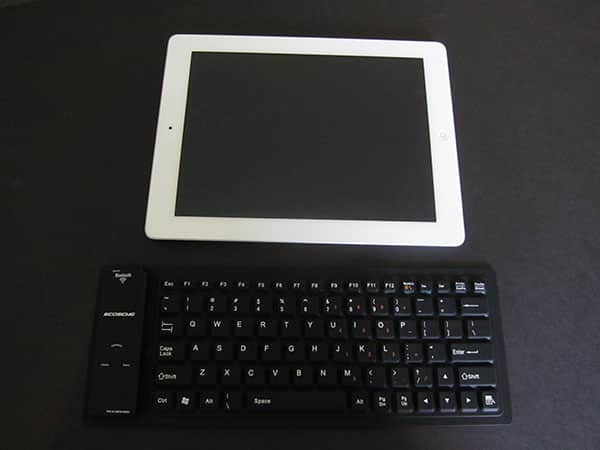
Made from soft, water-resistant rubber and completely flexible, Scosche’s freeKEY ($60) is perhaps the most portable of all of the full-sized Bluetooth wireless keyboards we’ve yet seen marketed towards iPad and iOS users, thanks to its ability to roll up into a 4.5″-long tube that’s roughly 2.25″ in diameter. The integrated battery and Bluetooth hardware are found on the left side, complete with a water-resistant, rubber-capped panel for the power switch and USB charging port. A retractable USB charging cable is included in the package.

Review: Scosche freeKEY Flexible Water Resistant Keyboard

freeKEY works generally as it’s supposed to; using Bluetooth 2.0, it properly connects to an iPad or iPad 2 to become a physical replacement for the tablet’s on-screen virtual keyboard. Pairing is a very easy process: it has a “connect” button that puts it into discoverable mode, which the iPads recognizes almost instantly, and requires only a four digit pairing code to complete the syncing.

Unlike some of the Bluetooth keyboards we’ve tested for iPads, freeKEY’s keys are all where you’d expect them to be, besides an atypically small space bar and some generic function keys that aren’t iPad-specific.


Review: Scosche freeKEY Flexible Water Resistant Keyboard

Review: Scosche freeKEY Flexible Water Resistant Keyboard

That aside, freeKEY is just a keyboard, though it’s unusually squishy because of its entirely rubber exterior. Surprisingly, typing on it is easy, and as these keyboard accessories go, we found it to be very accurate—the only challenge you’ll deal with is the need for a flat surface, because freeKEY has no internal reinforcement to keep itself straight or flat when laid on a leg or other curved shape.


Review: Scosche freeKEY Flexible Water Resistant Keyboard

The keys are about the same size as on most of the iPad-specific keyboards we’ve tested, which is to say roughly 90% of the key size on Apple’s keyboards. There are no iOS-style function keys; in fact, the keyboard is set up for a PC, complete with a Windows key that’s nestled between control and alt. Luckily, the Windows key functions in the same way as the command key and can be used for cut, copy, and paste when combined with the appropriate letter.


A number of keys are completely superfluous, including the entire top row of function keys.


Review: Scosche freeKEY Flexible Water Resistant Keyboard

We were initially somewhat skeptical of how freeKEY would do as a keyboard, but we actually liked it—while it may be a rebadged version of an OEM keyboard, and it’s certainly not iPad- or iOS-customized, there’s no question that it does what it’s supposed to do. Though we’d have preferred more iPad-specific keys, it’s less expensive than Apple’s Wireless Keyboard, is even easier to carry around, and can be put away when not in use instead of hanging at the iPad 2’s side all the time. If you’re working from any flat surface, as small as an airplane tray table, you’ll almost certainly be able to type better with freeKEY than the iPad’s or iPad 2’s virtual keyboard.



Latest News
The Apple Watch Series 11 46mm GPS Is $100 Off
1 Min Read
Clamshell Style iPhone Being Looked Into By Apple
1 Min Read
Foldable iPhones May Have the Largest Battery Ever
1 Min Read
Apple and TSMC’s 10-Year Collaboration May Be Ending
1 Min Read
The 13-inch M5 iPad Pro 256GB Wi-Fi Is $149 Off
1 Min Read
M5 Pro and M5 Max Chips for the MacBook Pro could Roll Out with macOS 26.3
1 Min Read
Mac Ordering Process Revamped
1 Min Read
Check Signed By Steve Wozniak and Steve Jobs Sold For $2.4 Million
1 Min Read
The Anker 140W 4-Port GaN USB-C Charger is $35 Off
1 Min Read
No iPhone Air 2 This Year, according to Latest Report
1 Min Read
New Report Corroborates Split iPhone Release Dates
1 Min Read
Apple Losing More Researchers As They Plan To Release 2 Siri Versions
1 Min Read

iLounge logo

iLounge is an independent resource for all things iPod, iPhone, iPad, and beyond. iPod, iPhone, iPad, iTunes, Apple TV, and the Apple logo are trademarks of Apple Inc.

This website is not affiliated with Apple Inc.
iLounge © 2001 - 2025. All Rights Reserved.
  • Contact Us
  • Submit News
  • About Us
  • Forums
  • Privacy Policy
  • Terms Of Use
Welcome Back!

Sign in to your account

Lost your password?








