
Camera manufacturer-developed wireless DSLR accessories are expensive — these days, all but unjustifiably so. Before Eye-Fi cards appeared, adding wireless photo transfer capabilities to a DSLR generally cost many hundreds of dollars, requiring bolt-on boxes that dramatically increased a camera’s size and weight. But now most cameras can add Eye-Fi wireless photo and video sharing for $40, assuming they don’t have Wi-Fi built in already; both alternatives have considerably reduced the need for expensive or bulky alternatives. So why has Sanho/HyperDrive released the iUSBportCamera ($300)? Well, if you want to go beyond just wirelessly sending photos from a DSLR to your iOS device or computer, and actually compose images or videos from afar, iUSBportCamera lets you do that, though there are a few strings attached.
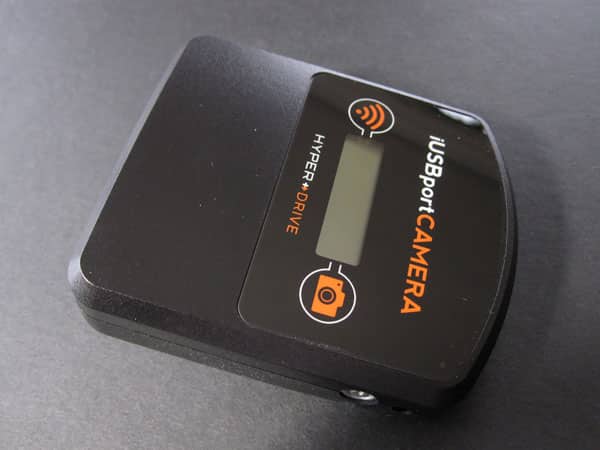
Measuring 3.25” by 2.75” by 1.4” at its largest points, iUSBportCamera combines an 802.11b/g/n Wi-Fi access point with 4GB of onboard flash memory and a USB port, a mix of parts that enhance the DSLR shooting and sharing experience in a variety of ways. Critically, they enable two-way wireless communications between a Canon or Nikon DSLR and, say, an iPad, such that you can use the iPad’s screen as a live video preview of what the camera’s lens and sensor are seeing, while adding remote touchscreen tap-to-focus, shutter speed, white balance, and aperture remote controls. Once you’ve set up your scene, you hit an on-iPad shutter button, and your camera snaps the shot or begins recording a video. Beyond this, Sanho includes a couple of other novel features, including the ability of a second iOS device to see the first device’s photos, as well as turning iUSBportCamera’s USB port into a flash drive reader. These are small but intriguing additions to the classic manufacturer-specific DSLR wireless attachment formula; the latter can actually be very useful on the road for serious photographers.

Sanho’s package includes three physical components: the accessory, a standard USB to mini-USB cable, and a proprietary USB-based power recharging cable.
The first cable is a little on the long side given how close iUSBportCamera is supposed to be to a DSLR, and the latter’s a little short if you opt to self-supply a wall adapter rather than a computer’s USB port, but both otherwise work as expected. In addition, you’ll need to manually download Sanho’s iUSBport app from the App Store, pair your iOS device with iUSBportCamera on its self-created Wi-Fi network—usable anywhere—then decide whether you want to bring the accessory onto your home’s or office’s existing wireless network, a very easy process with app assistance. Doing this will let your iOS device continue to access the Internet while paired with the accessory, and in our testing didn’t noticeably impact the speed or reliability of wireless functionality, a major plus.

Made from black plastic that feels similar in texture to magnesium camera bodies, iUSBportCamera’s height is primarily attributable to a bottom hump centered near its back: this enables it to slide into the standard hot/cold shoe flash accessory ports found on DSLRs. There’s also a 1/4” tripod thread as an alternative mounting option. After placing iUSBportCamera above or beside your DSLR, you connect the mini-USB cable to its left side and the matching port on your camera, then press a silver power button on its right side to turn it on. A small two-line LCD screen on the top displays surprisingly granular and legible status updates, while a small blue light flashes to indicate both power and transferring activity; two taps of the power button are necessary to turn the unit off.
One of iUSBportCamera’s assets compared with power-hungry Eye-Fi cards is its inclusion of a 3300mAh internal battery, which you charge using the included cable for a seven-hour complete recharging cycle. While this is a painfully long time to wait from a full discharge—and could have been helped with more powerful recharging circuitry—you likely won’t need to go through a complete cycle each time, and the battery means that wireless transmitting is not eroding as much of your camera’s battery life as an Eye-Fi card would. Unlike Eye-Fi, which sends blasts of data only when it’s transferring files, iUSBportCamera’s Wi-Fi hardware gets more of a workout because it can also stream live preview video from the camera to your iOS device.
In fact, if you’re considering buying iUSBportCamera, that’s probably the key reason.

Although that live preview feature turns out to be iUSBportCamera’s biggest selling point, it’s not without wrinkles. After you install the iUSBport app, turn the camera and accessory on, and tap the accessory’s icon within the app, you probably won’t be able to start using your camera right away. We waited through a firmware update process, hit minor speed bumps during Wi-Fi setup, and needed to learn a few small interface quirks in the app before we were able to fill the iPad’s screen with an almost fluid, nearly realtime preview of a Canon DSLR’s Live View photo or video screens. The screen stays mostly black unless you click on an eye or video camera icon to activate the live preview; your iOS device otherwise works as a relatively basic wireless remote and file receiver. Similarly, a basic histogram and the remaining number of photos your memory card can hold are found on the top right of the screen in displays that are less beautiful than functional.

Initially, we were blown away when we tapped on the iPad and saw the camera’s focus point shifting to each tap zone, but that feature stopped working for reasons unknown; playing with the camera’s autofocus settings subsequently restored the functionality. Similarly, we occasionally had issues when trying to switch other settings—aperture buttons, for instance, would sometimes trigger an error message while still changing to the desired value. It’s hard to know whether these issues are iUSBportCamera’s or specific to a given DSLR, and although Sanho’s awkwardly-written manual suggests that there’s a camera compatibility list on its web site, we couldn’t find that or much other technical detail on the accessory there. It suffices to say that the features generally worked as promised during our testing, except when they didn’t, after which tinkering could make them work again.











