
Apple’s $5 GarageBand app is impressively designed, but it can’t fully replicate the experience of playing a piano or keyboard with full-sized, pressure-sensitive keys. That’s why Samson has released Carbon 49 ($90), a complete MIDI keyboard solution for use with GarageBand, other iOS apps, and computers. While Carbon 49 has a couple of noteworthy limitations, it’s very affordable, designed to hold an iPad, and certainly worth considering if you’re looking for a way to play music on a substantial-feeling digital keyboard.
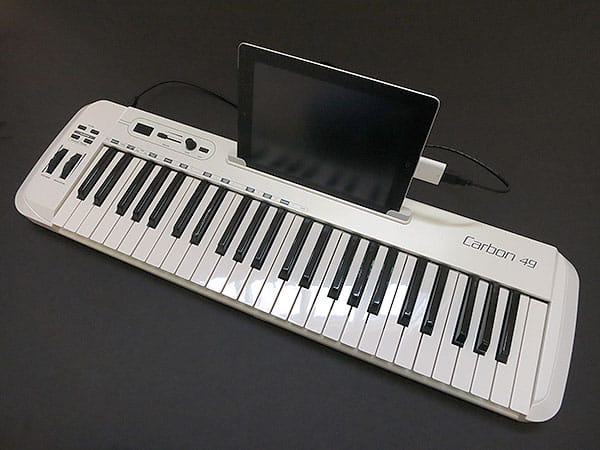
Made from thick, substantial-feeling pearl white and matte black plastics, Carbon 49 measures 31.2” across, roughly 8.5” deep and 2.5” tall, so if you lay it on your legs, you’ll feel every bit of its 6.2-pound weight, plus the weight of your iPad. Because it’s so large, it’s best placed on a table or desk, but can be used somewhat awkwardly in your lap, hanging off the edges of your legs. Any generation of iPad can be placed in a dedicated, somewhat case-compatible slot behind the 49-key, velocity-sensitive synthesizer keyboard, though your iPad’s case compatibility with the cabling may be somewhat of an issue.
More likely than not, you’ll need to pull your iPad from the case to use Carbon 49; two inserts are included but not necessary to help keep the iPad 2 rigid inside the slot.


The reason you’ll likely have to keep your iPad bare is Samson’s decision to rely upon a traditional USB cable rather than a Dock Connector plug: iPad users need to self-supply Apple’s highly useful but not particularly case-friendly $29 iPad Camera Connection Kit for connectivity. Samson’s D-shaped USB cable connects to the back, alongside optional MIDI-out and sustain pedal ports, as well as a simple on-off power switch. There’s no wall power adapter nor means to supply additional energy to the keyboard when it’s connected to your iPad.


Samson’s reliance on USB power for everything has a couple of consequences beyond its inconvenience for some iPad users—it works, but looks a little odd, and restricts Carbon 49’s capabilities. Since the accessory can only draw a modest amount of power from the iPad, Samson hasn’t built a speaker or other sophisticated, power-hungry hardware into the keyboard; this is acceptable in that it avoids “device requires too much power” error messages on the iPad, or the need for an external powered USB hub, but limits Carbon 49 to relatively simple functionality. When you’re using GarageBand or another app, the only way you’ll hear whatever the keys are doing is through the iPad’s small integrated speaker, or a separate speaker system if you use the iPad’s headphone port, AirPlay, or Bluetooth.
Without an iPad, computer, or other MIDI device attached, Carbon 49 won’t even turn on; it can’t be used as a standalone synthesizer.


That having been said, Carbon 49 is a capable, relatively inexpensive keyboard. The keys work as expected to offer pressure-sensitive control that is only simulated by GarageBand, allowing you to tickle or pound the ivories rather than just tapping them. Off to the left of the keyboard are transpose and octave buttons, pitch bend and modulation wheels, plus an assignable data encoder, volume slider, and a small three-digit LCD screen. As expected, these buttons and wheels enable you to play with and warp the amplitude and pitch of whatever you’re playing without having to change settings on the iPad itself, in addition to whatever instruments, controls, and filters GarageBand or another app might be applying to your performance. PC and Mac users will appreciate the inclusion of Native Instruments’ Komplete Elements software with additional sounds, though it’s on an optical disc and can’t be used with the iPad.


Overall, though it could stand to improve its iPad connection interface and add features, Carbon 49 is a good keyboard for what it intends to do—provide a pressure-sensitive, semi-programmable interface for performing music through a tablet or computer.











