
iLoungeiLounge
  • News
    • Apple
      • AirPods Pro
      • AirPlay
      • Apps
        • Apple Music
      • iCloud
      • iTunes
      • HealthKit
      • HomeKit
      • HomePod
      • iOS 13
      • Apple Pay
      • Apple TV
      • Siri
    • Rumors
    • Humor
    • Technology
      • CES
    • Daily Deals
    • Articles
    • Web Stories
  • iPhone
    • iPhone Accessories
  • iPad
  • iPod
    • iPod Accessories
  • Apple Watch
    • Apple Watch Accessories
  • Mac
    • MacBook Air
    • MacBook Pro
  • Reviews
    • App Reviews
  • How-to
    • Ask iLounge
Font ResizerAa
iLoungeiLounge
Font ResizerAa
Search
  • News
    • Apple
    • Rumors
    • Humor
    • Technology
    • Daily Deals
    • Articles
    • Web Stories
  • iPhone
    • iPhone Accessories
  • iPad
  • iPod
    • iPod Accessories
  • Apple Watch
    • Apple Watch Accessories
  • Mac
    • MacBook Air
    • MacBook Pro
  • Reviews
    • App Reviews
  • How-to
    • Ask iLounge
Follow US

News › Apps

AppsReviews

Review: Romotive Romo

Last updated: May 16, 2021 7:57 pm UTC
By Nick Guy
Review: Romotive Romo

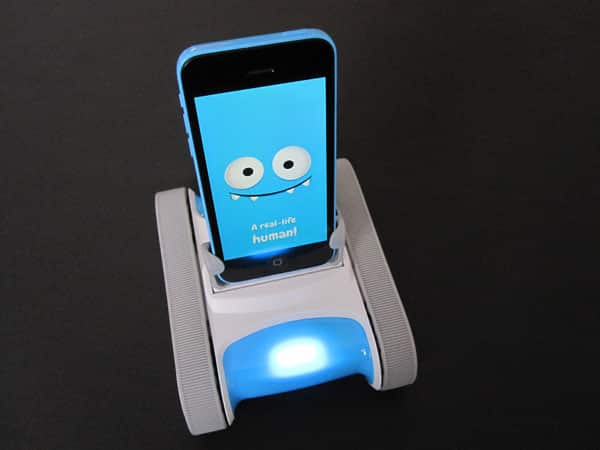
Although there are a good number of remote control cars that simply replicate physical controls onto the iPhone or iPad screen, some take advantage of apps in fun new ways. Take Orbotix’s Sphero 2.0, which has an ecosystem of dozens of apps, each one doing something unique. Romotive’s Romo ($150) is another example. Released in 2013, the dual-tread rover is much more than just a remote control car. Available with either a Dock Connector or Lightning Plug — we received the latter for review — the robotic base station works with iPhones and iPod touches. There are two different modes: one allows the docked device to control Romo, and the other requires a second iPhone or an iPad to drive it.

Review: Romotive Romo

Romo is built to look like a tank, albeit a cute tank. Its plastic body is 5.5” long, 4.5” wide, and just about 2” tall without an iPhone installed. Two different textures of plastic are used, along with rubber tire treads on either side. In the center is the plug that, like all Apple-authorized Lightning docks, isn’t case compatible.

It’ll fit any bare iPhone 5, 5c, or 5s, as well as the fifth-generation iPod touch. Rubber supports on either side help hold the device in place. Inside, a battery that recharges with the included mini-USB cable lasts for two hours of play on a single charge. 


Review: Romotive Romo

When you connect an iPhone and launch the Romo app, you’ll see a mostly blue screen appear, with eyes and a mouth. This is Romo, an alien robot sent to Earth to prepare for the Robot Space Race. The app quickly establishes Romo’s personality as a precarious, fun spirit ready to learn and teach. As it delivers its story through text-based dialogue, the rover moves along, with the dock rocking back and forth, and the treads turning. You’re then walked through a series of missions that teach basic programming. For example, you start by putting together steps that move Romo forward and backwards, and as you advance, can adjust aspects such as speed and distance. A free play mode called the Lab allows you to play with these moves however you’d like, stringing together steps and then letting Romo execute them. As you advance, the robot will be able to identify colors, follow faces, and even move along paths you set on the floor.


Review: Romotive Romo

On its own, Romo doesn’t travel long distances unless you tell it instruct it to do so. To enter the instructions, you leave the iPhone docked and tap away at the screen. This means you’ll need to be at eye level with Romo. If you’ve got Romo up on a table, beware of edges — if it’s directed to go too far, it may fall off.


Review: Romotive Romo

A second app, Romo Control, requires you to have a second iOS device. The first remains plugged into Romo with the main app running, while the second serves as a virtual remote control. There are three different control methods, allowing you to zoom around and adjust the angle of the docked iPhone’s display. The control app shows what the other iPhone’s front-facing camera is seeing, and you can take pictures. Romo moves quickly and easily, even over carpet.


Review: Romotive Romo

We had a lot of fun playing with Romo, and we appreciate that there’s an educational component to the toy.



Latest News
The 14-inch MacBook Pro with M5 Chip 16GB RAM/512GB is $250 Off
1 Min Read
Noise and Static on AirPods Pro 3 Still Unfixed
1 Min Read
New iMac with 24-inch OLED Display May be Brighter With 600 Nits
1 Min Read
The 15-inch M4 MacBook Air 256GB Is $250 Off
1 Min Read
Internal Kernel Debug Kit from Apple Reveals Tests for a MacBook with A15 Chip
1 Min Read
Apple Currently In Talks With Suppliers for Chip Assembly & Packaging of iPhones in India
1 Min Read
Apple Allows Easier Battery Replacement For M5 MacBook Pro with 14-inch Display
1 Min Read
The Apple Watch SE 3 44mm GPS is $50 Off
1 Min Read
20th Anniversary iPhone May Launch in Two Years
1 Min Read
Better Image Generation Capabilities and Apple Music Integration Coming to ChatGPT
1 Min Read
A20 Pro Chip Coming to Next Gen iPad Mini OLED
1 Min Read
Amazon has the AirTag 4 Pack Marked $29 off
1 Min Read

iLounge logo

iLounge is an independent resource for all things iPod, iPhone, iPad, and beyond. iPod, iPhone, iPad, iTunes, Apple TV, and the Apple logo are trademarks of Apple Inc.

This website is not affiliated with Apple Inc.
iLounge © 2001 - 2025. All Rights Reserved.
  • Contact Us
  • Submit News
  • About Us
  • Forums
  • Privacy Policy
  • Terms Of Use
Welcome Back!

Sign in to your account

Lost your password?








