
iOS devices have become great at helping people collect data — there are now apps and hardware that help track everything from fitness to finances. Now, somewhat following the lead of Netatmo’s stationary Urban Weather Station, Robocat is adding completely portable temperature measurement to that list with Thermodo ($30-$45). Available in black, red, or white painted aluminum, with anodized aluminum as a premium edition, this accessory plugs into the headphone port of a compatible device, and works with a companion app to display the temperature in real time. When not in use, the sensor fits into a sheath with a keyring.
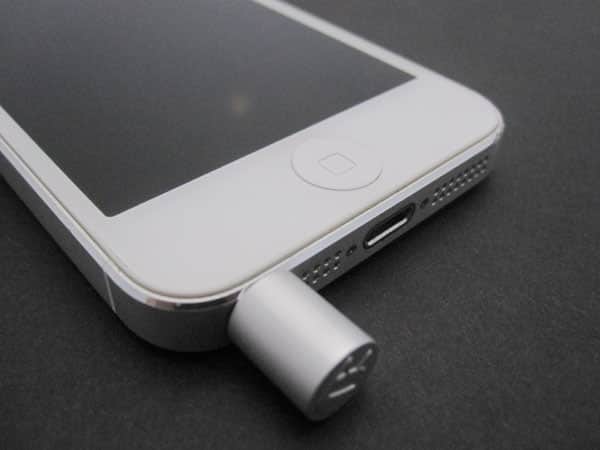
Thermodo is all about portability, which makes sense for an accessory that won’t be used all the time, but will likely be needed in different scenarios and locales. The sensor unit is only an inch long, while popping it into the cap brings the length up to 1.4”. We tested the anodized version and found it to feel totally solid; there should be no issues in keeping it on a keychain, even if the keys get tossed around a bit. It’s also not going to get lost, as there’s a satisfying snap ensuring that the two pieces are securely together.

Robocat’s app is exceedingly simple in both its design and functionality. When launched, it’ll check to see if the sensor has been inserted into the headphone jack, and ask for it to be if not. Once connected, Thermodo will instantly begin to read the temperature, displaying it out to one decimal place in your choice of Celsius or Fahrenheit. When the app is open and the screen is on, it’ll continue to read the temperature, displaying and logging the low, high, and average. This data can then be accessed from the app’s history.
One of the confounding factors when using an accessory plugged into an iPhone to measure temperature is the heat generated by the handset itself. To compensate for this, Robocat has a setting to adjust based on device heat. When turned on, you have the option of toggling between “regular,” “warm,” and “custom,” the latter of which provides a +/- 20° slider.
That this setting has to be there in the first place, and that it is so ambiguous, are both problems for something as simple as a thermometer.

In order to check Thermodo’s accuracy, we compared it against Amazon’s top-selling weather station, the 613 Indoor Humidity Monitor, from AcuRite. This $13 device displays humidity as well as temperature, but it’s considered accurate with over 1,300 five-star reviews.

Our testing showed Thermodo to be accurate within one to two degrees when set to the “warm” compensation level. This is despite the fact that the iPhone hadn’t been charging, and felt cool to the touch. Turning that feature off instantly raised the level by 10°, a huge variance. Therein lies the main issue with this accessory: just how is a user supposed to know when his or her iPhone is “regular,” “warm,” or in another condition such that the temperature might need to be compensated for? The custom option seems particularly superfluous, as we can’t imagine any way in which someone would know to set it to be, say, 17° off. Robocat lists a number of ways of minimizing heat pollution when measuring temperatures, including connecting with a self-provided audio extension cable.











