
Pros: A deluxe keyboard with an array of 15 application-specific special keys and 10 user-programmable macro keys, plus an iPod dock integrated into the keyboard. Includes line-out port so that you can listen to iPod music when the iPod’s not synchronizing or even when the computer’s off, assuming you attach your speakers to that port rather than your computer’s audio-out. Limited key backlighting helps to differentiate macro keys from others; USB 1.1 ports permit connection of some mice and other peripherals. New dedicated and macro buttons work well to provide one-touch access to iTunes and other programs.
Cons: High price – over twice that of similar, earlier competitor – and very large size. iPod dock’s location is awkward for use with keyboard trays on desks, not preferable in features or practicality to a considerably less expensive standalone iPod dock – even with a similar standalone keyboard. Consumes two separate USB 2.0 ports that need to be relatively near each other; not for use with MacBook Pros and other machines with side-separated USB ports. Lights can’t be turned off and may put off some users. Designed primarily for PC users; keys are labelled without Mac conventions.
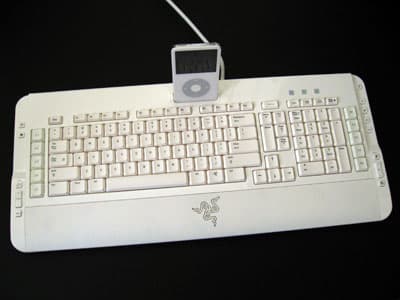
What makes a keyboard great? The answer will depend on who you ask, and vary a lot from person to person: some people like a medium-sized keyboard with soft, whisper-quiet keys, others prefer the precision and clicking of a tiny keyboard with scissor keys, and still others want a skateboard-sized typing surface with tons of bells and whistles. Razer’s new Pro|Type Keyboard ($130) fits most neatly in the latter category, expanding upon traditional Mac and PC keyboards with an iPod dock, 10 programmable macro keys, 10 separate profiles for the macro keys, and a host of application-specific buttons, besides.
What makes a keyboard great? The answer will depend on who you ask, and vary a lot from person to person: some people like a medium-sized keyboard with soft, whisper-quiet keys, others prefer the precision and clicking of a tiny keyboard with scissor keys, and still others want a skateboard-sized typing surface with tons of bells and whistles.
Razer’s new Pro|Type Keyboard ($130) fits most neatly in the latter category, expanding upon traditional Mac and PC keyboards with an iPod dock, 10 programmable macro keys, 10 separate profiles for the macro keys, and a host of application-specific buttons, besides.
To make one point up front, even though Pro|Type (Pro Type) is billed as the “world’s first keyboard with an integrated iPod dock,” it’s actually the second of its kind. Atech Flash’s $60 KB-Reader was the first to blend a full-fledged PC or Mac keyboard with an iPod charging and synchronization dock well, and included a flash card reader, besides. While the Atech design was a couple steps short of flashy, it included its own set of media keys and the same basic functionality as Pro|Type – a year and a half ago, at less than half the price.

The differences in Razer’s design are several in number. Unlike the black and silver KB-Reader, Pro|Type is almost entirely in Mac-matching white, and its programmable macro and profile keys are illuminated in blue light for easy differentiation. There’s also a matching, pulsing blue triple-snake Razer logo front and center. These illuminated touches take Pro|Type out of the “classy” category, but they’ll only bother those looking for a darker solution: there’s no way to turn the lights off, at least with the version of the Razer software we tested.

Unlike KB-Reader, Razer’s iPod dock is of the Universal Dock variety, and non-detachable: it sits, like KB-Reader’s, right above the function keys. As such, this isn’t the right keyboard for those with desks that use pull-out keyboard trays; the iPod will stick prominently out of Pro|Type’s top, and because the keyboard is unusually deep – almost twice the depth of an Apple keyboard and an inch more than Logitech’s previously-covered, iTunes-ready Laser S530 – the dock, and perhaps the function keys, will sit significantly inside such a tray. A standard-sized palm rest is partially to blame for the depth.

As it turns out, aside from the integrated iPod dock, which is fully compatible with all USB Dock Connecting iPods, the S530 and Pro|Type are cosmetically kissing cousins. With the exception of Razer’s 10 programmable keys, which are arrayed 5 to the left (L1-L5) and 5 to the right (R1-R5), and a Profile toggle key that replaces the S530’s dedicated Help key, they boast almost exactly the same key arrangements.

Both have six additional dedicated buttons on the left side, here for power, your web browser, rotate, zoom, and 100% size in an image viewer, and nine buttons on the right, here all for iTunes. You can use included software to change the music application or image viewer if you prefer – QuickTime, Photoshop, and Preview are the very limited Mac choices – and easily set up the profiles and macros you prefer.

We liked certain aspects of Pro|Type’s design quite a bit. Though we tend to prefer the precise feel of old-fashioned, scissor-style keys, Razer’s keys are quiet, soft, and thanks to the illumination on the macro keys, fairly easy to discern from one another despite their sheer number. Without any programming – so long as the software is installed – the iTunes keys worked perfectly, as did the browser and power keys, and macro creation was literally painless. “Pro” (or gamer) users who need access to lots of additional dedicated functions – or the ability to toggle between multiple sets of functions – can find that all here. Razer has also included angling feet on the undercarriage for inclined typing, if you want to pop them out.

Other parts of the design didn’t do as much for us. Like some other keyboards, Pro|Type offers two USB pass-through ports for connection of other devices, such as a mouse or printer, and the ports are of the slower USB 1.1 variety. But the keyboard also requires two USB ports thanks to a double-tipped cable that separately connects the keyboard features and iPod dock for charging and synchronization. The cable’s design requires that the two USB ports be fairly close together – not on separate sides of a MacBook Pro, for instance – so you’ll have to make some connectivity compromises (or add a multi-port hub) to add Pro|Type to your machine.

It’s worth a brief additional note that the keyboard’s layout and markings are optimized for PC users rather than Mac users – like most of the keyboard’s other design decisions, this is a carryover from Razer’s earlier Tarantula keyboard for computer game players. Insert, Scroll Lock and Print Screen buttons replace the Mac’s F13 to F15 keys, the option and Apple keys are replaced by Start and Alt keys, and so on.











