
iLoungeiLounge
  • News
    • Apple
      • AirPods Pro
      • AirPlay
      • Apps
        • Apple Music
      • iCloud
      • iTunes
      • HealthKit
      • HomeKit
      • HomePod
      • iOS 13
      • Apple Pay
      • Apple TV
      • Siri
    • Rumors
    • Humor
    • Technology
      • CES
    • Daily Deals
    • Articles
    • Web Stories
  • iPhone
    • iPhone Accessories
  • iPad
  • iPod
    • iPod Accessories
  • Apple Watch
    • Apple Watch Accessories
  • Mac
    • MacBook Air
    • MacBook Pro
  • Reviews
    • App Reviews
  • How-to
    • Ask iLounge
Font ResizerAa
iLoungeiLounge
Font ResizerAa
Search
  • News
    • Apple
    • Rumors
    • Humor
    • Technology
    • Daily Deals
    • Articles
    • Web Stories
  • iPhone
    • iPhone Accessories
  • iPad
  • iPod
    • iPod Accessories
  • Apple Watch
    • Apple Watch Accessories
  • Mac
    • MacBook Air
    • MacBook Pro
  • Reviews
    • App Reviews
  • How-to
    • Ask iLounge
Follow US

Reviews

Reviews

Review: Pressure Drop DecoDock for iPod shuffle

Last updated: May 16, 2021 8:57 am UTC
By Jeremy Horwitz
Review: Pressure Drop DecoDock for iPod shuffle

Pros: A uniquely designed iPod shuffle dock, solidly constructed with an art deco motif and white LED pillars on the shuffle’s sides. Nice selection of colors.


Cons: Light pillars can’t be switched off unless computer’s off; not as attractive a proposition on price or features as certain other options that are currently available.
Review: Pressure Drop DecoDock for iPod shuffle

In concept, it’s easy to build an iPod shuffle dock: take a standard USB 2.0 cable, attach it to a piece of plastic or metal that holds the iPod shuffle, and you’re generally ready to roll. But to make a successful product, you’ll also need something that looks good and doesn’t cost too much – Apple’s $29 price tag for the official iPod shuffle Dock (iLounge rating: B) is currently about as much as the shuffle market is willing to bear.


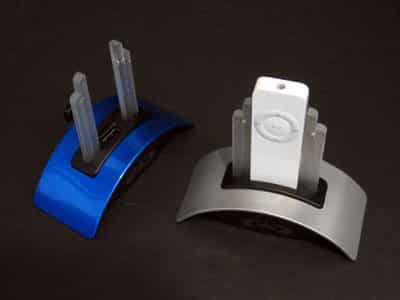
Overall, Pressure Drop’s DecoDock ($28.99) is a pretty smart alternative to the offerings currently on the market. Each DecoDock consists of a curved metal base made in your choice of six colors (silver, white, blue, pink, black, or green), a plastic USB port housing that’s always black from version to version, and two art deco-style transparent plastic pillars that stand on each side of the top USB port.

A black USB cable comes with each DecoDock, plugging in to the unit’s back and your computer’s USB port. Pressure Drop’s logo sits in a subtle gray tone on the Dock’s black front face, while a small black peg at the top rear serves as an “integrated cap holder” for your iPod shuffle’s standard USB cap.


Review: Pressure Drop DecoDock for iPod shuffle

The major design benefits of the DecoDock are two in number. When you plug an iPod shuffle in to the unit’s top, the combination of iPod and DecoDock becomes skyscraperesque in a visual throwback to architecture of the 1920s and 1930s. It’s an original design regardless of whether you like the style – as we do – and the various colored bases look nice, as well.

We’ve tested the blue and silver versions depicted in these photographs, and they both use quality metal paint rather than something cheaper and less attractive.


Review: Pressure Drop DecoDock for iPod shuffle

When the Dock’s plugged in to a powered USB port, the two transparent pillars illuminate with a nice white light. This is a particularly cool touch with only one negative consequence: there’s no way to turn the light off unless power isn’t running through your USB ports. If your machine keeps power flowing when it’s in sleep mode, the DecoDock’s light will remain turned on unless you unplug it – a problem that many light-up USB products avoid with a simple on-off switch. Mac owners in particular will find this an annoyance; PC owners and those unaccustomed to leaving their computers turned on may not mind at all.

Review: Pressure Drop DecoDock for iPod shuffle

Predictably, the DecoDock worked perfectly as an iPod shuffle docking station, but unless you plan to use the single USB port for another device instead, that’s all it does – just like Apple’s official Dock, which is smaller and lighter.



Latest News
The 14-inch MacBook Pro with M5 Chip 16GB RAM/512GB is $250 Off
1 Min Read
Noise and Static on AirPods Pro 3 Still Unfixed
1 Min Read
New iMac with 24-inch OLED Display May be Brighter With 600 Nits
1 Min Read
The 15-inch M4 MacBook Air 256GB Is $250 Off
1 Min Read
Internal Kernel Debug Kit from Apple Reveals Tests for a MacBook with A15 Chip
1 Min Read
Apple Currently In Talks With Suppliers for Chip Assembly & Packaging of iPhones in India
1 Min Read
Apple Allows Easier Battery Replacement For M5 MacBook Pro with 14-inch Display
1 Min Read
The Apple Watch SE 3 44mm GPS is $50 Off
1 Min Read
20th Anniversary iPhone May Launch in Two Years
1 Min Read
Better Image Generation Capabilities and Apple Music Integration Coming to ChatGPT
1 Min Read
A20 Pro Chip Coming to Next Gen iPad Mini OLED
1 Min Read
Amazon has the AirTag 4 Pack Marked $29 off
1 Min Read

iLounge logo

iLounge is an independent resource for all things iPod, iPhone, iPad, and beyond. iPod, iPhone, iPad, iTunes, Apple TV, and the Apple logo are trademarks of Apple Inc.

This website is not affiliated with Apple Inc.
iLounge © 2001 - 2025. All Rights Reserved.
  • Contact Us
  • Submit News
  • About Us
  • Forums
  • Privacy Policy
  • Terms Of Use
Welcome Back!

Sign in to your account

Lost your password?








