
Whenever a brand new type of accessory appears for the iPod or iPhone, the threshold question we — and most users — ask is whether the idea even makes sense in the first place. Companies have released and then eventually discontinued iPod laser pointers and rescue lights, for instance, so though there are all sorts of other attachments that can conceivably be added to Apple’s devices, practicality is an important question. Universal remote controls are in the “debatable” category. Over the last few weeks, two companies have debuted Infrared add-ons for the iPhone and iPod touch, as well as accompanying free App Store downloads that enable the dongles to control televisions, DVD players, AV receivers, and some game consoles — virtually anything with an Infrared port built in. But are they worthwhile, and worth their asking prices? That’s the topic of this two-accessory review.
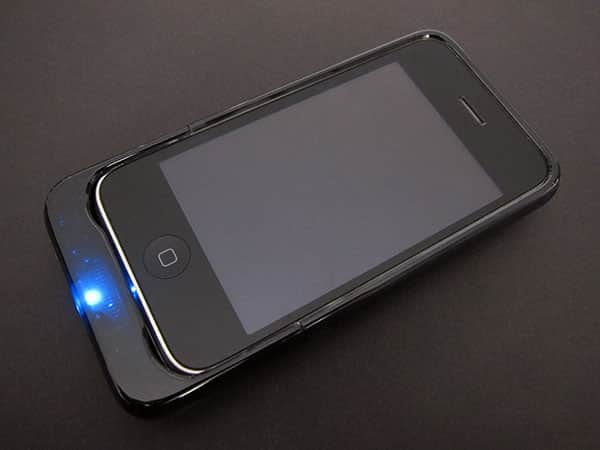
One of the accessories is from New Potato Technologies and is called FLPR ($80). It’s a tiny black plastic dongle that connects to the bottom of any iPod touch or iPhone, even when the device is inside of a case—so long as the case has a Dock Connector-exposing hole at the bottom large enough to accommodate its just-slightly-larger than Apple cable-sized body. The other is the Universal Remote Case for iPhone 3G/3GS ($60) from PowerA/BDA. This accessory is designed specifically to attach to the current iPhone 3G and 3GS models, and takes the form of a glossy black iPhone case with a slide-on Infrared remote control attachment, which slides off when not in use, swapping with a thinner conventional case bottom.
A version of the case sized for the iPod touch is coming in June.

Of the two accessories, FLPR is the better overall product for two reasons: the hardware and the software. Though New Potato’s design doesn’t work with every iPod touch or iPhone case out there, we strongly prefer the fact that you can choose the case you prefer to use and attach it when designed; more importantly, it works with all iPhone and iPod touch models out of the box, rather than requiring you to buy a separate case and accessory every time Apple changes the design of one of its touchscreen devices. On connection, it doesn’t illuminate a light or do anything unnecessary to draw power from the connected device, though when it’s first plugged in, it does direct you automatically to the App Store to download the FLPR application.

The key to FLPR’s value is the app, which New Potato claims has 14,000 remote control codes built in—this means that in many cases, you can just launch the app, tell it which devices you’re using, and start controlling them right away. New Potato turns the iPhone or iPod touch screen into a scrollable replacement for individual remotes, letting you press a top-of-screen icon to swap between the remotes, and then scroll up or down through each remote’s buttons. In our testing with a set of five different devices, we found that the FLPR app properly controlled three without any customization—a Sony AV receiver, a Panasonic TV, and an Apple TV—but had problems with a Toshiba DVD player and a Microsoft Xbox 360, both of which appeared to be compatible given the app’s list of supported devices. When there’s a compatibility issue, New Potato provides a custom feature that lets you teach FLPR the commands for your remote.

One big picture comment that needs to be made at this point is that New Potato’s approach to remote performance is what we’d call a “third best” solution: best would be an application that can drill down to specific device model numbers, knowing the correct commands for devices that fall outside of its “most commonly used” defaults, and moreover, offers a single, easily customizable remote control face so that you needn’t toggle between several different remotes in order to use your AV system. The FLPR app sorta-kinda offers work-around solutions for these issues, but not in a way that replicates the best practices of Logitech’s series of Harmony universal remotes.
In addition to replacing its ugly-looking skins to differentiate remotes, FLPR could really benefit from a software evolution that streamlines and enhances the automation process for average users.

By comparison, the BDA/PowerA Universal Remote Case has advantages and disadvantages of its own. On a positive note, this unit’s price is $20 lower, and the physical housing is unquestionably more protective than New Potato’s, though also more limiting: it provides a complete case, minus screen protection, for the iPhone 3G and 3GS, but doesn’t work with the iPod touch or the first-generation iPhone. The Universal Remote Case initially turns a blue light on to indicate that it has power, and its free application installs just as automatically and easily as New Potato’s. Though the app’s user interface isn’t fantastic, it looks nicer than FLPR, and PowerA makes it easy to teach the app all of the Infrared button commands you want it to learn.


But that’s the problem with the PowerA solution: you need to teach it everything. With FLPR, you pull the accessory out of the box, attach it to whichever device you want, tell it the type and brand of the item you want to control, and you’re pretty much ready to go. BDA and PowerA instead start you with a “Set Up New Remote” button, show you a remote with a bunch of blue circles on it, and then have you manually teach the app every one of the commands you want to use. You’re then supposed to repeat this process with each remote control you have for your devices, and toggle between them, though you can conceivably frankenremote your way to a single screen with most of the buttons you need for multiple devices. It’s a lot of work to go through, and you need to remember to hit the “save” button after every set of changes—we forgot once and lost some of our programming—but once you’ve put in the time, the remote works as expected.











