
iLoungeiLounge
  • News
    • Apple
      • AirPods Pro
      • AirPlay
      • Apps
        • Apple Music
      • iCloud
      • iTunes
      • HealthKit
      • HomeKit
      • HomePod
      • iOS 13
      • Apple Pay
      • Apple TV
      • Siri
    • Rumors
    • Humor
    • Technology
      • CES
    • Daily Deals
    • Articles
    • Web Stories
  • iPhone
    • iPhone Accessories
  • iPad
  • iPod
    • iPod Accessories
  • Apple Watch
    • Apple Watch Accessories
  • Mac
    • MacBook Air
    • MacBook Pro
  • Reviews
    • App Reviews
  • How-to
    • Ask iLounge
Font ResizerAa
iLoungeiLounge
Font ResizerAa
Search
  • News
    • Apple
    • Rumors
    • Humor
    • Technology
    • Daily Deals
    • Articles
    • Web Stories
  • iPhone
    • iPhone Accessories
  • iPad
  • iPod
    • iPod Accessories
  • Apple Watch
    • Apple Watch Accessories
  • Mac
    • MacBook Air
    • MacBook Pro
  • Reviews
    • App Reviews
  • How-to
    • Ask iLounge
Follow US

Reviews

Reviews

Review: PocketMac RingtoneStudio 2 for iPhone

Last updated: May 15, 2021 10:40 am UTC
By Jeremy Horwitz
Review: PocketMac RingtoneStudio 2 for iPhone

Apart from Apple’s abortive initial attempts to block users from making their own files without paying ridiculous 99-cent-per-song fees, creating a ringtone for the iPhone hasn’t been especially difficult for the past year and a half or so: Apple eventually added a dead simple ringtone creator to GarageBand, and made it even easier to find in the latest version, which is included with every new Mac purchase. So why would anyone want to pay for a separate program, PocketMac’s RingtoneStudio 2 for iPhone ($30)?

Review: PocketMac RingtoneStudio 2 for iPhone

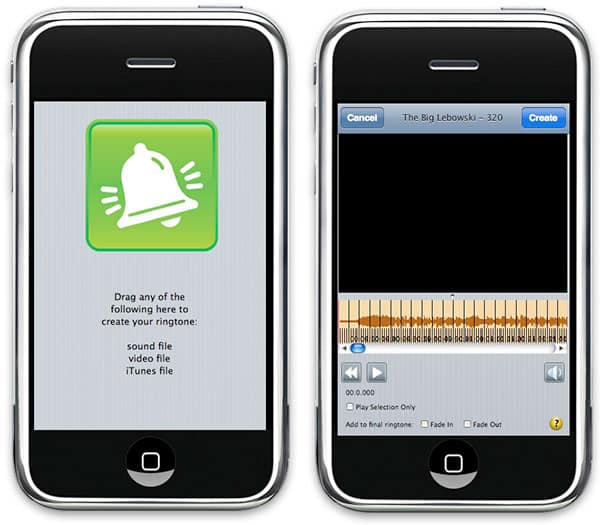
There are answers, but they’re not entirely straightforward ones. This Mac-only application runs in a window shaped like an iPhone, providing you with a very simple initial interface: just drag and drop an audio or video file on top of the iPhone, and you’ll be presented with a waveform image of the audio, a portion of which can be highlighted and transformed with a second click—the “Create” button—into a ringtone. RingtoneStudio limits you to highlighting only as much of the track as can be transformed into a ringtone, which is to say 40 seconds, and redefines the highlighted area if you decide to place your cursor elsewhere in the track and swipe in a different direction.


On the surface, this seems like a very simple way of creating a ringtone, but in practice, it’s not. Apple’s GarageBand implementation instead provides you with a bright yellow bar that represents the maximum length of the tone, allows you to slide the bar wherever you want to place it on top of a similar waveform, and then trim its start and end points to match whatever your needs may be. In playback mode, it then loops the portion you’ve selected to let you hear what the sample will sound like when it’s playing over and over again as a ringing sound. This implementation is something pretty close to ideal; if you don’t find the part of the song you like at first, slide the bar to try again, and trim until you’re satisfied.


GarageBand also works with video files; neither program can make ringtones from protected AAC audio or video files.

When using RingtoneStudio, what you get is an interface that forces you to hunt around in the waveform within the cramped dimensions of the iPhone frame, sometimes requiring manual zooming in or out that you’ll need to do with keystrokes or a menu bar command. Then you’ll have to redefine the entire sample, from start point to end point, as you try to play with the audio file to find the sweet spots. It’s actually a primitive way of looking at the editing task, and not fun to use. That said, the program does make it easy to add fade-ins or fade-outs, as well as to adjust the volume of the track as it’s being transformed into a ringtone; in our tests, the RingtoneStudio ringtones actually sounded noticeably better than the ones created by GarageBand, due to what appears to be more aggressive Apple compression.



Latest News
The 14-inch MacBook Pro with M5 Chip 16GB RAM/512GB is $250 Off
1 Min Read
Noise and Static on AirPods Pro 3 Still Unfixed
1 Min Read
New iMac with 24-inch OLED Display May be Brighter With 600 Nits
1 Min Read
The 15-inch M4 MacBook Air 256GB Is $250 Off
1 Min Read
Internal Kernel Debug Kit from Apple Reveals Tests for a MacBook with A15 Chip
1 Min Read
Apple Currently In Talks With Suppliers for Chip Assembly & Packaging of iPhones in India
1 Min Read
Apple Allows Easier Battery Replacement For M5 MacBook Pro with 14-inch Display
1 Min Read
The Apple Watch SE 3 44mm GPS is $50 Off
1 Min Read
20th Anniversary iPhone May Launch in Two Years
1 Min Read
Better Image Generation Capabilities and Apple Music Integration Coming to ChatGPT
1 Min Read
A20 Pro Chip Coming to Next Gen iPad Mini OLED
1 Min Read
Amazon has the AirTag 4 Pack Marked $29 off
1 Min Read

iLounge logo

iLounge is an independent resource for all things iPod, iPhone, iPad, and beyond. iPod, iPhone, iPad, iTunes, Apple TV, and the Apple logo are trademarks of Apple Inc.

This website is not affiliated with Apple Inc.
iLounge © 2001 - 2025. All Rights Reserved.
  • Contact Us
  • Submit News
  • About Us
  • Forums
  • Privacy Policy
  • Terms Of Use
Welcome Back!

Sign in to your account

Lost your password?








