
iLoungeiLounge
  • News
    • Apple
      • AirPods Pro
      • AirPlay
      • Apps
        • Apple Music
      • iCloud
      • iTunes
      • HealthKit
      • HomeKit
      • HomePod
      • iOS 13
      • Apple Pay
      • Apple TV
      • Siri
    • Rumors
    • Humor
    • Technology
      • CES
    • Daily Deals
    • Articles
    • Web Stories
  • iPhone
    • iPhone Accessories
  • iPad
  • iPod
    • iPod Accessories
  • Apple Watch
    • Apple Watch Accessories
  • Mac
    • MacBook Air
    • MacBook Pro
  • Reviews
    • App Reviews
  • How-to
    • Ask iLounge
Font ResizerAa
iLoungeiLounge
Font ResizerAa
Search
  • News
    • Apple
    • Rumors
    • Humor
    • Technology
    • Daily Deals
    • Articles
    • Web Stories
  • iPhone
    • iPhone Accessories
  • iPad
  • iPod
    • iPod Accessories
  • Apple Watch
    • Apple Watch Accessories
  • Mac
    • MacBook Air
    • MacBook Pro
  • Reviews
    • App Reviews
  • How-to
    • Ask iLounge
Follow US

Reviews

Reviews

Review: Photogene by Omer Shoor

Last updated: May 13, 2021 6:55 am UTC
By Charles Starrett
Review: Photogene by Omer Shoor

This review originally appeared within iLounge’s iOS Gems series within the compilation article, iPhone Gems: Top Photography and Image Manipulation Apps. Additional details may be found in the original article.


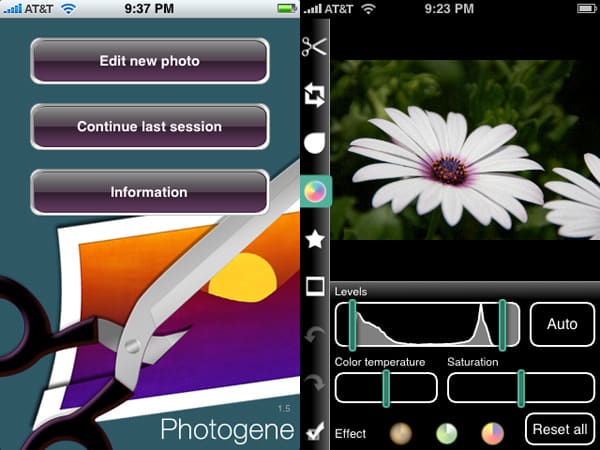
Photogene ($5) is another full-featured image adjustment application that balances a healthy set of features with an intelligently-designed interface. Following a brief splash screen, users are presented with a menu that lets them edit a new photo, continue their last editing session, or view more information. The main photo editing view places buttons for crop, rotate, sharpen, color adjustment, symbols, frames, undo, redo, and save in a slim vertical bar along the left side of the screen.
Review: Photogene by Omer Shoor

Selecting the crop tool gives users an adjustable box that appears atop the image, letting them select the area to be cropped with reasonable precision.


Buttons for canceling or cropping appear at the bottom. The rotate tool works similarly, with buttons appearing at the bottom for clockwise and counter-clockwise 90-degree rotation, and vertical and horizontal flipping. A custom slider lets the user straighten the image; a reset button is also available. Likewise, the sharpness tool uses a custom slider with a reset button to the left, and the color adjust tool provides a levels slider with a graphic read out inside and an auto button to the right, separate sliders for color temperature and saturation, three effect (filter) buttons, and a reset all button.


The symbols tool brings up a side-scrolling selection of thought bubble and other common shapes, the frame tool uses a similar selection process, but with the option of selecting a background color. Photogene saves images at their full resolution — up to 1600×1200.


Review: Photogene by Omer Shoor

In practice, all of these tools do their jobs well, and it’s a credit to the developer that all are accessible from within one single screen. Adjustment previews don’t appear instantly but also don’t take as long as Picoli’s, and are handled well. While it lacks some of the more advanced tools and options of Magic Touch, each of Photogene’s tools is inherently more usable thanks to the superior interface.



Latest News
The AirPods Pro 3 is $20 Off
1 Min Read
Exynos 2600 Chip 2nm Process Revealed by Samsung
1 Min Read
New Celebrity Ad Campaign Featuring Travis Scott Released by Beats
1 Min Read
Australia Getting Hypertension Notification Feature
1 Min Read
The 14-inch MacBook Pro with M5 Chip 16GB RAM/512GB is $250 Off
1 Min Read
Noise and Static on AirPods Pro 3 Still Unfixed
1 Min Read
New iMac with 24-inch OLED Display May be Brighter With 600 Nits
1 Min Read
The 15-inch M4 MacBook Air 256GB Is $250 Off
1 Min Read
Internal Kernel Debug Kit from Apple Reveals Tests for a MacBook with A15 Chip
1 Min Read
Apple Currently In Talks With Suppliers for Chip Assembly & Packaging of iPhones in India
1 Min Read
Apple Allows Easier Battery Replacement For M5 MacBook Pro with 14-inch Display
1 Min Read
The Apple Watch SE 3 44mm GPS is $50 Off
1 Min Read

iLounge logo

iLounge is an independent resource for all things iPod, iPhone, iPad, and beyond. iPod, iPhone, iPad, iTunes, Apple TV, and the Apple logo are trademarks of Apple Inc.

This website is not affiliated with Apple Inc.
iLounge © 2001 - 2025. All Rights Reserved.
  • Contact Us
  • Submit News
  • About Us
  • Forums
  • Privacy Policy
  • Terms Of Use
Welcome Back!

Sign in to your account

Lost your password?








