
iLoungeiLounge
  • News
    • Apple
      • AirPods Pro
      • AirPlay
      • Apps
        • Apple Music
      • iCloud
      • iTunes
      • HealthKit
      • HomeKit
      • HomePod
      • iOS 13
      • Apple Pay
      • Apple TV
      • Siri
    • Rumors
    • Humor
    • Technology
      • CES
    • Daily Deals
    • Articles
    • Web Stories
  • iPhone
    • iPhone Accessories
  • iPad
  • iPod
    • iPod Accessories
  • Apple Watch
    • Apple Watch Accessories
  • Mac
    • MacBook Air
    • MacBook Pro
  • Reviews
    • App Reviews
  • How-to
    • Ask iLounge
Font ResizerAa
iLoungeiLounge
Font ResizerAa
Search
  • News
    • Apple
    • Rumors
    • Humor
    • Technology
    • Daily Deals
    • Articles
    • Web Stories
  • iPhone
    • iPhone Accessories
  • iPad
  • iPod
    • iPod Accessories
  • Apple Watch
    • Apple Watch Accessories
  • Mac
    • MacBook Air
    • MacBook Pro
  • Reviews
    • App Reviews
  • How-to
    • Ask iLounge
Follow US

Reviews

Reviews

Review: PhotoFast i-FlashDrive HD

Last updated: May 17, 2021 2:35 am UTC
By Nick Guy
Review: PhotoFast i-FlashDrive HD

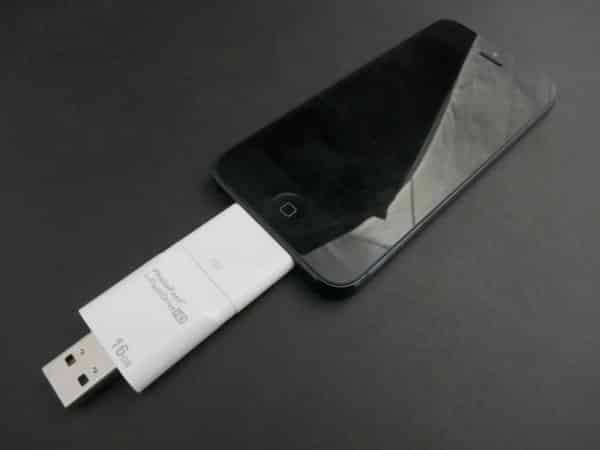
Because we’re likely never going to see removable storage as a feature of an iPad, iPhone, or iPod, accessory makers have developed accessories that can carry extra photos, music, movies, and documents. Nearly two years ago, we reviewed PhotoFast’s Dock Connector- and USB-equipped flash drive i-FlashDriveLightning to 30-Pin Adapter — not a cheap knockoff, but an actual retail unit, as indicated by the seemingly hand-torn front of the Apple packaging found inside the box.

Review: PhotoFast i-FlashDrive HD

i-FlashDrive HD comes in several configurations. The least expensive is the 8GB Dock Connector-only model at $100. Next is 16GB for $150, or $170 with the Lightning adapter, while $230 gets you 32GB with the Lightning Adapter, and $330 is an otherwise identical 64GB versions. PhotoFast’s higher capacity units come with the adapter pre-attached, and visible through the clear plastic packaging.

While the prices have only changed a little since 2011, they are now significantly higher than current pricing for standard flash drives.


Review: PhotoFast i-FlashDrive HD

Review: PhotoFast i-FlashDrive HD

Compared to the previous i-FlashDrive, the HD version is smaller and more refined, though still made from glossy white plastic. From the end of the USB plug to the end of the 30-Pin Dock Connector, it’s about 2.9”, and only an inch wide. It tapers down around the Dock Connector, coming to the same dimensions as Apple’s 30-Pin cable for case compatibility. If you’re using the included Lightning Adapter, it pretty much matches Apple’s casing. Gone are the lips to hold the included clear plastic caps in place; now, they simply slide tightly around the plugs.


Review: PhotoFast i-FlashDrive HD

To load content onto i-FlashDrive, you plug it into your Mac or PC and treat it like any other flash drive. Connecting it to your iPad, iPhone, or iPod touch for the first time will prompt you to install the i-FlashDrive HD app; a pop-up will appear each subsequent time, asking if you’d like to launch it.

The app looks essentially the same as the prior version, although improvements have been made—an important detail, as the app was the weakest element of the last iteration.


Review: PhotoFast i-FlashDrive HD

Review: PhotoFast i-FlashDrive HD

Originally, content needed to be loaded into local storage before it could be played back. This meant you needed at least that much free space on your device, and it would take quite a long time for files to transfer. Now videos load directly from the drive with just a second or two of buffering; the same goes for music; nothing is stored in your local storage unless you explicitly move it there. This is a big improvement that makes this version of i-FlashDrive much, much more useful. Unfortunately, DRM-protected content can’t be played back, so you won’t be able to load movies and TV shows purchased from iTunes.


Review: PhotoFast i-FlashDrive HD

The app is also still packed with a voice recorder, local storage, and contact backup features. Newly added is Dropbox support: once you’ve linked the app to your account, you can transfer files directly to the cloud storage service. In addition to videos and music, the app is capable of displaying dozens of file types, including Microsoft Office and iWork documents.



Latest News
The AirPods Pro 3 is $20 Off
1 Min Read
Exynos 2600 Chip 2nm Process Revealed by Samsung
1 Min Read
New Celebrity Ad Campaign Featuring Travis Scott Released by Beats
1 Min Read
Australia Getting Hypertension Notification Feature
1 Min Read
The 14-inch MacBook Pro with M5 Chip 16GB RAM/512GB is $250 Off
1 Min Read
Noise and Static on AirPods Pro 3 Still Unfixed
1 Min Read
New iMac with 24-inch OLED Display May be Brighter With 600 Nits
1 Min Read
The 15-inch M4 MacBook Air 256GB Is $250 Off
1 Min Read
Internal Kernel Debug Kit from Apple Reveals Tests for a MacBook with A15 Chip
1 Min Read
Apple Currently In Talks With Suppliers for Chip Assembly & Packaging of iPhones in India
1 Min Read
Apple Allows Easier Battery Replacement For M5 MacBook Pro with 14-inch Display
1 Min Read
The Apple Watch SE 3 44mm GPS is $50 Off
1 Min Read

iLounge logo

iLounge is an independent resource for all things iPod, iPhone, iPad, and beyond. iPod, iPhone, iPad, iTunes, Apple TV, and the Apple logo are trademarks of Apple Inc.

This website is not affiliated with Apple Inc.
iLounge © 2001 - 2025. All Rights Reserved.
  • Contact Us
  • Submit News
  • About Us
  • Forums
  • Privacy Policy
  • Terms Of Use
Welcome Back!

Sign in to your account

Lost your password?








