
Six or seven years ago, there was a debate over whether Apple would ever sell an iPod with expandable memory capacity, which was subsequently followed by discussions of accessories that might possibly use tricks to achieve the same purpose. Neither expandable iPods nor add-on storage accessories ever happened, despite the increasing availability of portable hard drives, flash cards, and even Dock Connector adapters to connect such things to Apple’s devices. With only one exception — Camera Adapter add-ons that let certain iPods and then iPads transfer photos and some videos from digital cameras — the rule was simple: use your device’s built-in storage for media.
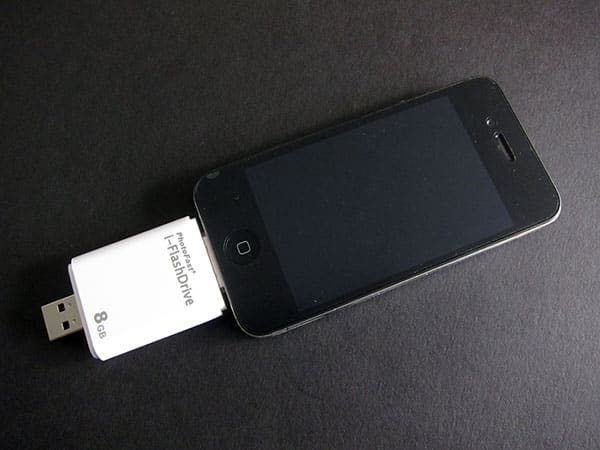
Thanks to recent iOS application developments, the old norm appears to be in the process of changing. Companies such as Kingston and Seagate have recently released wireless, battery-powered hard drives with gigabytes of spare capacity for videos, music, photos, and other files, leveraging apps to stream their content directly onto iOS devices. And now a Taiwanese company called PhotoFast has come up with its own alternative, i-FlashDrive, that does away with the wireless hardware in an effort to achieve a similar end. Sold in 8GB ($99), 16GB ($120), and 32GB ($193) capacities, i-FlashDrive plugs into your computer like any flash drive, lets you drag and drop files into a folder structure, and then lets you connect directly to the bottom of an iPod touch, iPhone, or iPad to play back the files.

The unit isn’t fancy. Made mostly from clear white plastic, each unit has silver USB and Dock Connector plugs on its ends, plus clear plastic storage protectors for both connectors; nothing else is in the box.
By flash drive standards, it’s relatively large, with a wider body than the Dock Connector at its top, and thickness that’s roughly equal to the iPhone 4. Moreover, it’s not designed to attach to encased devices, as the Dock Connector plug has no extra space at the end—the sort of engineering mistake that major developers no longer make these days.


Conceptually, i-FlashDrive otherwise sounds pretty reasonable. If you started with a $199 or $229 8GB iPod touch and didn’t want to go out and buy a higher-capacity model for $299 or $399, PhotoFast’s options provide less expensive ways to double, triple, or quintuple your storage space. Except that it doesn’t, really. PhotoFast’s application is saddled with a limitation that effectively kills the accessory’s value: if you want to play something back, you’ll first need to copy it from i-FlashDrive onto the iOS device. That means you’ll need to have enough free space to at least temporarily store whatever you’re trying to play back from i-FlashDrive’s integrated storage.

As bad as that sounds, it gets worse.
In addition to the time you’ll spend putting your files on i-FlashDrive, the transfer speeds between the accessory and iOS devices are atrocious. It took over 16 minutes to copy a test 100MB video clip from the accessory to an iPhone 4—a clip that took only a minute and a half to actually play; even if you use more aggressive file compression for your videos, you’ll likely find that they take at least as long to transfer to the iOS device as their running times, perhaps more. Photos, music files, and the like go through the same process, albeit considerably faster. As noted before, you’ll need to have the extra space to store these files temporarily on your iOS device; moreover, once you’re done viewing them, you need to manually delete them from your iOS device’s “local storage” using the PhotoFast application. Unless you’re planning to use i-FlashDrive primarily for really small files, which you might as well just put on your iOS device anyway, the time- and battery-wasting storage process used here is just not going to fly for most users.

There are other small features in PhotoFast’s application. For some reason, it includes a voice recorder that creates AAC samples, a primitive text file creator, and a contact backup feature.











