
iLoungeiLounge
  • News
    • Apple
      • AirPods Pro
      • AirPlay
      • Apps
        • Apple Music
      • iCloud
      • iTunes
      • HealthKit
      • HomeKit
      • HomePod
      • iOS 13
      • Apple Pay
      • Apple TV
      • Siri
    • Rumors
    • Humor
    • Technology
      • CES
    • Daily Deals
    • Articles
    • Web Stories
  • iPhone
    • iPhone Accessories
  • iPad
  • iPod
    • iPod Accessories
  • Apple Watch
    • Apple Watch Accessories
  • Mac
    • MacBook Air
    • MacBook Pro
  • Reviews
    • App Reviews
  • How-to
    • Ask iLounge
Font ResizerAa
iLoungeiLounge
Font ResizerAa
Search
  • News
    • Apple
    • Rumors
    • Humor
    • Technology
    • Daily Deals
    • Articles
    • Web Stories
  • iPhone
    • iPhone Accessories
  • iPad
  • iPod
    • iPod Accessories
  • Apple Watch
    • Apple Watch Accessories
  • Mac
    • MacBook Air
    • MacBook Pro
  • Reviews
    • App Reviews
  • How-to
    • Ask iLounge
Follow US

Reviews

Reviews

Review: Photoboard by Zest Prod

Last updated: May 13, 2021 6:55 am UTC
By Charles Starrett
Review: Photoboard by Zest Prod

This review originally appeared within iLounge’s iOS Gems series within the compilation article, iPhone Gems: Top Photography and Image Manipulation Apps. Additional details may be found in the original article.


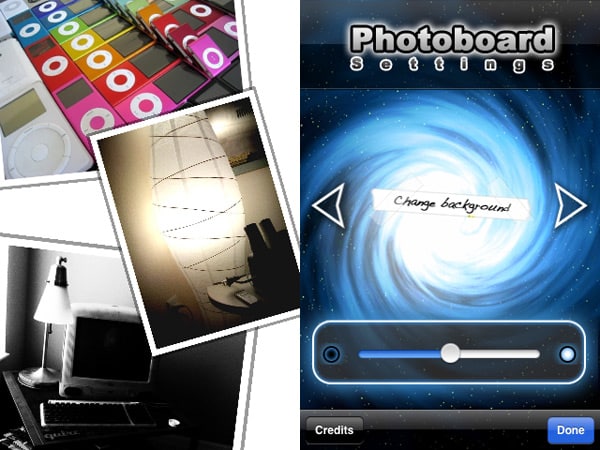
Photoboard ($1) is a multi-touch picture viewer for iPhone and iPod touch resembling the interface of the Microsoft Surface table. Following a brief splash screen, users are presented with a background — space-themed image, by default — on which they may view photos.
Review: Photoboard by Zest Prod

Tapping with a single finger brings up the app’s menu system, which changes based on what the user is touching, and uses a four-way selector — left is setup, right is add, and so on — to invoke actions. The setup menu lets the user change the background and adjust the brightness, making both completely white and completely black backgrounds possible.


Photos appear inside a relatively thin border, and can users can shrink, expand, and rotate the photos by touching them with two fingers and using basic gestures. Tapping on a photo with a single finger brings up the menu to either group the photos together in a corner of the screen, or remove the photo, while tapping inside a photo’s border with three fingers lets the user distort the image.

Furthermore, the user can zoom in and out on the board itself, reframing the photos as they go, and the app also lets users save their collages to the Camera Roll in 1600×1200 resolution. We really appreciate this high-resolution save feature; it distinguishes this app from its peers.


Review: Photoboard by Zest Prod

Though it initially feels like a straightforward technology demo, Photoboard is fairly impressive — in some ways, it feels as if it should have been on the phone from the start, as the way it allows the user to manipulate the photos is both natural and intuitive. The ability to save the board as a screenshot is also welcome.



Latest News
The Anker Prime 14in1 Thunderbolt 5 Dock is $60 Off
1 Min Read
iPhone 18 Pro Max May Have a Bigger Battery That’s The Best of Its Kind
1 Min Read
Apple Tightens Their Grip on the Market for Tablets As Demand For iPad Rises
1 Min Read
Teardown Video For AirTag 2 Shared By iFixit
1 Min Read
The Apple Watch Series 11 42mm GPS is $100 Off
1 Min Read
Apple Launching A New Education Hub In India Teaching Robotics and Swift Programming
1 Min Read
Women’s and Men’s Golf Added to Apple Sports
1 Min Read
Apple Adding Civilization VII and Other Games To Apple Arcade
1 Min Read
AirPods 4 ANC Is $59 Off
1 Min Read
Apple Using 2NM Process For Their M6 and A20 Chip
1 Min Read
iPhone 18 Models Will Not Have a Big Redesign
1 Min Read
Launch of MacBook Pro M5 Pro and M5 Max Models is Approaching
1 Min Read

iLounge logo

iLounge is an independent resource for all things iPod, iPhone, iPad, and beyond. iPod, iPhone, iPad, iTunes, Apple TV, and the Apple logo are trademarks of Apple Inc.

This website is not affiliated with Apple Inc.
iLounge © 2001 - 2025. All Rights Reserved.
  • Contact Us
  • Submit News
  • About Us
  • Forums
  • Privacy Policy
  • Terms Of Use
Welcome Back!

Sign in to your account

Lost your password?








