
iLoungeiLounge
  • News
    • Apple
      • AirPods Pro
      • AirPlay
      • Apps
        • Apple Music
      • iCloud
      • iTunes
      • HealthKit
      • HomeKit
      • HomePod
      • iOS 13
      • Apple Pay
      • Apple TV
      • Siri
    • Rumors
    • Humor
    • Technology
      • CES
    • Daily Deals
    • Articles
    • Web Stories
  • iPhone
    • iPhone Accessories
  • iPad
  • iPod
    • iPod Accessories
  • Apple Watch
    • Apple Watch Accessories
  • Mac
    • MacBook Air
    • MacBook Pro
  • Reviews
    • App Reviews
  • How-to
    • Ask iLounge
Font ResizerAa
iLoungeiLounge
Font ResizerAa
Search
  • News
    • Apple
    • Rumors
    • Humor
    • Technology
    • Daily Deals
    • Articles
    • Web Stories
  • iPhone
    • iPhone Accessories
  • iPad
  • iPod
    • iPod Accessories
  • Apple Watch
    • Apple Watch Accessories
  • Mac
    • MacBook Air
    • MacBook Pro
  • Reviews
    • App Reviews
  • How-to
    • Ask iLounge
Follow US

Reviews

Reviews

Review: Philips Hue Motion Sensor

Last updated: May 16, 2021 2:02 pm UTC
By Jesse Hollington
Review: Philips Hue Motion Sensor

Philips new Hue Motion Sensor is the latest addition to the company’s Hue lighting ecosystem, providing a light and motion sensor that can be used to automate all of the Hue lights within a given room based on detecting motion, or a lack of motion. The wireless motion sensor also includes an integrated daylight sensor to allow for more granular control of lights, along with the ability to set separate day and night schedules. Unfortunately, while Hue Motion Sensor is a nice addition to the Hue ecosystem, it lacks any kind of HomeKit support, making it a less useful solution for anybody who wants to mix and match Hue lighting with other HomeKit-enabled solutions.

Review: Philips Hue Motion Sensor

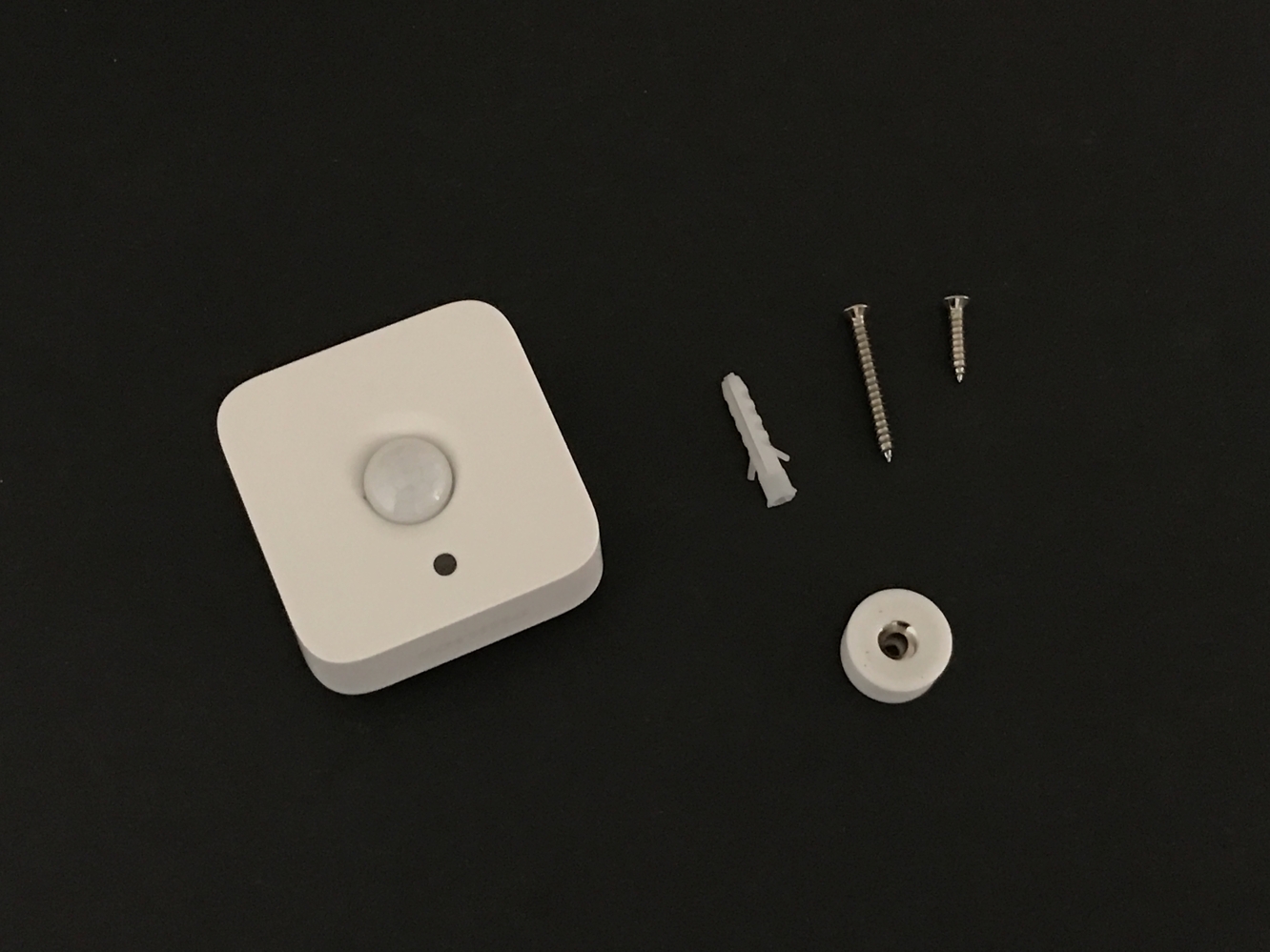
The Hue Motion Sensor package includes the wireless motion sensor and a magnetic mount with screws for mounting the sensor on a surface, such as a wall.

It’s powered by two AAA batteries that are already pre-installed with a plastic strip that you’ll need to remove to initially power on the motion sensor. The mounting system is relatively straightforward — a single screw secures the circular magnetic base to a wall, and then the motion sensor attaches magnetically in any orientation you prefer.


Review: Philips Hue Motion Sensor

Setting up the motion sensor is similar to setting up a Hue Dimmer Switch; as soon as the motion sensor is powered on by removing the plastic strip, it should go into pairing mode, where it can be discovered and added from the “Add Accessory” option in the Hue app’s settings. This will take you through a quick process of finding and associating the sensor with a given room or set of rooms.

Review: Philips Hue Motion Sensor

The Hue Motion Sensor will be automatically configured with default settings for daytime, nighttime, and no-motion lighting, which can be customized from within the Hue app.


In all cases, motion will only be triggered if insufficient daylight is available — a handy feature designed to save energy by not having lights come on when they’re not needed. You can choose the specific hours during which daytime and nighttime schedules are in effect, although only a daily schedule is available — you won’t be able to use different times on weekends, for instance — and the no-motion timeout can be specified. You can choose a pre-defined lighting level, scene, or recipe for each of the three scenarios, and like the Hue Dimmer Switch, the sensor is designed to operate on rooms, rather than individual bulbs. This means you either need to be content with having the motion sensor control all of the Hue lights in a room, or get a bit creative with how you organize your lights by essentially creating virtual “rooms” as groupings instead of relying on physical rooms.



Latest News
The 14-inch MacBook Pro with M5 Chip 16GB RAM/512GB is $250 Off
1 Min Read
Noise and Static on AirPods Pro 3 Still Unfixed
1 Min Read
New iMac with 24-inch OLED Display May be Brighter With 600 Nits
1 Min Read
The 15-inch M4 MacBook Air 256GB Is $250 Off
1 Min Read
Internal Kernel Debug Kit from Apple Reveals Tests for a MacBook with A15 Chip
1 Min Read
Apple Currently In Talks With Suppliers for Chip Assembly & Packaging of iPhones in India
1 Min Read
Apple Allows Easier Battery Replacement For M5 MacBook Pro with 14-inch Display
1 Min Read
The Apple Watch SE 3 44mm GPS is $50 Off
1 Min Read
20th Anniversary iPhone May Launch in Two Years
1 Min Read
Better Image Generation Capabilities and Apple Music Integration Coming to ChatGPT
1 Min Read
A20 Pro Chip Coming to Next Gen iPad Mini OLED
1 Min Read
Amazon has the AirTag 4 Pack Marked $29 off
1 Min Read

iLounge logo

iLounge is an independent resource for all things iPod, iPhone, iPad, and beyond. iPod, iPhone, iPad, iTunes, Apple TV, and the Apple logo are trademarks of Apple Inc.

This website is not affiliated with Apple Inc.
iLounge © 2001 - 2025. All Rights Reserved.
  • Contact Us
  • Submit News
  • About Us
  • Forums
  • Privacy Policy
  • Terms Of Use
Welcome Back!

Sign in to your account

Lost your password?








