
When this site started as iPodlounge all the way back in 2001, there was no way we would have guessed that we’d be writing about wirelessly-controlled lightbulbs twelve years later. Yet here we are, looking at not one but two different lighting options that aren’t controlled by just a switch on the wall, but by your iOS device. Philips was the first to market, releasing the Hue Connected Bulb Starter Pack ($200), which was followed by BlueBulb’s Bluetooth Bulb 9W RGB + White ($59), which also comes in a less powerful 6W version. Both use wireless connections and free apps that not only toggle the bulbs on and off, but also allow you to cycle through colors and set up wake and sleep transitions. One relies on the relatively new Bluetooth 4 standard to directly communicate with recent iOS devices, while the other requires both Wi-Fi connectivity and a base station.
Hue, an accessory available exclusively in Apple stores and from Apple’s website, comes in the Starter Pack with three bulbs and a wireless bridge, while additional bulbs are available for $60 each. Also in the box are a power supply for the bridge, and an Ethernet cable to connect it to your router. Each of the bulbs is an 8.5-Watt light and puts out 600 lumens, which is roughly comparable to a traditional 50-Watt lightbulb. The capsule-shaped bulbs don’t look terribly different from the standard models most people are used to purchasing, although there’s a two-inch tall sleeve of metal between the screw-in plug and the glass—likely where the Wi-Fi and other novel electronics are hidden. At 4.6 ounces each, they’re surprisingly heavy by lightbulb standards, not that you’ll notice after installing them.

The bridge is a 4”-diameter plastic circle that must be physically connected to your router. Depending on the type of router you have—older AirPort Expresses won’t work—and where it’s positioned, this may be a problem for some users.
It must also be connected to a wall power outlet, another issue that isn’t deeply troubling in the grand scheme of things, but winds up being another addition to your energy bill. Brackets on the back allow it to be mounted on a wall, to get it out of the way. Once it’s been plugged in, the lightbulbs are installed, their respective switches have been flipped to the on position, and the app is installed on your iPhone or iPad, you press the center button to sync everything up and get the bulbs connected to your home network. Because it’s connected over Wi-Fi, the Hue system can be controlled even if you’re not at home.

While the Hue bulbs can be used around your house, the Starter Pack is ideal for use in one room. This is because Philips’ app comes preloaded with scenes—different colorscapes with names such as “Sunset” or “Beach.” Each combines different colors and intensities to preset conditions, but allows you to alter them if you so choose. You can also create your own, or switch to settings including “Relax” and “Concentrate.” With any of them, you can set alarms to switch the scene on or off at certain times, either automatically or fading in and out over three or nine minutes. They can also be turned off and on in unison. The coolest feature of the entire system is the in-app ability to drag a loupe around a picture of your choice, then see a bulb’s color adjusting to match the sample. Decorators looking for perfect- or near-perfect color control will be able to swipe and point on any image to get the right illumination match for their needs.

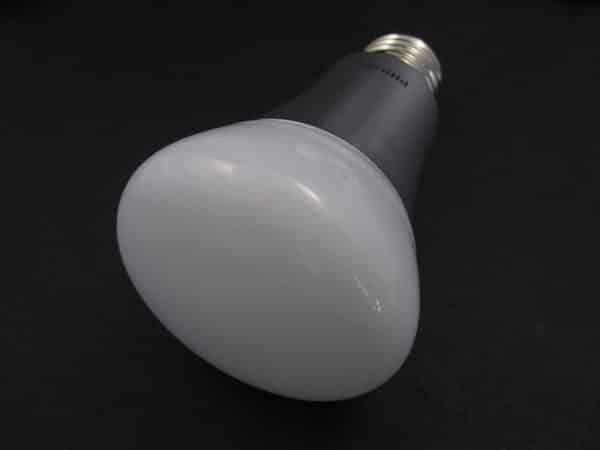
BlueBulb’s lightbulb looks a little bit different than Hue, but doesn’t stray too far from the standard bulb design, either. It’s glass in a more rounded shape, and instead of silver, it has a black core with ridged metal. The company claims that the bulb puts out 80 lumens per watt, for a total of 720 lumens, or 120 more than Hue—roughly equivalent to a 60-Watt bulb.
There are a few key differences between the two, stemming from the way this bulb communicates with your iPhone. Because it uses Bluetooth 4, there’s no need for a base station, and you can buy single bulbs, instead of having to start with a trio.

Pairing the Bluetooth Bulb with the iOS Bluetooth Bulb app is about as easy as it gets. Once the bulb has been screwed into place, and the switch turned on, you simply launch the app, hit the search button, and the two sync right up. From there, every time you launch the application, you simply have to tap the specific bulb you want to control, and it’ll automatically connect. As with Hue, you can control multiple bulbs at a time, although we only had one for review.

BlueBulb’s app isn’t quite as polished, and is more basic in its functionality. Instead of allowing you to choose colors based off of pictures, it provides a row of normal colors, one for white balance, and one with color bars. You simply drag your finger along the row until you find the color you like, and you can choose to mix the color and white levels as you go. There’s also the option to set wake up and sleep alarms, lasting anywhere from five minutes to an hour.


We prefer the look, interface, and frills in Philips’ app, although there’s something to be said for the simplicity of BlueBulb’s. It’s worth noting that you can get the same functionally from the Hue app by dragging a hidden tray up from the bottom of the screen, although it’s designed to be a secondary interface for Hue. In terms of the bulbs themselves, both performed impressively well. Despite the fact that BlueBulb is supposed to be the brighter of the two options, it looked to us like Hue actually is a bit more powerful.











