
iLoungeiLounge
  • News
    • Apple
      • AirPods Pro
      • AirPlay
      • Apps
        • Apple Music
      • iCloud
      • iTunes
      • HealthKit
      • HomeKit
      • HomePod
      • iOS 13
      • Apple Pay
      • Apple TV
      • Siri
    • Rumors
    • Humor
    • Technology
      • CES
    • Daily Deals
    • Articles
    • Web Stories
  • iPhone
    • iPhone Accessories
  • iPad
  • iPod
    • iPod Accessories
  • Apple Watch
    • Apple Watch Accessories
  • Mac
    • MacBook Air
    • MacBook Pro
  • Reviews
    • App Reviews
  • How-to
    • Ask iLounge
Font ResizerAa
iLoungeiLounge
Font ResizerAa
Search
  • News
    • Apple
    • Rumors
    • Humor
    • Technology
    • Daily Deals
    • Articles
    • Web Stories
  • iPhone
    • iPhone Accessories
  • iPad
  • iPod
    • iPod Accessories
  • Apple Watch
    • Apple Watch Accessories
  • Mac
    • MacBook Air
    • MacBook Pro
  • Reviews
    • App Reviews
  • How-to
    • Ask iLounge
Follow US

Reviews

Reviews

Review: Pelican ProGear Vault for iPad Air and iPad mini

Last updated: May 16, 2021 7:57 pm UTC
By Nick Guy
Review: Pelican ProGear Vault for iPad Air and iPad mini

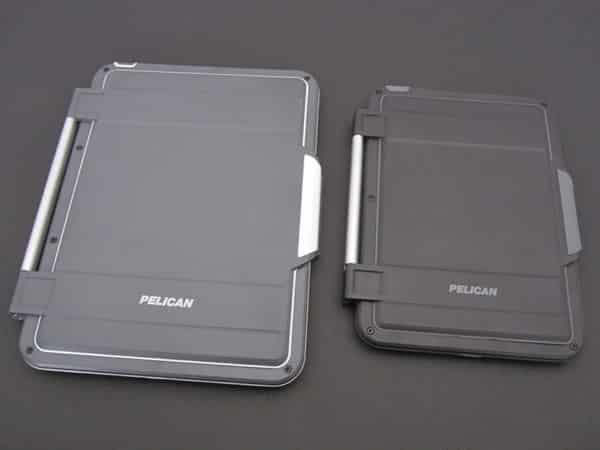
Available for both the iPad Air ($100) and iPad mini ($80), Pelican’s ProGear Vault case is a different take on heavy-duty protectors. It’s one of the few such cases with a folio rather than playthrough design, but can transform into the latter as needed. ProGear Vault is a full conversion kit, requiring you to unscrew and rescrew the parts every time you want to install or remove your tablet. Once inside, the iPad is heavily protected, with military-grade drop protection, a dust and dirt seal, and protection from momentary liquid immersion.


Review: Pelican ProGear Vault for iPad Air and iPad mini

Apart from obvious size differences, the iPad Air and mini cases are highly similar. In fact, other than some color swaps here and there, the biggest difference we found was when it came to installation. Both cases require you to use an included hex wrench to unscrew the screws, and then put them back in place.

On the iPad mini version of the case, there are six screws, but on the full-sized version, you’ll have to fuss with 15 screws. Six is an annoyance, but 15 is crazy, especially if you ever have to take the iPad out of the case. Each case lets you remove the lid using the same wrench, though you actually must take the lid off to install the larger iPad.


Review: Pelican ProGear Vault for iPad Air and iPad mini

Review: Pelican ProGear Vault for iPad Air and iPad mini

Inside ProGear Vault, the iPad is protected by sturdy materials that should help prevent significant damage, including rubber lining the inside. Not only is the body of the device covered, but so are the ports, buttons, bezel, and even the rear camera. Starting at the top edge, there’s a rubber protector for the headphone port, special grates over the microphones, and a hard plastic protector for the Sleep/Wake button. This button becomes hard to press on the larger case, but it’s just about right on the mini. Then, there’s glass over the rear camera, a flip open side switch protector, and a segment of rubber that effectively transplants the volume buttons to the back of the case, where they remain responsive.


On the outer edges, there’s one more port protector for the Lightning port, and a grating over the speakers. All in all, ProGear Vault offers a high level of body protection.


Review: Pelican ProGear Vault for iPad Air and iPad mini

Review: Pelican ProGear Vault for iPad Air and iPad mini

Two levels of coverage are found on the front of the iPad. First, the border of the case covers about half of the iPad’s bezel, and is lined with rubber to create a tight seal; there’s also rubber over the Home Button, allowing it to be protected and used normally. Then there’s the lid. Attached with two or three screws, depending on the size of the case, it has a large metal hinge. Also lined with rubber, the cover can snap shut over the screen, reinforcing the seal, but it doesn’t have auto-locking magnets.



Latest News
The Apple Watch Series 11 46mm GPS Is $100 Off
1 Min Read
Clamshell Style iPhone Being Looked Into By Apple
1 Min Read
Foldable iPhones May Have the Largest Battery Ever
1 Min Read
Apple and TSMC’s 10-Year Collaboration May Be Ending
1 Min Read
The 13-inch M5 iPad Pro 256GB Wi-Fi Is $149 Off
1 Min Read
M5 Pro and M5 Max Chips for the MacBook Pro could Roll Out with macOS 26.3
1 Min Read
Mac Ordering Process Revamped
1 Min Read
Check Signed By Steve Wozniak and Steve Jobs Sold For $2.4 Million
1 Min Read
The Anker 140W 4-Port GaN USB-C Charger is $35 Off
1 Min Read
No iPhone Air 2 This Year, according to Latest Report
1 Min Read
New Report Corroborates Split iPhone Release Dates
1 Min Read
Apple Losing More Researchers As They Plan To Release 2 Siri Versions
1 Min Read

iLounge logo

iLounge is an independent resource for all things iPod, iPhone, iPad, and beyond. iPod, iPhone, iPad, iTunes, Apple TV, and the Apple logo are trademarks of Apple Inc.

This website is not affiliated with Apple Inc.
iLounge © 2001 - 2025. All Rights Reserved.
  • Contact Us
  • Submit News
  • About Us
  • Forums
  • Privacy Policy
  • Terms Of Use
Welcome Back!

Sign in to your account

Lost your password?








