
Universal remote control accessories for iOS devices became downright common last year, as a collection of small companies launched Infrared blasting dongles and cases for iPhones and iPod touches — sometimes iDevice-agnostic, and otherwise specific to a given and soon-to-be-discontinued model. After testing virtually all of these accessories and the iOS apps they worked with, our recommendation was clear: no developer got the price, performance, and feature formula quite right, but L5 Technology’s L5 Remote came as close as anything, helped considerably by its reasonable $50 price point and small, universally compatible dongle.
Depending on your perspective—and on your tolerance for spending more money for a better solution—you’ll either be intrigued or bemused by Peel Technologies’ new Peel Universal Remote Control ($100), which is now the most expensive Infrared remote solution we’ve tested for iOS devices. It’s also the best overall option yet released, but with some significant caveats that will limit its appeal to some users. Between the heavily streamlined but powerful iOS application Peel has developed, and the completely dongle-free design of its Universal Remote Control hardware, the company has created a solution that some people will really enjoy with minimal effort, assuming that they’re willing to invest twice the cash of an L5 Remote, and manage a little more hardware in the process.

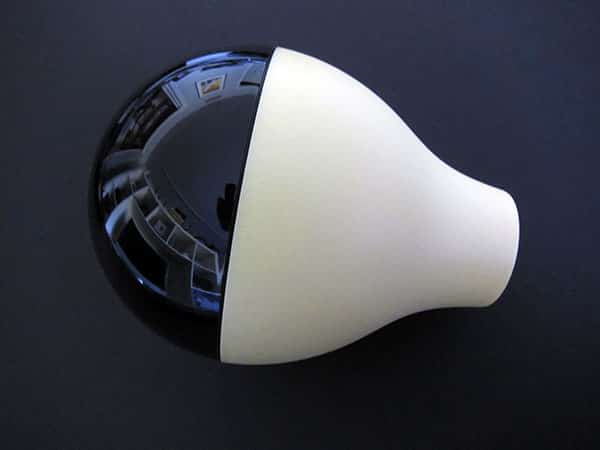
Peel Technologies bundles together a somewhat unusual-looking half-yellow, half-black Fruit-shaped Infrared blaster called “Peel Fruit” with a wall-powered Wi-Fi adapter called “Peel Cable.” During a setup process that takes only minutes, you plug the Peel Cable into your home router and the wall, then unscrew the Peel Fruit and insert an included C battery into its center. Run Peel’s free application and you’ll be guided step by step through the process of pairing the Fruit and Cable, which requires little more than a working battery and a five-digit pairing code. Then you move briskly through the setup of your TV and, optionally, other IR-ready devices including DVRs, optical disc players, cable boxes, and so on.

The fundamental difference between Peel’s approach, and the one taken by competitors, needs to be underscored again at this point. With Peel, there’s no dongle to attach to your iPod, iPhone, or iPad whenever you want to control your TV or home entertainment center. You just load an app and, thanks to the Fruit and Cable pieces, everything’s handled over Wi-Fi—a major convenience. But there are some consequences.
First, you need to leave Peel Fruit sitting somewhere in your room in front of your TV and entertainment center. Second, you need to replace the Fruit’s C battery whenever it stops working. Peel’s web site doesn’t focus much on the battery life, but we found that we needed a new battery after a little less than a month. Under some conditions, the battery may last longer.* From our perspective, Peel Fruit’s battery drain is the single biggest demerit against an otherwise thoughtfully implemented end-to-end solution; whether you consider it “acceptable,” “big” or “completely fatal” is up to you. [Editor’s Note/April 15, 2011: In an e-mail exchange following this review, Peel said that its tests had suggested a typical battery life of 6 months, and was investigating reasons that the number might have been lower.]

To call the Peel setup process otherwise flawless would be a little generous but not too far off the mark. Assuming that you follow the app’s on-screen instructions, which are simple and clearly written, you’ll be impressed at how quickly the cable pairs with the Infrared blaster, and starts controlling your devices. Probably. The Fruit’s designed to be used in the same room as the Cable, which is to say that it performs best if your home entertainment center happens to be in the same room as your wireless router. We tested Peel Fruit with a second TV another room away from the Cable and found that it worked fine, though button presses were considerably slower in registering on an Apple TV through the Peel app than they did through Apple’s free iOS app Remote. Power and volume changes to the connected TVs we tested were much quicker, however, though often not as precise as using their own dedicated remote controls.
Some tweaks to the app to replace slide gestures with tap ones, at least optionally, might improve its perceived accuracy.

There’s so much to like in Peel’s application that it’s easy to look past its issues. On the plus side, Peel has removed all of the geeky elements that we’ve spotted in earlier iOS remote control applications, often making device selection as simple as choosing a manufacturer, and button use as straightforward as tapping or swiping clearly indicated UI elements on the screen. You’ll typically have no need to scroll on a remote control screen, no clunky interface to play with the placement or functions of buttons, and no visual clutter to distract you from the basic tasks of changing channels, volume, power status, or navigating menus. Moreover, Peel’s application includes smart and impressively illustrated program guides that are customized to your cable provider, and if you desire, to your personal genre and other tastes. You can get program suggestions based on a Peel database of similar programs, and share your show discoveries via Facebook and Twitter. A lot of thought has gone into the Peel application, and iPhone/iPod touch users will be impressed by how nicely it presents programming options, with a heavy emphasis on cover art and large, attractive buttons rather than numbers.

On the other hand, Peel’s approach does have some shortcomings. When there’s something that it can’t automate, such as a TV that it doesn’t seem to be able to turn on, it doesn’t fall back upon the help wizards common to Logitech’s Harmony series of remote controls, taking you step-by-step through possible fixes. Instead, it generally presents only a failure screen with guidance to contact Peel for assistance. To be fair, we tested it with TVs, DVD players, DVRs and other devices that it eventually was able to control just fine, but on the occasion when it didn’t initially seem to be working, we thought we were out of luck until it started to perform properly.

Additionally, Peel’s assumptions as to what a specific cable company’s service offerings are can lead to a program guide that is overbroad; in our testing, it called up a suite of channels far beyond the ones we actually had, presenting us with photos of options we couldn’t actually tune.











