
You’ve probably heard of the Pebble Smart Watch ($150). Developed by Pebble Technology, the wearable Bluetooth 4.0 accessory started as a Kickstarter project in April 2012, and was fully funded the next month at over 10,000% of its goal — the creators asked for $100,000, and raised more than $10.25 million from almost 69,000 backers. Today, more than a year later, some funders are still waiting for their watches to arrive, while small batches have been sold through Best Buy, and certain initially promised features are still in the process of being fleshed out for iOS users. After testing Pebble, notably including a long-awaited and recently-released iOS-centric software update, we are ready to issue our full review.

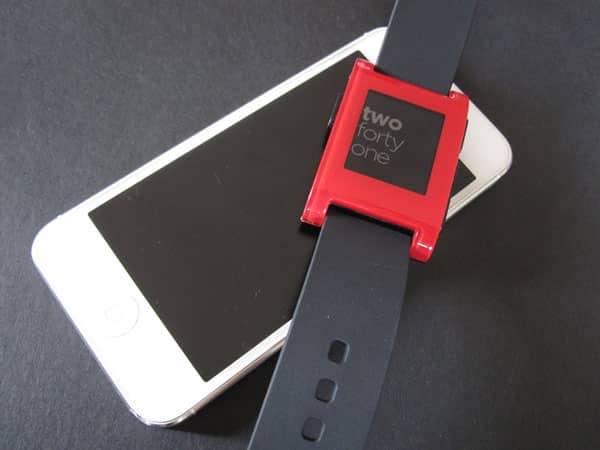
First and foremost, Pebble should be understood as a watch. From end to end, it’s ten inches long, with a black silicone band surrounding a 2” by 1.25” watch chassis. Our review unit was red, while black, white, orange, and grey models are being offered by the company as alternatives. Notably, only the bezel around the screen is colored, while the rest of the watch is black plastic. Along the left edge is a large button, with a proprietary magnetic charging connector underneath. Pebble comes with a micro-USB cable for power, and the battery is promised to last for seven or more days between charges. After five days of continuous use, we saw no issues. The other side of the watch features two large oval-shaped buttons alongside a smaller one in the center.


Pebble’s display is a 144- by 168-pixel black and white e-paper screen.
By default, it shows you the time using one of a handful of included watch faces. Pressing the up or down buttons on the right side of the watch allows you to alternate through the different faces on the fly. Many feature animation, ranging from ticking clock hands to numbers that fly in from the side. A backlight makes Pebble readable when it’s dark, and plays a part in one of our favorite features: shake your wrist and the light will come on automatically. Aided by an accelerometer, this gesture is far more practical then we would have first thought, and became natural very quickly. Between the customizable display and handy illumination toggle, we really like Pebble as a watch.


Pressing the center button brings you to Pebble’s home screen, which is actually just a list of text options, some accompanied by simple graphics. The top and bottom buttons let you scroll through the lists, using the center button to select an item; the left button is used to move back a step. By default, the options are Music, Set Alarm, Watchfaces, and Settings; more features can be added when you download apps. After connecting to an iPhone with Bluetooth, Music allows you to control playback on your device, which can be useful at times when the phone is out of reach, and was fully responsive during our testing. Set Alarm works somewhat as you’d expect: it vibrates when it goes off, but doesn’t make any noise, since Pebble doesn’t have a speaker. Another small problem was that the alarm can only be set using 24-hour, military-style time. This isn’t an issue if you know that to be the case, but if not, there’s the possibility of missed evening alarms—7:00 is 7:00am, versus 19:00 for 7:00pm.
Pebble could easily address this with a firmware tweak.


One of the key selling points of the “Smart Watch” is its notification system. As of now, Pebble can alert you when your phone receives a text message, an email sent to an IMAP email account (such as Gmail), or a phone call. These notifications are all forwarded through a free Pebble app that runs on your device and is necessary for those features, as well as for adding new functionality to your watch. The phone’s calls and texts are handled automatically, but you must manually program the app for the email accounts you’d like to use. Texts and iMessages pop up nearly simultaneously with when they hit your phone, and display the name of the sender along with the body of your message, scrolling if necessary. Phone calls display the name of the caller, although we had to toggle contact settings off and then on again for this to work. E-mails, however, sometimes run behind. You may wait several minutes for a message to appear on Pebble once it has hit your inbox.


The key to Pebble is that it’s a platform, including a software development kit (SDK) and room for user personalization. There’s not a lot out there right now, but the main categories of content are apps, games, and watchfaces. The last is currently the most populated category, with hundreds of watchfaces available for free on websites such as mypebblefaces.com. To install any of these, you must browse to the site on your phone, click a download link, and then choose the Pebble app from the “Open in…” menu.











