
iLoungeiLounge
  • News
    • Apple
      • AirPods Pro
      • AirPlay
      • Apps
        • Apple Music
      • iCloud
      • iTunes
      • HealthKit
      • HomeKit
      • HomePod
      • iOS 13
      • Apple Pay
      • Apple TV
      • Siri
    • Rumors
    • Humor
    • Technology
      • CES
    • Daily Deals
    • Articles
    • Web Stories
  • iPhone
    • iPhone Accessories
  • iPad
  • iPod
    • iPod Accessories
  • Apple Watch
    • Apple Watch Accessories
  • Mac
    • MacBook Air
    • MacBook Pro
  • Reviews
    • App Reviews
  • How-to
    • Ask iLounge
Font ResizerAa
iLoungeiLounge
Font ResizerAa
Search
  • News
    • Apple
    • Rumors
    • Humor
    • Technology
    • Daily Deals
    • Articles
    • Web Stories
  • iPhone
    • iPhone Accessories
  • iPad
  • iPod
    • iPod Accessories
  • Apple Watch
    • Apple Watch Accessories
  • Mac
    • MacBook Air
    • MacBook Pro
  • Reviews
    • App Reviews
  • How-to
    • Ask iLounge
Follow US

Reviews

Reviews

Review: Paint by Alterme Inc.

Last updated: May 13, 2021 6:56 am UTC
By Charles Starrett
Review: Paint by Alterme Inc.

This review originally appeared within iLounge’s iOS Gems series within the compilation article, iPhone Gems: Every Drawing Application, Reviewed. Additional details may be found in the original article.


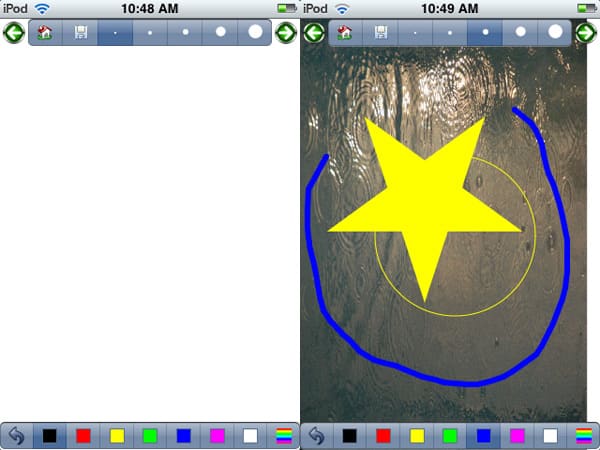
Paint ($1; listed as iPaint on the Home screen) is a single-screen drawing application that offers users a wide variety of ways to manipulate and create drawings and images. Paint’s single view presents users with a side-scrolling button bar of brush sizes, open and filled geometric shapes, pre-defined, clip-art like images, and buttons for adding an image from the photo library as a background, changing the background color, and saving the drawing to the photo library.
Review: Paint by Alterme Inc.

A non-scrolling button bar at the bottom lets users undo, select from seven pre-set colors, or tap a color selection button to set a custom color using RGB sliders, along with a tint control.


The sheer number of options in Paint is impressive, although they aren’t presented in the best way possible, and some buttons — such as the computer monitor icon for changing the background color — are less than immediately obvious in utility. When loading a picture from the photo library for use as a background, the selection menu does not extend to the status bar, stopping slightly above the bottom of the top button bar, leaving an ugly gap. In addition, the loaded picture doesn’t cover the entire drawing surface, leaving a several-pixels-wide vertical border on the right side which lets the underlying background show through.


Also, when drawing shapes, the actual shape appears only after the user has drawn an invisible line to represent the size of the shape, giving the user no indication of how the shape will look. Apart from these issues, the app performs as expected, letting users draw on the screen by accurately following the movement of their fingers. Shaking the device clears the screen.

While it does have its issues, Paint is the most full-featured drawing app available at its price point.



Latest News
The AirPods Pro 3 is $20 Off
1 Min Read
Exynos 2600 Chip 2nm Process Revealed by Samsung
1 Min Read
New Celebrity Ad Campaign Featuring Travis Scott Released by Beats
1 Min Read
Australia Getting Hypertension Notification Feature
1 Min Read
The 14-inch MacBook Pro with M5 Chip 16GB RAM/512GB is $250 Off
1 Min Read
Noise and Static on AirPods Pro 3 Still Unfixed
1 Min Read
New iMac with 24-inch OLED Display May be Brighter With 600 Nits
1 Min Read
The 15-inch M4 MacBook Air 256GB Is $250 Off
1 Min Read
Internal Kernel Debug Kit from Apple Reveals Tests for a MacBook with A15 Chip
1 Min Read
Apple Currently In Talks With Suppliers for Chip Assembly & Packaging of iPhones in India
1 Min Read
Apple Allows Easier Battery Replacement For M5 MacBook Pro with 14-inch Display
1 Min Read
The Apple Watch SE 3 44mm GPS is $50 Off
1 Min Read

iLounge logo

iLounge is an independent resource for all things iPod, iPhone, iPad, and beyond. iPod, iPhone, iPad, iTunes, Apple TV, and the Apple logo are trademarks of Apple Inc.

This website is not affiliated with Apple Inc.
iLounge © 2001 - 2025. All Rights Reserved.
  • Contact Us
  • Submit News
  • About Us
  • Forums
  • Privacy Policy
  • Terms Of Use
Welcome Back!

Sign in to your account

Lost your password?








