
iLoungeiLounge
  • News
    • Apple
      • AirPods Pro
      • AirPlay
      • Apps
        • Apple Music
      • iCloud
      • iTunes
      • HealthKit
      • HomeKit
      • HomePod
      • iOS 13
      • Apple Pay
      • Apple TV
      • Siri
    • Rumors
    • Humor
    • Technology
      • CES
    • Daily Deals
    • Articles
    • Web Stories
  • iPhone
    • iPhone Accessories
  • iPad
  • iPod
    • iPod Accessories
  • Apple Watch
    • Apple Watch Accessories
  • Mac
    • MacBook Air
    • MacBook Pro
  • Reviews
    • App Reviews
  • How-to
    • Ask iLounge
Font ResizerAa
iLoungeiLounge
Font ResizerAa
Search
  • News
    • Apple
    • Rumors
    • Humor
    • Technology
    • Daily Deals
    • Articles
    • Web Stories
  • iPhone
    • iPhone Accessories
  • iPad
  • iPod
    • iPod Accessories
  • Apple Watch
    • Apple Watch Accessories
  • Mac
    • MacBook Air
    • MacBook Pro
  • Reviews
    • App Reviews
  • How-to
    • Ask iLounge
Follow US

Reviews

Reviews

First Look: Ozaki O!care Plug & Play Wireless Smart IP Camera

Last updated: May 14, 2021 6:52 pm UTC
By Jeremy Horwitz
First Look: Ozaki O!care Plug & Play Wireless Smart IP Camera

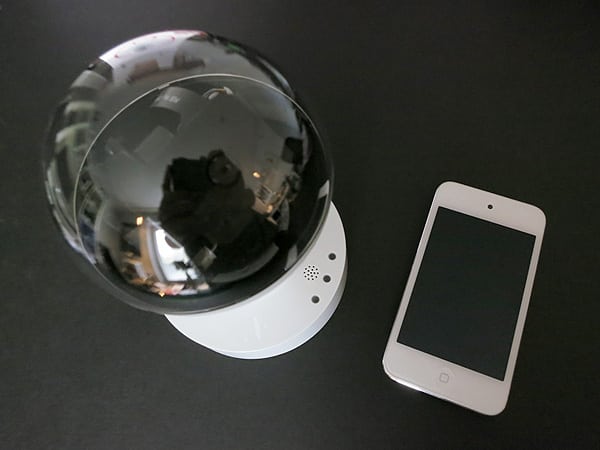
Following on the heels of iHealth Lab’s really well-designed iBaby Monitor is this new alternative from Ozaki, a company we’ve previously chided for some of the most wasteful packaging practices we’ve seen in years of covering Apple products. Ozaki’s O!care ($399) regrettably continues that tradition, loading layer upon layer of cardboard and foam packaging with one of the weirdest-looking video cameras we’ve yet seen for iOS devices — a transparent-topped, lightbulb-shaped accessory atop a light socket-shaped base. Like iBaby Monitor, O!care contains a motorized camera that can change positions, hardware for ceiling mounting, an Ethernet cable, and wall power adapter; it can also operate wirelessly over Wi-Fi. Thanks to a micro SD slot, O!care can record videos — the primary thing that differentiates it from iBaby Monitor — with similar audio support thanks to an integrated microphone, and a free app. Ozaki’s packaging notes that you can “look after who/what you care: Pets, Babies and Elderlys …etc,” while a sheet in the box helpfully notes that it can also be used if you’re “looking for hot girls,” to find out “who’s stealing your bras,” or to look for ghosts in your home, complete with illustrations of other sorts of activities — monitoring robberies, chickens hatching, and lazy employees.


White and black versions will be available.
First Look: Ozaki O!care Plug & Play Wireless Smart IP Camera


First Look: Ozaki O!care Plug & Play Wireless Smart IP Camera

First Look: Ozaki O!care Plug & Play Wireless Smart IP Camera

First Look: Ozaki O!care Plug & Play Wireless Smart IP Camera

First Look: Ozaki O!care Plug & Play Wireless Smart IP Camera

First Look: Ozaki O!care Plug & Play Wireless Smart IP Camera

First Look: Ozaki O!care Plug & Play Wireless Smart IP Camera

First Look: Ozaki O!care Plug & Play Wireless Smart IP Camera

Updated February 22, 2012: Due to ongoing issues with Ozaki, we have opted not to provide a full review of O!care, but wanted to update this article with a handful of additional details based on the most recent 2.0 release of the company’s iCare+ app. On a positive note, the application provides users with a fairly easy way to access and control the O!care camera anywhere they may be: once you’ve set up the camera on your network, and linked the app to the camera, you can access it regardless of whether you’re on that network or outside using 3G or Wi-Fi someplace else. Setup of the application isn’t as easy as it could be, thanks to several different layers of passwords and a less than totally streamlined process for getting the camera running. Installing the app on a second device requires you to walk through part of the setup process again.


Once the app’s installed, you can use pan and tilt gestures to move the camera lens inside the clear lightbulb-shaped top through a wide arc, and straight upwards, though barely downwards.

There’s no zoom capability, but a motion sensor can automatically trigger alerts to your device if it’s set off.

The camera’s AV output is acceptable. By default, it provides a 640×480 feed, and on average shows approximately 10 frames per second at that resolution, plus monaural audio. But there are so many settings menus, some obscure, that it’s hard to figure out how to change the AV performance of the unit to increase the frame rate—oddly, you need to tap on text (“normal”) below the camera to play with its settings. Video looks respectable on an iPhone or iPod touch screen, less so on the iPad, where the app has not been optimized for the original iPads’ 1024×768 display. It’s noteworthy that the O!care is capable of recording videos and photos directly to your iOS device even if an SD card is not inserted, as well.



Latest News
The 14-inch MacBook Pro with M5 Chip 16GB RAM/512GB is $250 Off
1 Min Read
Noise and Static on AirPods Pro 3 Still Unfixed
1 Min Read
New iMac with 24-inch OLED Display May be Brighter With 600 Nits
1 Min Read
The 15-inch M4 MacBook Air 256GB Is $250 Off
1 Min Read
Internal Kernel Debug Kit from Apple Reveals Tests for a MacBook with A15 Chip
1 Min Read
Apple Currently In Talks With Suppliers for Chip Assembly & Packaging of iPhones in India
1 Min Read
Apple Allows Easier Battery Replacement For M5 MacBook Pro with 14-inch Display
1 Min Read
The Apple Watch SE 3 44mm GPS is $50 Off
1 Min Read
20th Anniversary iPhone May Launch in Two Years
1 Min Read
Better Image Generation Capabilities and Apple Music Integration Coming to ChatGPT
1 Min Read
A20 Pro Chip Coming to Next Gen iPad Mini OLED
1 Min Read
Amazon has the AirTag 4 Pack Marked $29 off
1 Min Read

iLounge logo

iLounge is an independent resource for all things iPod, iPhone, iPad, and beyond. iPod, iPhone, iPad, iTunes, Apple TV, and the Apple logo are trademarks of Apple Inc.

This website is not affiliated with Apple Inc.
iLounge © 2001 - 2025. All Rights Reserved.
  • Contact Us
  • Submit News
  • About Us
  • Forums
  • Privacy Policy
  • Terms Of Use
Welcome Back!

Sign in to your account

Lost your password?








