
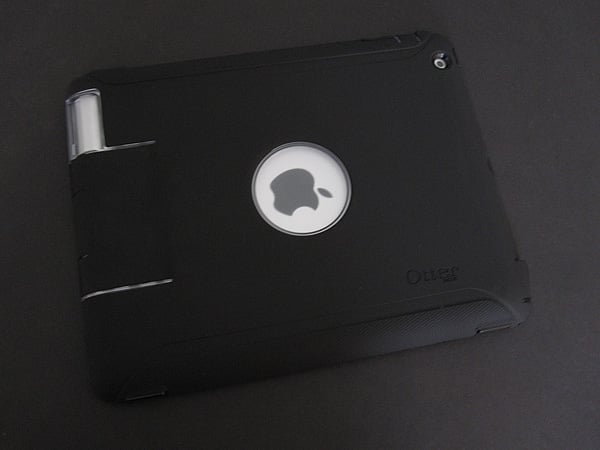
OtterBox has earned a reputation over the years for making some of the most protective cases around, and the company’s new Defender Series Case ($90) for iPad 2 isn’t a huge surprise given the company’s most recent several releases for Apple devices. Like the prior version for the original iPad, it’s not watertight, unlike the company’s highest-end designs for other devices. But it’s still one of the more protective cases available for this tablet — at least for the back and sides — though it’s also very bulky. It is composed of three layers: a two-piece hard plastic case that fits directly over the iPad 2, a silicone sheath to cover that, and a black plastic lid that doubles as a stand.

The base is made out of two different plastics. Covering most of the back is a slightly-clouded clear material, while the piece covering the front is black and glossy. The iPad 2 first fits into the front frame, which covers about half the width of the bezel on the left and right sides of the screen, leaving just a slim strip on the top and bottom. This frame juts out from the bottom over the Home button, leaving a circular opening. Along the top edge there are openings for the headphone port, microphone, and Sleep/Wake button; there is also an opening for the rear camera.

Next, the clear plastic section snaps into the black piece and covers most of the remainder of the back; four foam pads help protect the rear of the tablet from scratches. Getting the halves to latch together is not difficult, but in our testing did require pressing around the perimeter a few times to ensure that everything had snapped into place. This piece leaves separate openings for the side switch and volume rocker, as well as one for the mic and a large 2” by 3.25” rectangular opening that’s centered around the Dock Connector port. Additionally, a raised shield protects the top portion of the speaker.


Once the plastic shell has been assembled, the silicone component fits around it. Just as with the two plastic halves, it isn’t hard to get the soft piece to stay in place, but it does require two or three push-runs around the edge to get everything to work together properly. The silicone is held by plastic clips that extend to the outside, as well as a ridge on the entire outer edge of the plastic. With this final mandatory piece in place, all of the iPad 2’s rear and side inputs and outputs are covered except for the microphone, rear camera, and speaker.

The Sleep/Wake button, volume rocker, and Home button are all completely protected by the silicone.
While the first two maintain almost full tactility, the feeling from the Home button is reduced to the point that it is hard to tell if a successful press has been made, which is especially noticeable when attempting to double-click to activate quick app switching. Fold over flaps cover both the headphone port and the side switch. They stay in place rather well, and the switch is not so far recessed that it is difficult to use. To protect the overly exposed area around the Dock Connector port, there’s a flap within a flap. The smaller of the two lets you expose just the port, while the larger is reinforced with black plastic and opens up the surrounding metal. It seems like a strange design decision, though, since docking is still not possible with most accessories—for example, Defender Series still doesn’t work with the iPad 2 Dock.


Last is the optional plastic lid. A large plastic rectangle, it has rubber feet at its corners and clips on both sides. It can attach to the back or front; the former makes the case much too thick, while the latter is the only sort of screen protection offered by Defender Series—there’s no clear screen film or clear plastic layer, a major bummer for users who expected a simple way to protect the iPad 2’s glass display.











