
iLoungeiLounge
  • News
    • Apple
      • AirPods Pro
      • AirPlay
      • Apps
        • Apple Music
      • iCloud
      • iTunes
      • HealthKit
      • HomeKit
      • HomePod
      • iOS 13
      • Apple Pay
      • Apple TV
      • Siri
    • Rumors
    • Humor
    • Technology
      • CES
    • Daily Deals
    • Articles
    • Web Stories
  • iPhone
    • iPhone Accessories
  • iPad
  • iPod
    • iPod Accessories
  • Apple Watch
    • Apple Watch Accessories
  • Mac
    • MacBook Air
    • MacBook Pro
  • Reviews
    • App Reviews
  • How-to
    • Ask iLounge
Font ResizerAa
iLoungeiLounge
Font ResizerAa
Search
  • News
    • Apple
    • Rumors
    • Humor
    • Technology
    • Daily Deals
    • Articles
    • Web Stories
  • iPhone
    • iPhone Accessories
  • iPad
  • iPod
    • iPod Accessories
  • Apple Watch
    • Apple Watch Accessories
  • Mac
    • MacBook Air
    • MacBook Pro
  • Reviews
    • App Reviews
  • How-to
    • Ask iLounge
Follow US

Reviews

Reviews

Review: Oregon Scientific Weather@Home Bluetooth-Enabled Weather Station

Last updated: May 16, 2021 7:56 pm UTC
By Nick Guy
Review: Oregon Scientific Weather@Home Bluetooth-Enabled Weather Station

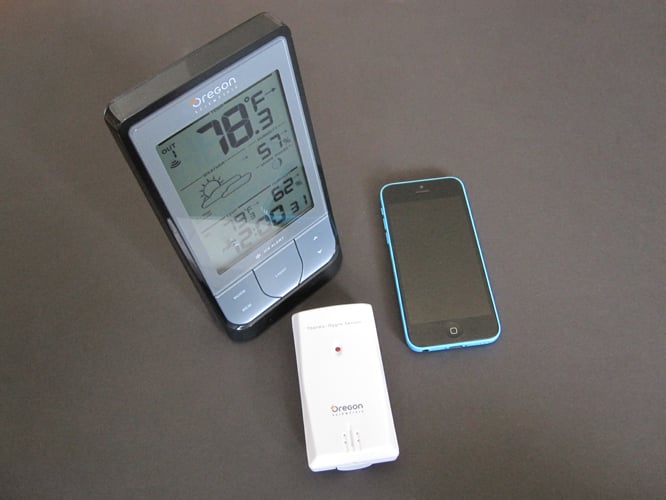
Much like its Grill-Right Bluetooth BBQ Thermometer, Oregon Scientific’s Weather@Home Bluetooth-Enabled Weather Station ($60) can be used on its own, or it can be wirelessly paired with an iPad, iPhone, or iPod touch. There are two components to the system: the main weather station, with an integrated display, plus a satellite temperature sensor for outdoor use. This package actually has the same list price as a comparable station from the same company without iPhone connectivity — a version that’s very popular and highly-rated on Amazon.

Review: Oregon Scientific Weather@Home Bluetooth-Enabled Weather Station

The largest part of the system, and the heart of it all, is referred to as the main unit. Made primarily of black plastic, it’s a tall, reclined shape that measures 7” in height, just over 2” deep, and about 3.75” wide. On its face is a green 5” screen with black text and icons. That’s located above a set of physical buttons: mode, memory, light, and up and down. This main unit is powered by three AA batteries, which are included in the package.


Inside the battery compartment, you’ll also find switches for alternating between Celsius and Fahrenheit, as well as resetting the system.


Review: Oregon Scientific Weather@Home Bluetooth-Enabled Weather Station

Much smaller and less complex is the outdoor thermo-hygro sensor. White instead of black, it’s a 3.75” by 2” by 1” rectangle, without any sort of display. It’s capable of capturing both temperature and humidity information, and can be mounted on a wall. Oregon Scientific recommends putting it under an overhang so it’s protected from sunlight and rain. This piece also runs on an included battery, and up to four additional units can be purchased separately to be placed in different locations.


Review: Oregon Scientific Weather@Home Bluetooth-Enabled Weather Station

Review: Oregon Scientific Weather@Home Bluetooth-Enabled Weather Station

On its screen, the main unit compiles information from both sensors. From the top down, it shows the outdoor temperature, humidity, moon phase, weather conditions for the next 12 hours represented as a picture, and then the indoor temperature and humidity, above the current time. Trends are also displayed using simple arrows next to the figures.

Pressing the memory button will allow you to toggle through highs and lows, while the up and down buttons will move you through the different outdoor sensors. There’s also a dedicated display for ice alerts.


Review: Oregon Scientific Weather@Home Bluetooth-Enabled Weather Station

Review: Oregon Scientific Weather@Home Bluetooth-Enabled Weather Station

Using Bluetooth 4.0, compatible iPads, iPhones, and iPod touches can pair with the main unit through a relatively simple process. Once they’re connected, temperature, humidity, and barometric pressure data is beamed to your device. You can see the information from each sensor neatly displayed on a well-designed home screen. Tapping on any of them allows you to see a graph of the information over the past day, although loading up the history can take about half a minute. There are also options for rainfall, wind speed, and altitude, but without the proper sensors connected, tapping them does nothing.


Review: Oregon Scientific Weather@Home Bluetooth-Enabled Weather Station

Review: Oregon Scientific Weather@Home Bluetooth-Enabled Weather Station

Of course, the downside to Bluetooth in this application is its limited range.


Latest News
The Apple Watch Series 11 46mm GPS Is $100 Off
1 Min Read
Clamshell Style iPhone Being Looked Into By Apple
1 Min Read
Foldable iPhones May Have the Largest Battery Ever
1 Min Read
Apple and TSMC’s 10-Year Collaboration May Be Ending
1 Min Read
The 13-inch M5 iPad Pro 256GB Wi-Fi Is $149 Off
1 Min Read
M5 Pro and M5 Max Chips for the MacBook Pro could Roll Out with macOS 26.3
1 Min Read
Mac Ordering Process Revamped
1 Min Read
Check Signed By Steve Wozniak and Steve Jobs Sold For $2.4 Million
1 Min Read
The Anker 140W 4-Port GaN USB-C Charger is $35 Off
1 Min Read
No iPhone Air 2 This Year, according to Latest Report
1 Min Read
New Report Corroborates Split iPhone Release Dates
1 Min Read
Apple Losing More Researchers As They Plan To Release 2 Siri Versions
1 Min Read

iLounge logo

iLounge is an independent resource for all things iPod, iPhone, iPad, and beyond. iPod, iPhone, iPad, iTunes, Apple TV, and the Apple logo are trademarks of Apple Inc.

This website is not affiliated with Apple Inc.
iLounge © 2001 - 2025. All Rights Reserved.
  • Contact Us
  • Submit News
  • About Us
  • Forums
  • Privacy Policy
  • Terms Of Use
Welcome Back!

Sign in to your account

Lost your password?










