
iLoungeiLounge
  • News
    • Apple
      • AirPods Pro
      • AirPlay
      • Apps
        • Apple Music
      • iCloud
      • iTunes
      • HealthKit
      • HomeKit
      • HomePod
      • iOS 13
      • Apple Pay
      • Apple TV
      • Siri
    • Rumors
    • Humor
    • Technology
      • CES
    • Daily Deals
    • Articles
    • Web Stories
  • iPhone
    • iPhone Accessories
  • iPad
  • iPod
    • iPod Accessories
  • Apple Watch
    • Apple Watch Accessories
  • Mac
    • MacBook Air
    • MacBook Pro
  • Reviews
    • App Reviews
  • How-to
    • Ask iLounge
Font ResizerAa
iLoungeiLounge
Font ResizerAa
Search
  • News
    • Apple
    • Rumors
    • Humor
    • Technology
    • Daily Deals
    • Articles
    • Web Stories
  • iPhone
    • iPhone Accessories
  • iPad
  • iPod
    • iPod Accessories
  • Apple Watch
    • Apple Watch Accessories
  • Mac
    • MacBook Air
    • MacBook Pro
  • Reviews
    • App Reviews
  • How-to
    • Ask iLounge
Follow US

Reviews

Reviews

Review: Nyko Stereo Link Cable and FireWire Adaptor

Last updated: May 16, 2021 9:00 am UTC
By Jeremy Horwitz
Review: Nyko Stereo Link Cable and FireWire Adaptor

Pros: The easiest and least expensive way yet to connect your iPod to a stereo system with top-quality audio.


Cons: Can’t use with Apple’s Dock; a passive mounting solution may be required. Can’t charge and use cable at same time, either.
Review: Nyko Stereo Link Cable and FireWire Adaptor

When video game accessory manufacturer Nyko announced in January that it would enter the iPod accessories market with a huge collection of new products, we weren’t sure what to expect. iPod-ambitious vendors of PDA (and other types of) accessories have been hit and miss on innovation, relying a lot on “easy” ideas that look and feel like items already out there. Nyko, however, hit the ground running with a wide variety of interesting new products, and we’re beginning to showcase them here today — starting with the mundane.


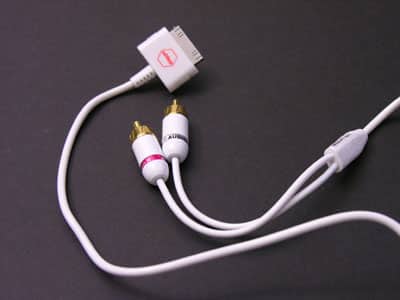
The company’s Stereo Link cable ($24.99, available for $9.99 and up) is a simple but pretty smart idea: why not create a Dock Connector cable that goes straight to stereo RCA left and right plugs? The theory behind this cable is one that serious audio lovers will generally appreciate: instead of buying a headphone jack-to-RCA cable and connecting it to the iPod’s headphone jack, you plug this cable in and pull better sound from the iPod’s Dock Connector port.

While this could have been accomplished with the right SendStation PocketDock ($30) or Apple’s own Dock and the aforementioned cable (together, $50), Nyko’s solution achieves the same result for a lower price.


An attractive, six-foot long white cable uses what appears to be an authorized and slender Apple Dock Connector at one end, and two gold-plated RCA plugs at the other. Nyko’s logo is on one side of the Dock Connector; an iPod “this side up” icon appears on the top, both in red, matching the company’s attractive packaging.

pic

pic

When we connected the cable to our iPods and speakers, it worked perfectly, delivering rich, clear sound from the iPod’s bottom port. The only limitation we found, however, is one that some people won’t like: the Stereo Link doesn’t work when connected to Apple’s Docks.


We tested with both the iPod mini and photo Docks, and no signal came out. Consequently, if you want to both mount your iPod and use the Stereo Link, you’ll need to use a passive mounting solution such as Thought Out’s iPed. And if you want to charge your iPod while using the Stereo Link, you’re out of luck.

That’s why we say that it’s pretty smart – though it’s highly useful for as long as your battery will run, a charge-friendly solution would have been smarter. It’s hard to complain about the Stereo Link given the price, but users of older iPods with less battery life may want to consider an Apple Dock or a PocketDock for extended stereo usage.

pic

pic

We also checked out Nyko’s FireWire Adaptor ($19.99, available for $5.99 and up), which is a clear and white plastic improvement on Apple’s one-time iPod pack in: a six-pin-to-four-pin adaptor that lets PC laptop owners connect the iPod’s FireWire cable to their machines.



Latest News
The 14-inch MacBook Pro with M5 Chip 16GB RAM/512GB is $250 Off
1 Min Read
Noise and Static on AirPods Pro 3 Still Unfixed
1 Min Read
New iMac with 24-inch OLED Display May be Brighter With 600 Nits
1 Min Read
The 15-inch M4 MacBook Air 256GB Is $250 Off
1 Min Read
Internal Kernel Debug Kit from Apple Reveals Tests for a MacBook with A15 Chip
1 Min Read
Apple Currently In Talks With Suppliers for Chip Assembly & Packaging of iPhones in India
1 Min Read
Apple Allows Easier Battery Replacement For M5 MacBook Pro with 14-inch Display
1 Min Read
The Apple Watch SE 3 44mm GPS is $50 Off
1 Min Read
20th Anniversary iPhone May Launch in Two Years
1 Min Read
Better Image Generation Capabilities and Apple Music Integration Coming to ChatGPT
1 Min Read
A20 Pro Chip Coming to Next Gen iPad Mini OLED
1 Min Read
Amazon has the AirTag 4 Pack Marked $29 off
1 Min Read

iLounge logo

iLounge is an independent resource for all things iPod, iPhone, iPad, and beyond. iPod, iPhone, iPad, iTunes, Apple TV, and the Apple logo are trademarks of Apple Inc.

This website is not affiliated with Apple Inc.
iLounge © 2001 - 2025. All Rights Reserved.
  • Contact Us
  • Submit News
  • About Us
  • Forums
  • Privacy Policy
  • Terms Of Use
Welcome Back!

Sign in to your account

Lost your password?








