
Pros: An attractive way to move track, volume, and play/pause buttons to a location easier for sleeve- or pocket-carrying iPodders to access. Reasonably priced, too.
Cons: Functionally equivalent to Apple’s own Remote control, absent Apple’s extended cable, but can’t be used anywhere other than on the iPod’s top.
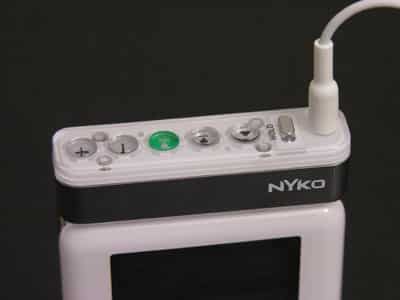
Does Nyko’s iTop Button Relocator ($29.99) merit its own category of accessories? Or is it something familiar, distinctively repackaged? Depending on your perspective, it’s one or the other – we tend to think the latter.
Some people carry their iPods in ways that prevent full-time access to the iPod’s front panel. They may have acquired sheathe-like sleeves that entirely cover the iPod’s screen and controls, or they might just be tossing their iPods into jacket or pants pockets. In both of these situations and others, the iPod’s top is its only visible surface, but you can’t do anything with it save plug in headphones and flip the Hold switch back and forth.
iTop changes that. Though it’s called a Button Relocator, it actually duplicates the key functions of the iPod’s front Click Wheel controls, giving you volume up and down, play/pause, and track forward and backward buttons, along with a standard headphone port and hold switch.
Each of the button sets uses a unique texture so that you can know what they are without looking: the track forward and backward buttons are concave, the volume up and down are convex, and the play/pause button is given an elevated dot. Play/pause is also colored green, unlike the otherwise silverish buttons, just in case you want to find the key button at a quick glance.

Like the bottom four-fifths of the iTop’s body, the Hold switch is chromed, matching the rear casings of full-sized iPods, and the top surface is mostly thick clear acrylic with just enough white to mimic larger iPods’ front bodies. Nyko’s logo appears in white on iTop’s front face. A groove in its bottom is cut to accommodate the original Hold switch positions of full-sized iPods, and both a headphone plug and extended four-pin connector are used to connect to the iPod. Consequently, iTop locks firmly into place on an iPod’s top surface – even an iPod mini’s – and doesn’t twist or shake unless you pull it out.

Its only modest design oddity is a consequence of the different tops of different iPods.
It fits best on current-generation 20GB iPods, but leaves some space on the top of thicker iPods such as 30, 40, and 60GB iPod photos. Like many other top-mounting iPod accessories, it dangles far off the edge of iPod minis, and doesn’t look to have been designed with them in mind.
In our testing, the new buttons, Hold switch, and headphone port all worked exactly as one would expect. Numerous iPod remote controls have had to change the iPod hardware’s gradual sliding scale of volume levels into something that can be moved through with button presses, and the iTop steps through the scale in small but quick hops, and lets holding down the button act as a reasonably-paced repeat of the increase or decrease command. Similarly, moving from track to track requires individual button presses, but holding down either track button skips through the current song like a fast-forward button.

At a $29.99 suggested retail price (and potentially lower actual price), iTop isn’t going to break anyone’s bank account. It compares favorably with the cost of Apple’s official iPod remote, which at $39.00 does pretty much the exact same things as iTop, but extends the iPod’s cabling quite a bit.











