
iLoungeiLounge
  • News
    • Apple
      • AirPods Pro
      • AirPlay
      • Apps
        • Apple Music
      • iCloud
      • iTunes
      • HealthKit
      • HomeKit
      • HomePod
      • iOS 13
      • Apple Pay
      • Apple TV
      • Siri
    • Rumors
    • Humor
    • Technology
      • CES
    • Daily Deals
    • Articles
    • Web Stories
  • iPhone
    • iPhone Accessories
  • iPad
  • iPod
    • iPod Accessories
  • Apple Watch
    • Apple Watch Accessories
  • Mac
    • MacBook Air
    • MacBook Pro
  • Reviews
    • App Reviews
  • How-to
    • Ask iLounge
Font ResizerAa
iLoungeiLounge
Font ResizerAa
Search
  • News
    • Apple
    • Rumors
    • Humor
    • Technology
    • Daily Deals
    • Articles
    • Web Stories
  • iPhone
    • iPhone Accessories
  • iPad
  • iPod
    • iPod Accessories
  • Apple Watch
    • Apple Watch Accessories
  • Mac
    • MacBook Air
    • MacBook Pro
  • Reviews
    • App Reviews
  • How-to
    • Ask iLounge
Follow US

Reviews

Reviews

Review: Nimblstand Nimblstand for iPad

Last updated: May 16, 2021 7:57 pm UTC
By Nick Guy
Review: Nimblstand Nimblstand for iPad

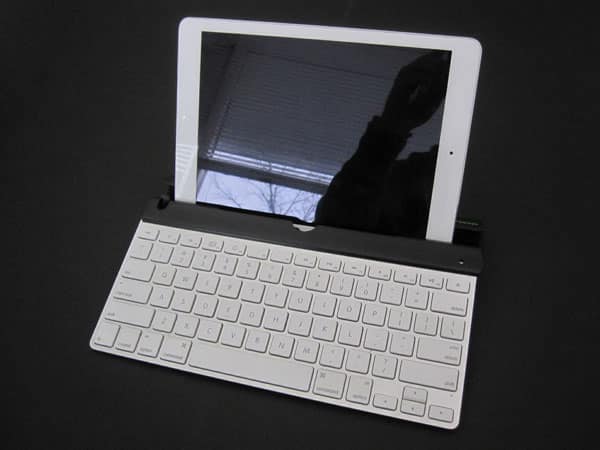
Apple’s Wireless Keyboard is still one of the best typing surfaces available for iPads, although there are only a handful of third-party accessories for it. Nimblstand ($40), from the company of the same name, is the latest addition to the group. The all-plastic accessory is a stand solution for any iPad, with some case compatability, allowing for a few different positions based on how you need to use the tablet. It’s also available in a package with Wacom’s Bamboo Stylus, for a $17 premium.

Review: Nimblstand Nimblstand for iPad

Nimblstand’s construction and design is all based on sliding. It splits apart into two pieces: a 2.75” deep and 11” long core, plus an extension wedge that adds just under 3.5”.

The first piece has rubber rails at the front and back, helping to keep the stand in place. At one end, there’s a circular barrel, designed to hold the keyboard when inserted from one end and slid through until it’s fully in place. Behind it, there’s a a gap for the iPad, with a ridge holding it at about 55° when facing the keyboard, or between 25° and 40° degrees, depending on the thickness of your tablet, when turned the other way. The extension wedge can slide onto either the front or back, depending on in which position you’re using the iPad.


Review: Nimblstand Nimblstand for iPad

Review: Nimblstand Nimblstand for iPad

The first position, with the wedge tucked into the back, is made for typing; the wedge keeps the stand stable. In this arrangement, the iPad can be positioned in landscape or portrait orientation.

Flip it around with the wedge underneath the keyboard, and it transforms into a more reclined mode that’s shown as being used for drawing and similar tasks. A circular cutout serves as a stylus holder.


Review: Nimblstand Nimblstand for iPad

Nimblstand does what it does well enough, but the big question is, are there any situations in which it’s an optimal solution? Attaching the keyboard to the stand isn’t really necessary, although it may be useful on your lap, on the go. Otherwise, positioning it freely on any flat surface is just as good. Compare Nimblstand to Cooler Master’s JAS mini or other great stands and the value becomes questionable.



Latest News
The Apple Watch Series 11 46mm GPS Is $100 Off
1 Min Read
Clamshell Style iPhone Being Looked Into By Apple
1 Min Read
Foldable iPhones May Have the Largest Battery Ever
1 Min Read
Apple and TSMC’s 10-Year Collaboration May Be Ending
1 Min Read
The 13-inch M5 iPad Pro 256GB Wi-Fi Is $149 Off
1 Min Read
M5 Pro and M5 Max Chips for the MacBook Pro could Roll Out with macOS 26.3
1 Min Read
Mac Ordering Process Revamped
1 Min Read
Check Signed By Steve Wozniak and Steve Jobs Sold For $2.4 Million
1 Min Read
The Anker 140W 4-Port GaN USB-C Charger is $35 Off
1 Min Read
No iPhone Air 2 This Year, according to Latest Report
1 Min Read
New Report Corroborates Split iPhone Release Dates
1 Min Read
Apple Losing More Researchers As They Plan To Release 2 Siri Versions
1 Min Read

iLounge logo

iLounge is an independent resource for all things iPod, iPhone, iPad, and beyond. iPod, iPhone, iPad, iTunes, Apple TV, and the Apple logo are trademarks of Apple Inc.

This website is not affiliated with Apple Inc.
iLounge © 2001 - 2025. All Rights Reserved.
  • Contact Us
  • Submit News
  • About Us
  • Forums
  • Privacy Policy
  • Terms Of Use
Welcome Back!

Sign in to your account

Lost your password?








