
Much like Jawbone UP before it, Nike’s Nike+ FuelBand ($150) is one of a handful of big-name wearable athletic accessories on the market right now, and it’s designed to sync with your iPhone or iPod touch. Worn on a wrist, the band tracks physical activity including steps, calories burned, and a number that Nike calls Fuel — “a universal metric of activity” — then synchronizes data to your iOS device. Its integrated digital display conveniently allows FuelBand to act as a watch as well, a huge advantage over faceless competitors. The soft touch rubber-coated bracelet comes in a handful of color options, and in small, medium/large, or extra-large sizes; each includes an extra link, an installation tool, and a USB recharging cradle.
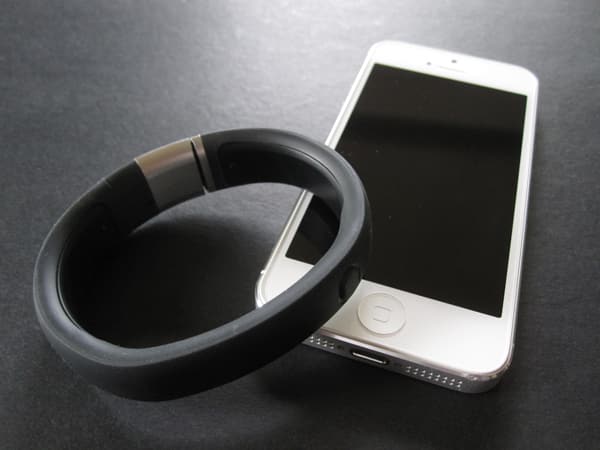
In terms of design, FuelBand is a stunner—a single continuous loop with semi-flexible electronic components covered by rubber, a material that’s comfortable enough to wear all day. A roughly 0.7” metal piece on one end serves as a simple clasp mechanism: press the small button and the bracelet opens, exposing a connector that turns out to be a half-height USB plug. This keeps the band splashproof, so you can wear it in the shower, but Nike says you shouldn’t go swimming with it.

The plug can connect directly into a computer’s USB port—a connection that we noted wasn’t always reliable—or into the included USB charging cable, which worked without issues during our testing. According to Nike, you’ll have to charge FuelBand every one to four days, which in our experience was closest to two days. For those who don’t want to have to worry about charging their watches on a regular basis, this may be a big issue—one of our editors sees it as a fatal flaw in the product—but users who are comfortable plugging FuelBand in at the end of the night alongside their iPhones won’t see it as a big problem.

FuelBand’s only integrated control system is a single button.
Pressing it once illuminates the hidden display, showing the category you were last looking at: Fuel, Calories, Steps, or Time. Pressing it again will allow you to toggle through the display options. On the opaque black version of FuelBand, the glowing display fades away into invisibility after a few seconds, a truly cool effect: simple thanks to its use of large text represented with simply-colored dots, but not lacking in style or pertinent information. Its only other display feature is a simple line, which starts from red on the right and changes to green as it goes across to the left, running underneath the main display. This line offers a quick way to track your progress toward reaching your self-set Fuel goal throughout the day. It’s worth noting that translucent white or black versions of FuelBand are also offered, neither hiding the display elements, which glow even more brightly through the watch’s surface—a possible issue for people who want to check the time in movie theaters or other dark rooms.

Instead of a traditional pedometer, FuelBand uses a three-axis gyroscope system to measure your physical activity. This is how it tracks steps and Fuel. Fuel is an amorphous measure of all your activity during the day, and although it doesn’t directly correlate to any real world figure, it lets users roughly understand how much they’ve moved around.
Conceptually, FuelBand’s main purpose is to help you track your Fuel score: it’ll alert you when you’ve reached your preferred milestone, with a celebratory message of “Goal” across the display, although the lack of a vibration motor means that you may miss it.

FuelBand can communicate with your iPhone or iPod touch wirelessly over Bluetooth, as well as your computer when it’s physically connected using USB. On your mobile device, syncing is simple: once the app is launched, you just hold down FuelBand’s button for a few seconds, and it’ll automatically pair up, transferring over all the relevant information. The main page of the FuelBand app mainly focuses on your Fuel score, but also shows calories, steps, and your daily average. Switching over to the activity tab displays a graph of your performance over the day, week, month, and year. There’s also a social feature that allows you to share your progress with your friends. All in all, it’s a cleanly-executed app without much bloat, and with Nike’s typically pleasant modern UI touches.

Once again, we certainly want to commend Nike’s designers: FuelBand is such an elegant, beautiful product that some users might consider buying it solely for the watch functionality. All that undermines its value there is the two-day battery life: our editors vigorously disagreed as to whether or not individuals would be willing to charge a watch nightly, or even every few days.











