
iLoungeiLounge
  • News
    • Apple
      • AirPods Pro
      • AirPlay
      • Apps
        • Apple Music
      • iCloud
      • iTunes
      • HealthKit
      • HomeKit
      • HomePod
      • iOS 13
      • Apple Pay
      • Apple TV
      • Siri
    • Rumors
    • Humor
    • Technology
      • CES
    • Daily Deals
    • Articles
    • Web Stories
  • iPhone
    • iPhone Accessories
  • iPad
  • iPod
    • iPod Accessories
  • Apple Watch
    • Apple Watch Accessories
  • Mac
    • MacBook Air
    • MacBook Pro
  • Reviews
    • App Reviews
  • How-to
    • Ask iLounge
Font ResizerAa
iLoungeiLounge
Font ResizerAa
Search
  • News
    • Apple
    • Rumors
    • Humor
    • Technology
    • Daily Deals
    • Articles
    • Web Stories
  • iPhone
    • iPhone Accessories
  • iPad
  • iPod
    • iPod Accessories
  • Apple Watch
    • Apple Watch Accessories
  • Mac
    • MacBook Air
    • MacBook Pro
  • Reviews
    • App Reviews
  • How-to
    • Ask iLounge
Follow US

Reviews

Reviews

Review: Newsstand by omz:software

Last updated: May 13, 2021 6:56 am UTC
By Charles Starrett
Review: Newsstand by omz:software

This review originally appeared within iLounge’s iOS Gems series within the compilation article, iPhone Gems: Every RSS Reader, Reviewed. Additional details may be found in the original article.


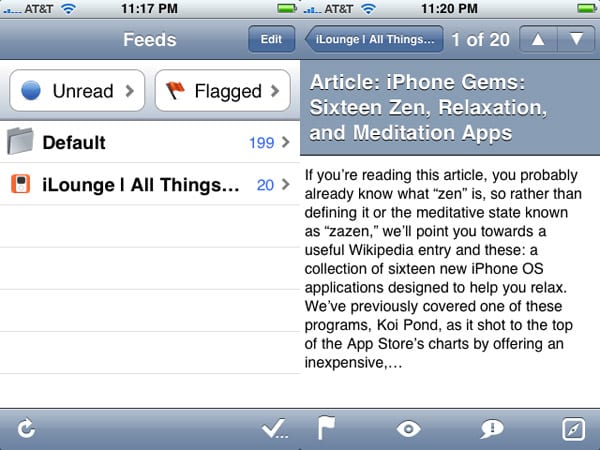
Possessing dual interfaces and a wealth of features, Newsstand ($5) is certainly the most interesting of all the currently available RSS readers for the iPhone. In vertical orientation (more on that later), the app opens to the feeds view, which offers an edit button for removal or addition of feeds, buttons for access to all unread and flagged items, and a list of feeds, along with buttons for refreshing all feeds or marking all items as read.
Review: Newsstand by omz:software

The add feed menu sports a bottom-tabbed interface, with options for searching Bloglines for new feeds, importing feeds from a Bloglines account or an OPML file, adding a folder for feed management, or adding a feed by URL, complete with feed auto-discovery.


Tapping a feed in the main feeds view presents a list of all items in the feed both read and unread, each with the title, date, and three lines of summary, and refresh and mark all as read buttons at the bottom. The individual item view presents the title below the navigation bar, the summary below that, and a bottom bar with a button to flag the item, and eye button for choosing between six different view styles, a talk bubble button for sharing the item via email or posting to del.icio.us, and a compass button to open the item in the built-in browser, from which the user can choose to open the item in Safari.


Review: Newsstand by omz:software

Turn the iPhone or iPod touch on its side, however, and Newsstand becomes a totally different animal. Landscape mode, as it’s called, presents each subscribed feed as a magazine or paper on a shelf, complete with the feed title and most recent items on the “cover.” Users navigate through feeds like they would in the iPod app’s CoverFlow mode, swiping across to move through the options.

Double-tapping on a feed opens it like one would a magazine, with two pages presented: entry titles on the left-hand side, and the selected entry summary on the right. It’s a great example of the kind of innovation we like to see from iPhone developers: well designed, unique, and novel new interface solutions for common applications. It’s this kind of innovation that will help propel the iPhone OS forward as a platform; an example of an experience that can’t be found on similar, competing devices.


Review: Newsstand by omz:software

What it lacks in features, such as two-way syncing and offline browsing, Newsstand makes up for with a wealth of import options, a highly-usable traditional interface, and a must-see alternate Landscape mode, the last of which could have easily been sold as a separate application.



Latest News
The Apple Watch Series 11 42mm GPS is $100 Off
1 Min Read
Apple Launching A New Education Hub In India Teaching Robotics and Swift Programming
1 Min Read
Women’s and Men’s Golf Added to Apple Sports
1 Min Read
Apple Adding Civilization VII and Other Games To Apple Arcade
1 Min Read
AirPods 4 ANC Is $59 Off
1 Min Read
Apple Using 2NM Process For Their M6 and A20 Chip
1 Min Read
iPhone 18 Models Will Not Have a Big Redesign
1 Min Read
Launch of MacBook Pro M5 Pro and M5 Max Models is Approaching
1 Min Read
Get the iPad Mini 7 256GB Wi-Fi at $99 Off
1 Min Read
Mozilla Now Allows Turning AI Features Off
1 Min Read
Barcelona Passeig de Gràcia Apple Store Temporarily Closing
1 Min Read
Apple’s Plans to Enter the Smart Glasses Market is Changing the Industry
1 Min Read

iLounge logo

iLounge is an independent resource for all things iPod, iPhone, iPad, and beyond. iPod, iPhone, iPad, iTunes, Apple TV, and the Apple logo are trademarks of Apple Inc.

This website is not affiliated with Apple Inc.
iLounge © 2001 - 2025. All Rights Reserved.
  • Contact Us
  • Submit News
  • About Us
  • Forums
  • Privacy Policy
  • Terms Of Use
Welcome Back!

Sign in to your account

Lost your password?








