
In March, we reviewed the first two universal remote control accessories released for the iPhone and iPod touch — New Potato’s $80 FLPR and PowerA’s $60 Universal Remote Case for iPhone 3G/3GS. Our conclusions were straightforward: neither of the companies had gotten the overall accessory, application, and pricing formula quite right, but each accessory had advantages that might endear it to certain users. Today, we take separate but overlapping looks at two more options, L5 Technology’s L5 Remote ($50), and NewKinetix’s Rē ($70, aka Re). Once again, these developers tackle the universal remote control question from somewhat different angles, though the results are a little better than last time.
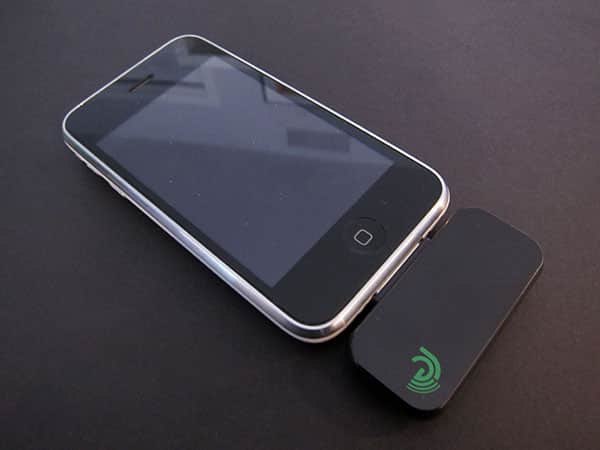
NewKinetix’s Rē is hard to easily categorize relative to all of the others we’ve reviewed. On positive notes, Rē sells for less than FLPR and is closer to it in execution than any other option. NewKinetix packages the half-glossy, half-matte black plastic dongle with a green and black neoprene sleeve that will be easier to spot and—if used correctly—a little harder to lose than the tinier FLPR and L5 Remote accessories. It also instantly goes to the App Store for a download of the free application, installs the app quickly, and includes “codes for most popular AV devices” so that you needn’t program every button for every remote on your own.
This is an obvious advantage over the L5 and PowerA remotes, and Rē is the lowest-priced iPod/iPhone accessory to include such a database.

Unfortunately, NewKinetix’s problems are all in execution. Putting aside the so-so design of the accessory, which is roughly the same thickness as the L5 Remote but taller and much wider, plus a prominent clear IR lamp on the bottom left corner, the real issues are in the application, which has a lot of work to do in the user experience department.

Rather than streamlining the application to automate the setup of individual remotes and multi-remote activities, NewKinetix essentially dumps you into a complex menuing system that you need to manually figure out. Someone obviously pointed out that navigating the menus was difficult, so it has placed equally confusing text on some of the pages. “You have not created any Device Remotes,” one says, so “To create a Device Remote, double tap ‘Rooms,’ then tap (>) on the selected Room and tap (>) on ‘Devices’.” Four taps and instructions to memorize? How about just taking the user directly into the setup process and making it easy on everyone?

The little UI issues continue to mount with every experience. An empty list requires you to read text and then hit an edit button to add the first item; selecting items from that list requires you to hit the (>) button rather than just the name of the device. On an iPhone, the Rē application makes the device vibrate every time you press a button—the use of what’s normally a silent alarm for ‘feedback’ makes you feel like you’re being punished for pressing things.
You can turn it off, but why anyone would want this on by default is beyond us. There are so many of these problems that using the simpler “dumb” L5 Remote app felt comparatively pleasant.

And that really shouldn’t be the case given how much power the Rē application has under the hood. You can set up rooms, devices for the rooms, and activities for those devices—a layer of extra personalization going beyond basic Harmony remotes, offset by the challenge of actually going through extra steps, pages, and tabs to manage everything. You can customize remotes with different button layouts and background art; remotes can be created as huge, scrollable monsters of buttons. And Rē does in fact know the remote codes for many different devices, even though it complicates their selection sometimes through the use of confusing number-based identifiers and categorizations—for instance, once you select “Apple,” you need to decide whether the Apple TV is an “audio accessory, docking system, media center, video accessory, or video media receiver,” even though all of Apple’s accessories use the same remote codes.

As of today, the choice between iPhone OS universal remotes isn’t as clear-cut as we’d like, nor is any option as likely to satisfy users as it should be. With PowerA’s design, you get a “dumb” app and a case-based accessory that only works with specific iPhone models; with L5 Remote, you pay $10 less and get a similarly “dumb” but better application that still requires lots of manual user programming, plus a more compatible accessory.











