
iLoungeiLounge
  • News
    • Apple
      • AirPods Pro
      • AirPlay
      • Apps
        • Apple Music
      • iCloud
      • iTunes
      • HealthKit
      • HomeKit
      • HomePod
      • iOS 13
      • Apple Pay
      • Apple TV
      • Siri
    • Rumors
    • Humor
    • Technology
      • CES
    • Daily Deals
    • Articles
    • Web Stories
  • iPhone
    • iPhone Accessories
  • iPad
  • iPod
    • iPod Accessories
  • Apple Watch
    • Apple Watch Accessories
  • Mac
    • MacBook Air
    • MacBook Pro
  • Reviews
    • App Reviews
  • How-to
    • Ask iLounge
Font ResizerAa
iLoungeiLounge
Font ResizerAa
Search
  • News
    • Apple
    • Rumors
    • Humor
    • Technology
    • Daily Deals
    • Articles
    • Web Stories
  • iPhone
    • iPhone Accessories
  • iPad
  • iPod
    • iPod Accessories
  • Apple Watch
    • Apple Watch Accessories
  • Mac
    • MacBook Air
    • MacBook Pro
  • Reviews
    • App Reviews
  • How-to
    • Ask iLounge
Follow US

Reviews

Reviews

Review: NetSketch by Gotow.net

Last updated: May 13, 2021 6:56 am UTC
By Charles Starrett
Review: NetSketch by Gotow.net

This review originally appeared within iLounge’s iOS Gems series within the compilation article, iPhone Gems: Every Drawing Application, Reviewed. Additional details may be found in the original article.


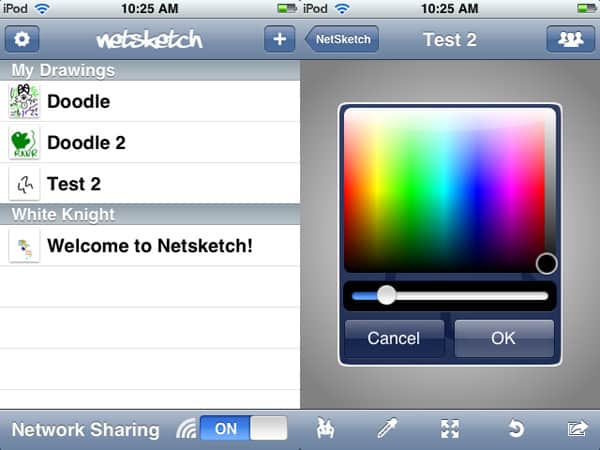
One of the most interesting drawing applications for the iPhone and iPod touch is NetSketch ($6), a competent application with a killer sharing feature. When the application opens, users are presented with a list of their drawings, each with a small thumbnail and the title listed.
Review: NetSketch by Gotow.net

A gears button allows users to delete, duplicate, or rename sketches, while an add button lets users create a new drawing by entering a title and selecting whether to share it with the just a certain group, all local users, or not share it at all.


Review: NetSketch by Gotow.net

Indeed, NetSketch’s sharing feature allows other iPhone and iPod touch units operating on the same wireless network to join in on the sketch, either by watching what the original user is doing, or by adding to it themselves. A button at the bottom of the drawing list turns the feature on and off, and shared sketches stored on connected devices show up in the list below the user’s own drawings. We could see this feature being extremely useful in situations such as brainstorming sessions, design consults, or just for fun; NetSketch is currently the only app to offer such a feature.


Review: NetSketch by Gotow.net

The drawing screen features a navigation bar at the top with buttons for returning to the drawing list and changing the sharing settings; a notification appears below this button whenever a user joins the drawing.

Buttons at the bottom allow the user to change the size and color of the brush, use an eyedropper to sample a color, automatically zoom in and out with pinch gestures, and undo, along with an action button for saving the drawing to the photo library, sending it in an email, or uploading it to NetSketch’s site for sharing online. With its unique wireless sharing and capable drawing features, NetSketch is a solid value at $6. As it is, it’s worthy of our strong general recommendation; added control over the brush texture, the ability to use a picture as a background, a lower price, and the ability to draw shapes would make it even better.



Latest News
The AirPods Pro 3 is $20 Off
1 Min Read
Exynos 2600 Chip 2nm Process Revealed by Samsung
1 Min Read
New Celebrity Ad Campaign Featuring Travis Scott Released by Beats
1 Min Read
Australia Getting Hypertension Notification Feature
1 Min Read
The 14-inch MacBook Pro with M5 Chip 16GB RAM/512GB is $250 Off
1 Min Read
Noise and Static on AirPods Pro 3 Still Unfixed
1 Min Read
New iMac with 24-inch OLED Display May be Brighter With 600 Nits
1 Min Read
The 15-inch M4 MacBook Air 256GB Is $250 Off
1 Min Read
Internal Kernel Debug Kit from Apple Reveals Tests for a MacBook with A15 Chip
1 Min Read
Apple Currently In Talks With Suppliers for Chip Assembly & Packaging of iPhones in India
1 Min Read
Apple Allows Easier Battery Replacement For M5 MacBook Pro with 14-inch Display
1 Min Read
The Apple Watch SE 3 44mm GPS is $50 Off
1 Min Read

iLounge logo

iLounge is an independent resource for all things iPod, iPhone, iPad, and beyond. iPod, iPhone, iPad, iTunes, Apple TV, and the Apple logo are trademarks of Apple Inc.

This website is not affiliated with Apple Inc.
iLounge © 2001 - 2025. All Rights Reserved.
  • Contact Us
  • Submit News
  • About Us
  • Forums
  • Privacy Policy
  • Terms Of Use
Welcome Back!

Sign in to your account

Lost your password?








