
iLoungeiLounge
  • News
    • Apple
      • AirPods Pro
      • AirPlay
      • Apps
        • Apple Music
      • iCloud
      • iTunes
      • HealthKit
      • HomeKit
      • HomePod
      • iOS 13
      • Apple Pay
      • Apple TV
      • Siri
    • Rumors
    • Humor
    • Technology
      • CES
    • Daily Deals
    • Articles
    • Web Stories
  • iPhone
    • iPhone Accessories
  • iPad
  • iPod
    • iPod Accessories
  • Apple Watch
    • Apple Watch Accessories
  • Mac
    • MacBook Air
    • MacBook Pro
  • Reviews
    • App Reviews
  • How-to
    • Ask iLounge
Font ResizerAa
iLoungeiLounge
Font ResizerAa
Search
  • News
    • Apple
    • Rumors
    • Humor
    • Technology
    • Daily Deals
    • Articles
    • Web Stories
  • iPhone
    • iPhone Accessories
  • iPad
  • iPod
    • iPod Accessories
  • Apple Watch
    • Apple Watch Accessories
  • Mac
    • MacBook Air
    • MacBook Pro
  • Reviews
    • App Reviews
  • How-to
    • Ask iLounge
Follow US

Reviews

Reviews

Review: Netatmo Rain Gauge

Last updated: May 16, 2021 3:18 pm UTC
By Jesse Hollington
Review: Netatmo Rain Gauge

We had pretty strong conflicting feelings when we first looked at Netatmo’s Urban Weather Station three years ago — on the one hand, the French developer has created an aesthetically impressive, intuitive, and easy-to-use weather monitoring solution that really “just works.” On the other hand, at $179, it was priced at a level that makes it a tough call for all but the serious weather enthusiast. Despite this, however, Netatmo has continued to expand the Urban Weather Station’s ecosystem with the addition of a Rain Gauge ($79), allowing users to measure and keep track of rainfall.

Review: Netatmo Rain Gauge

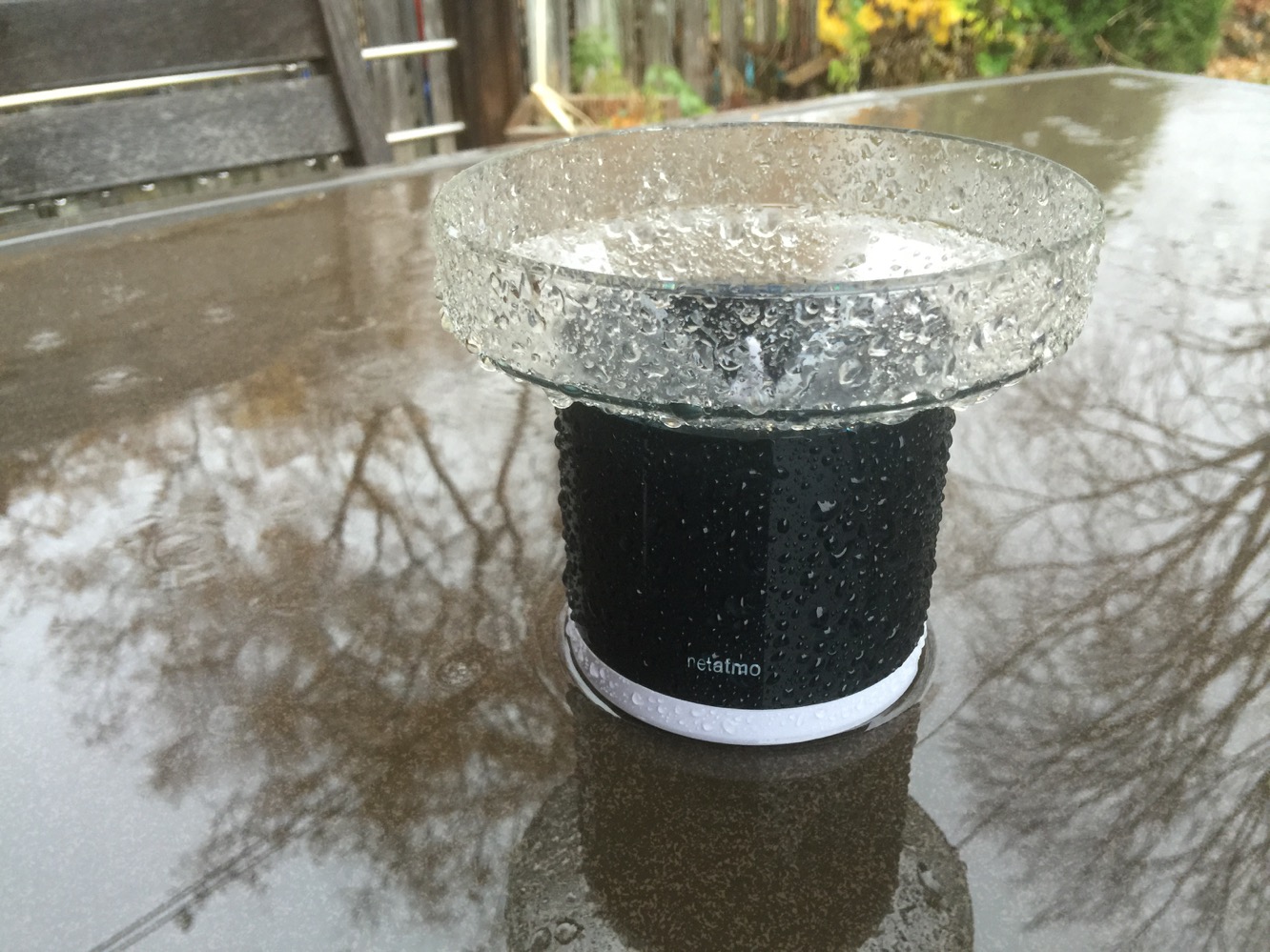
In the box you’ll find the Rain Gauge unit and two AA batteries to power it. You might be surprised to find out how little there seemingly is to the hardware — it’s basically a bucket that funnels rain into a central core where two tipping buckets are used to measure the amount of rainfall. Since the device is designed to work in the rain, however, the batteries and other electronics are enclosed in a waterproof seal, with a sturdy screw-down covering.


Review: Netatmo Rain Gauge

The Rain Gauge is an add-on for Netatmo’s Urban Weather Station, so you’ll need to have the base system already in place before adding the new unit. Adding a Rain Gauge to your system is about as simple as setting up the Netatmo in the first place, with the iOS app walking the user through the steps of pairing the additional unit with the main Netatmo base station.

As we noted in our review of the base system, the user experience is great, both in terms of the setup experience and then in daily use afterward. We’ve had a Netatmo system of one outdoor and three indoor stations in use over the past two years and it’s really something you don’t need to think about other than to change the batteries about once a year. The addition of the Rain Gauge continues that same approach — once it’s paired, you place it outside where it will collect rainfall and it just reports your rainfall without any further effort required on your part.


Review: Netatmo Rain Gauge

You can check your rainfall stats through the Netatmo app — the same one you use to check data from your Urban Weather Station — and in fact Netatmo has very recently released a major update to the app, providing a stunning new design. Rainfall data is reported privately to Netatmo’s cloud servers once every five minutes, along with your other weather data, whether the app is running or not, so it will continue to work in the background and keep everything up to date even if you only open the app once every couple of months.


In addition to the app, you can also check your weather data by logging into your Netatmo account from any web browser.

Review: Netatmo Rain Gauge

The app continues to be one of the most well-designed weather apps we’ve seen, and the Rain Gauge just adds another panel of data, providing rainfall stats for the current day alongside the forecast rainfall amount. Turning your iPhone sideways will display a series of graphs, and the addition of the Rain Gauge adds a bar graph representing rainfall over time. In addition. Netatmo includes a Today extension so you can see current data from the Rain Gauge, alongside your other stations, on your Today screen in Notification Center.



Latest News
The 14-inch MacBook Pro with M5 Chip 16GB RAM/512GB is $250 Off
1 Min Read
Noise and Static on AirPods Pro 3 Still Unfixed
1 Min Read
New iMac with 24-inch OLED Display May be Brighter With 600 Nits
1 Min Read
The 15-inch M4 MacBook Air 256GB Is $250 Off
1 Min Read
Internal Kernel Debug Kit from Apple Reveals Tests for a MacBook with A15 Chip
1 Min Read
Apple Currently In Talks With Suppliers for Chip Assembly & Packaging of iPhones in India
1 Min Read
Apple Allows Easier Battery Replacement For M5 MacBook Pro with 14-inch Display
1 Min Read
The Apple Watch SE 3 44mm GPS is $50 Off
1 Min Read
20th Anniversary iPhone May Launch in Two Years
1 Min Read
Better Image Generation Capabilities and Apple Music Integration Coming to ChatGPT
1 Min Read
A20 Pro Chip Coming to Next Gen iPad Mini OLED
1 Min Read
Amazon has the AirTag 4 Pack Marked $29 off
1 Min Read

iLounge logo

iLounge is an independent resource for all things iPod, iPhone, iPad, and beyond. iPod, iPhone, iPad, iTunes, Apple TV, and the Apple logo are trademarks of Apple Inc.

This website is not affiliated with Apple Inc.
iLounge © 2001 - 2025. All Rights Reserved.
  • Contact Us
  • Submit News
  • About Us
  • Forums
  • Privacy Policy
  • Terms Of Use
Welcome Back!

Sign in to your account

Lost your password?








