
Native Union’s new Moshi Moshi 03 ($130, aka MM03) is one of those “just makes sense” ideas — a completely wireless Bluetooth telephone that enables iPhone owners to answer phone calls even if their devices have been docked or just forgotten somewhere up to 30 feet out of reach. It’s attractively designed, not completely crazy in price, and comes with both an integrated rechargeable battery and a wall charger. In concept, it’s significantly better than Native Union’s earlier Moshi Moshi 02, which ran wires between the iPhone and the base, then the base and the handset. Yet in execution, Moshi Moshi 03 winds up falling short of its potential, and is considerable harder for us to recommend than we’d hoped.
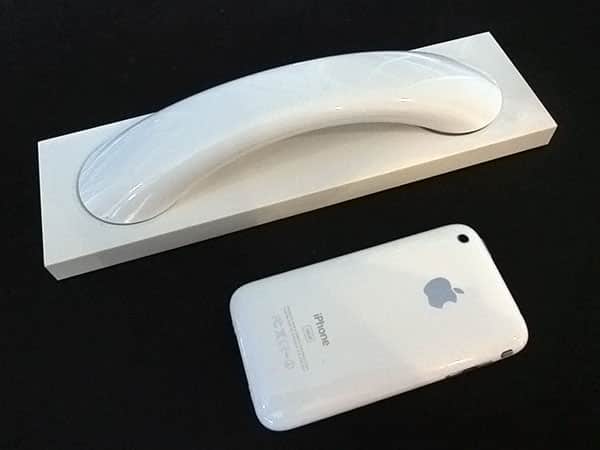
We really wanted to love Moshi Moshi 03. The design of this wireless telephone is pretty close to gorgeous, taking the boxy base and gently curved handset of MM02 and replacing their soft touch rubber with a glossy plastic finish, adding volume buttons to the handset alongside the call stop/start button, and cleanly implementing both charging pins and a color-matched wall charging cable. The roughly 9.7” by 2.8” base is perfectly weighted to feel substantial, and occupies just enough space to stand out on a professional user’s desktop. Some users may prefer the matte-styled finish of the MM02 to the polished MM03, but both phones are available in white or black color schemes, and they both look modern and attractive.

During 10 days of testing, the basics of MM03’s implementation offered very little to complain about.
It’s slightly inconvenient that it needs to be turned on again after automatically shutting off when the paired Bluetooth device leaves the area, but this is a fair compromise in the name of battery conservation—the same as with most Bluetooth wireless accessories. And on occasion, it’s easy to confuse the speaker and microphone sides of the handset, which are differentiated only by radiating arcs near the speaker and circles near the microphone, plus the presence of charging pins closer to the mic. The fact that the power cord connects to the base near the top speaker side rather than the bottom microphone and charging side adds to the modest confusion, but can be learned around. Power to the base is indicated with a white light on the top next to the power cable port; power for the phone with a flashing light dead center on the handset’s top, and an off-centered blue light underneath.

Controlling MM03 is simple, and to its credit enables users to tap the potential of the Voice Control features of the iPhone 3GS. The circular center button can be held down briefly to power the handset on or off, tapped to start or stop calls, and double-tapped to redial your prior caller. A tap of the plus button increases the volume, while holding it activates iPhone 3GS Voice Control, enabling you to dial contacts or numbers with this iPhone model—and presumably the upcoming iPhone 4—by just waiting for the beep, then speaking the contact name or a phone number. Finally, tapping the minus button decreases the volume, while holding it activates multi-phone pairing.
Holding the center button for an extended period of time on initial power-up activates normal single-phone pairing; pairing is indicated on the handset with alternating red and blue flashing lights, and achieved quickly on the iPhone with a tap of the “pair” button, reestablishing contact between the devices automatically after the MM03 is turned on.

The real problems began with the list of paired Bluetooth devices MM03 could work with. Initially, we thought that it was capable of being used with the iPhone, iPad, and Bluetooth-equipped versions of the iPod touch, but it’s not: as a monaural headset, it works solely with the iPhone—for now, at least, even iOS 4-equipped iPod touches can’t pair with MM03 for Skype, with iPads subject to the same limitation. In other words, it’s only a third as iOS-device compatible as MM02, which is a huge shame given how much more convenient it would be than attaching a headphone cable to the iPod touch and iPad for VoIP calling and other purposes. This leaves MM03 as a wireless handset solely for use with devices that are already, themselves, wireless handsets—and uniformly smaller, at that. It also doesn’t work for music streaming purposes, or for non-cellular, Skype phone calls with current model iPhones. Thus, the only reason to want MM03 is to replace the need to hold a cell phone with something more traditionally shaped, radiating only Bluetooth-frequency radio signals, and capable of using its own battery while the iPhone is docked or idling elsewhere.

Unfortunately, outgoing sound quality also turned out to be an issue with MM03: callers reported that it was a noticeable step down from the MM02, which was a little below the performance level of the iPhone’s integrated mic. In some of our tests, MM03 stripped out enough treble from our voices to leave outbound audio sounding bass-heavy; in others—with another Bluetooth device nearby but not paired with anything—the audio became noticeably fragmented and harsh-sounding.











