
iLoungeiLounge
  • News
    • Apple
      • AirPods Pro
      • AirPlay
      • Apps
        • Apple Music
      • iCloud
      • iTunes
      • HealthKit
      • HomeKit
      • HomePod
      • iOS 13
      • Apple Pay
      • Apple TV
      • Siri
    • Rumors
    • Humor
    • Technology
      • CES
    • Daily Deals
    • Articles
    • Web Stories
  • iPhone
    • iPhone Accessories
  • iPad
  • iPod
    • iPod Accessories
  • Apple Watch
    • Apple Watch Accessories
  • Mac
    • MacBook Air
    • MacBook Pro
  • Reviews
    • App Reviews
  • How-to
    • Ask iLounge
Font ResizerAa
iLoungeiLounge
Font ResizerAa
Search
  • News
    • Apple
    • Rumors
    • Humor
    • Technology
    • Daily Deals
    • Articles
    • Web Stories
  • iPhone
    • iPhone Accessories
  • iPad
  • iPod
    • iPod Accessories
  • Apple Watch
    • Apple Watch Accessories
  • Mac
    • MacBook Air
    • MacBook Pro
  • Reviews
    • App Reviews
  • How-to
    • Ask iLounge
Follow US

Reviews

Reviews

Review: Mophie Powerstand for iPad

Last updated: May 17, 2021 11:54 am UTC
By Nick Guy
Review: Mophie Powerstand for iPad

Mophie’s take on an iPad stand shouldn’t come as a surprise. The company is known for its charging accessories, so in addition to holding your tablet, Powerstand ($150) juices it up too. Made of metal and rubber, the collapsable holder is engineered to do more than most stands, but it comes at a much higher cost. The question comes down to this: is the integrated solution worth the price, or are iPad users better off with a less expensive solution and a Dock Connector cable?


Review: Mophie Powerstand for iPad

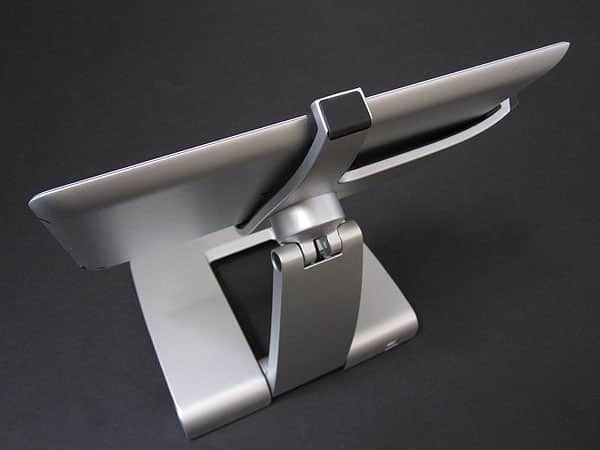
Powerstand arrives folded down, measuring about eight square inches. Despite its size and aluminum construction, it’s surprisingly light. Attached to the rear of the base is metal arm; lifting it up reveals the attached T-shaped iPad cradle.

Lined with rubber, there’s a Dock Connector plug at the bottom and wings to secure the sides of the iPad; Mophie includes a pair of replacement grips in case the ones that come attached wear out. It’s quite easy to insert and remove the tablet, and Powerstand supports all three generations of the iPad. Unfortunately it’s only compatible with bare devices, so cases and even Apple’s Smart Cover have to be removed. 


Review: Mophie Powerstand for iPad

Review: Mophie Powerstand for iPad

The “power” in Powerstand comes via the type B USB port at the bottom right corner of the stand. Included in the package are a somewhat thick USB A to B cable and a collapsable wall charger. The cord can be plugged into either a computer or the charger for syncing and powering the iPad, with the charge flowing through cables hidden in the stand’s arm to the Dock Connector plug. White circles around the Mophie logos on either side of the base glow white to let you know it’s connected.


Review: Mophie Powerstand for iPad

Once in place, the iPad floats a few inches above your desk and can be adjusted to a number of different viewing positions.

We really like how well this feature is executed; it’s actually our favorite aspect of the whole thing. With two points of articulation—at the base itself, and where the arm meets the cradle—users have a lot of freedom. The stand can even be used for typing, with the highly tensile hinges holding the position firmly even with pressure against it. A rotating connection allows for both landscape and portrait orientations. 


Review: Mophie Powerstand for iPad

Review: Mophie Powerstand for iPad

As both a stand and charging solution, we’re impressed with what Powerstand has to offer. It’s certainly more involved than most stands, offering a much great variety of positions. We also like that it raises the iPad up a bit, making it easier to actually use while docked.



Latest News
The 14-inch MacBook Pro with M5 Chip 16GB RAM/512GB is $250 Off
1 Min Read
Noise and Static on AirPods Pro 3 Still Unfixed
1 Min Read
New iMac with 24-inch OLED Display May be Brighter With 600 Nits
1 Min Read
The 15-inch M4 MacBook Air 256GB Is $250 Off
1 Min Read
Internal Kernel Debug Kit from Apple Reveals Tests for a MacBook with A15 Chip
1 Min Read
Apple Currently In Talks With Suppliers for Chip Assembly & Packaging of iPhones in India
1 Min Read
Apple Allows Easier Battery Replacement For M5 MacBook Pro with 14-inch Display
1 Min Read
The Apple Watch SE 3 44mm GPS is $50 Off
1 Min Read
20th Anniversary iPhone May Launch in Two Years
1 Min Read
Better Image Generation Capabilities and Apple Music Integration Coming to ChatGPT
1 Min Read
A20 Pro Chip Coming to Next Gen iPad Mini OLED
1 Min Read
Amazon has the AirTag 4 Pack Marked $29 off
1 Min Read

iLounge logo

iLounge is an independent resource for all things iPod, iPhone, iPad, and beyond. iPod, iPhone, iPad, iTunes, Apple TV, and the Apple logo are trademarks of Apple Inc.

This website is not affiliated with Apple Inc.
iLounge © 2001 - 2025. All Rights Reserved.
  • Contact Us
  • Submit News
  • About Us
  • Forums
  • Privacy Policy
  • Terms Of Use
Welcome Back!

Sign in to your account

Lost your password?








