
Pros: A water- and shock-resistant remote control, armband, and receiver set that can be attached to your wrist, forearm, or bike, providing control access to an iPod inside your clothes. Includes hold switch to prevent accidental button presses.
Cons: Bulky design may not suit athletes prone to spills, single included band isn’t right-sized for all possible arms, and uses only semi-sturdy metal clip on back of remote for mounting. Transmitter is weakest of the sport remotes we tested, promising 30-foot distances and achieving around 20; not well-suited to indoor use. Though less expensive than key sports competitors, still pricey by non-sport RF remote standards.
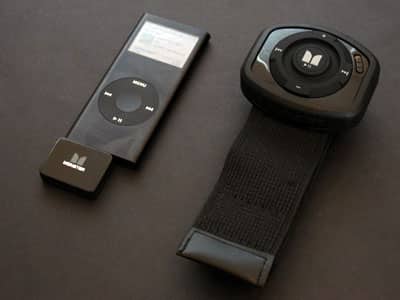
Similar to Belkin’s recently announced SportCommand, Monster’s iEZClick combines an RF (radio frequency) remote control and armband with an iPod Dock Connector receiver. You strap on the armband, which doubles as a bike attachment, attach the large-buttoned remote control, and use it to change tracks or volume on an iPod hidden someplace inside your clothing. The idea is to let you safely snowboard, jog, or otherwise use your iPod in extreme weather conditions without fear of damage to the iPod; iEZClick is weather-resistant and ruggedized. A click on the back of the remote allows it to be belt worn.
Thirty foot broadcasting distance is promised.
Over the last two weeks, we’ve had the opportunity to compare three new accessories designed for the same purpose: they’re all wireless remote controls designed for athletic use outdoors. Belkin has released SportCommand ($80, iLounge rating: B+), while Monster Cable has released iEZClick ($70, iLounge Rating: B-) and Scosche has released the 150’ Wireless RF Sport Remote ($80, iLounge rating: B), each pairing an RF (radio frequency) remote control with a Velcro armband and iPod-mounted receiver. You plug your earphones into your iPod, connect the receiver to the iPod’s bottom Dock Connector plug, and then stow your iPod inside your ski jacket, bike shirt or shorts, or elsewhere away from harm. The remote provides you with wrist or bicep-level access to the iPod’s track, play/pause and volume controls, reducing your need to use its screen or Click Wheel, and the receiver drains only modestly from your iPod’s battery, requiring none of its own.
While these remotes are similar in concept, they’re different enough in execution that you’ll be surprised by how they perform relative to each other, so we’ve put collective conclusions at the end for your reference. For more pictures and details for each individual unit, check out our separate reviews linked above.

Monster’s physical design for iEZClick is something between the SportCommand and 150’ Wireless RF Sport Remote in concept: Monster went with a big, arm-mounted remote control box and oversized buttons, but used a hard plastic material somewhat like Scosche’s, only with rubberized reinforcement. Because iEZClick is weather-resistant and ruggedized, it’s supposed to let you snowboard, jog, or otherwise use your iPod in extreme weather conditions without fear of damage to the iPod; our only fear in using it was falling on top of it, as it’s big and thick enough to make you think you might damage yourself in the process.

There are a few other noteworthy differences between iEZClick and its competitors. You’ll find a small but conspicuous hold switch on its face, in case you’re afraid of accidental button presses, a potential positive for some people.
But there are also a couple of negatives: first, there’s only one wrist or forearm-ready elastic armband in the package, rather than two. Monster notes that you can also attach this armband to a bike and mount the remote control there, as well, though there’s no specific clamping hardware in the box as most bikers would prefer. Second, the remote attaches to the band with a metal clip, but doesn’t feel quite as sturdy on there as the Belkin and Scosche designs; it’s adequate, but the remote could pop off if you fall.

The single biggest difference in iEZClick’s design is its RF broadcasting technology. Scosche promises 150 feet and delivers around 60. Belkin promises 50 feet and delivers around 80. Monster promises 30 feet and gets around 20 – just enough to work through a layer or two of clothes, not more. In other words, iEZClick does what it’s designed to do, but it’s not a remote control you’ll want to rely upon indoors at any great distance; Scosche’s design, complete with its pass-through Dock Connector port, is the best-suited of the bunch to this sort of use.

Of the three sport remotes, our top pick is Belkin’s SportCommand: it’s the easiest to use outdoors no matter where you want to wear it on your arm, or elsewhere on your clothes, has the best overall button and remote design, and has the strongest broadcasting power of the bunch: good enough to work from a couple of rooms away, indoors or outdoors.











