
A little less than two years ago, Monster Cable released the iCarPlay Wireless 200, an in-car FM transmitter and charger that was different from competitors in a few different ways. With a $100 price tag, the Wireless 200 was unquestionably expensive relative to similar devices, but featured an automatic clear station finder called Monster AutoScan, and a design that placed station tuning buttons directly under the iPod’s Click Wheel, with current station information on the iPod’s screen.
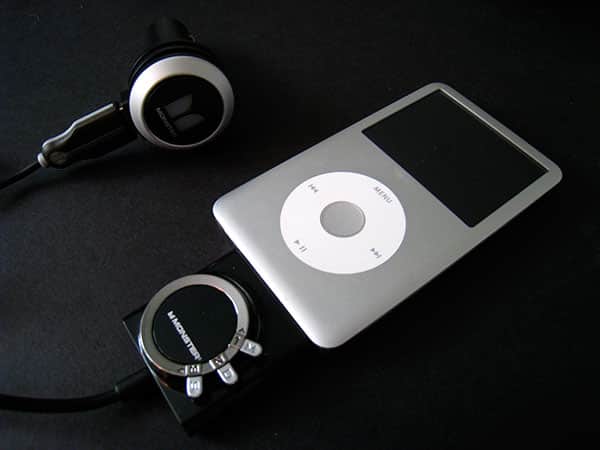
Now there’s a sequel, iCarPlay Wireless 250 ($100), which builds both figuratively and literally upon the 200, as well as adding compatibility with the iPhone and iPhone 3G. On the plus side, 250 does a little more than its predecessor for the same price, but on the minus side, it is an increasingly unwieldy piece of hardware physically, with two cable connection points that may prove tricky to manage in your car.

Unlike most in-car transmitter and charger combinations, Monster has re-designed the charger and FM transmitter cable as separate pieces that can be detached from one another, letting you connect the transmitter to any USB port for power, while the charger can be used to recharge any USB device that includes its own cable. You can decide for yourself whether these features have any purpose or appeal for your personal needs, though there are a couple of oddities that result from this design: first, there’s a large, stiff USB plug that now sticks down from the charger’s face, and may require that the otherwise attractive blue, M-logoed bulb be turned on its side in your charging port.

Second, the detachable transmitter design isn’t exactly like Belkin’s old, convenient TuneFM modular transmitters: here, it’s permanently attached to the cable, and you’re still required to find a power source for the Wireless 250 when it’s disconnected from your car. Consequently, if you have a USB Power Adapter or spare port on your computer, you can transmit your iPod or iPhone’s audio to a nearby radio, but this isn’t as convenient as having an iPod- or iPhone-based transmitter that works anywhere the devices work, fitting in any pocket where the devices could fit. Your mileage and usage scenarios may vary.

From a functionality standpoint, the transmitter is fine.
There are three total buttons on the unit, allowing you to access an automatic FM station tuning feature, a manual tuning feature, and three station presets. Monster has upgraded the automatic frequency scanner and renamed it AutoScan 3D, stating that it rapidly scans the 88.1FM to 107.9FM radio spectrum three times to determine the best possible station to play your iPod or iPhone music through. In practice, we found that the scan was as fast as other autoscanning transmitters we’ve seen, and the results were about par for the course: 50% of the time it seemed to find a clear station, while the other 50% it found not-clear stations, meaning that we typically needed to hit the button twice to get a good, mostly-empty station to broadcast on.

Our major issues with the Wireless 250 were in the size and ease of use of the new transmitter. Last time, Monster’s Wireless 200 added a smaller but still not tiny transmitter box onto the bottom of your iPod, choosing a shape that roughly matched the bottoms of the first- and second-generation iPod nanos. This time, Wireless 250’s transmitter is bigger, with a backlit screen and shrunken tuning buttons. Unfortunately, Monster has complicated these buttons by removing their tuning arrows, and replacing them with M, D, and S labels that activate secondary features: M activates manual tuning, D makes the display stay on or turn off automatically, and S activates scanning.

To tune a station, you have to hold the M button, then use the M and D buttons to tune, then hit the S button to set the channel. That’s a lot of work for something that is normally so simple, and really confusing until you spend some time trying to figure it all out. The results are ultimately satisfying, but not phenomenal; on a good station, the audio was pretty clear, but possessed a more than faint static hiss, while on bad stations, the audio was muddled as it mixed with existing channel audio. We had better results, namely more powerful, lower-static sound from the $70 XtremeMac InCharge FM, as well as the $100 Griffin iTrip AutoPilot. We thought Griffin’s $100 price was high for something as simple as a car charger and FM transmitter, but the iTrip AutoPilot has a number of interesting adjustable settings and bulb-based remote controls that can be handy for some iPhone and iPod touch users. iCarPlay Wireless 250 is, apart from its ability to split apart, lacking in frills. That said, the Wireless 250 sounded clearer than the latest Belkin TuneCast Auto, which underperformed the aforementioned two options on tuning and sound, but TuneCast Auto sells for $20 less than iCarPlay Wireless 250.

The last major issue with the Wireless 250 is that its physical shape is incompatible with virtually all of the cases we have been testing over the past couple of years, bucking a trend we’ve seen towards simplifying both cables and case openings to make many accessories work without case removal.











