
Pros: All-in-one solution for power charging and in-car FM transmission from iPod to radio.
Cons: High price, can’t be used outside a car, some plug and charger issues.
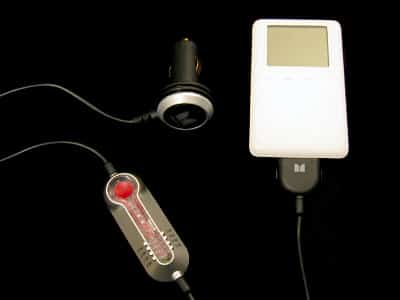
If you’ve never used an FM transmitter before, the concept is simple: plug one in to your iPod and your audio collection will emanate from any nearby radio. There are only two major issues. Since FM transmitters are like tiny radio stations that broadcast relatively weak signals through the air, you’ll have to pick an even weaker radio frequency that your transmitter can easily overwhelm. Second, because of FCC limitations on the broadcast range of these devices, your transmitter will need to be close to your radio – 30 feet maximum, 10 feet preferred – for best results.
Several companies have been selling iPod-specific FM transmitters – Griffin’s iTrip is perhaps the best known, with Belkin and others offering alternatives. (C Crane makes a device that’s not iPod specific but is widely regarded as the best because of its clear stereo output.) The key differences between these devices are their tuning mechanisms, power requirements, physical designs, and monaural versus stereo output. Most FM transmitters output only in single-channel (monaural) sound, have limited tuning capabilities, draw power from external sources, and only modestly match the iPod.
Monster’s Compromises
Few of the FM Transmitters are limited to in-car use, but Monster’s iCarPlay is one of them. Because it draws on and passes through power from a car’s cigarette lighter power source, you can’t use it inside your home.
It’s intended solely as an auto travel accessory, which is quite a limitation for a $69.99 product.
On the bright side, it does what it’s supposed to do, simultaneously charging your iPod and delivering audio to a car radio. The iCarPlay outputs a true stereo signal which may be more or less discernible depending on local radio interference. In our testing, the iCarPlay’s sound quality and stereo separation were acceptably strong when it found a mostly empty radio station to overwhelm with iPod music, though there was almost always a slight hiss on the line audible at average to above-average volume levels – a common problem with FM transmitters. The hiss (noise) became stronger with stronger interference from existing radio stations, and the stereo output of the iCarPlay became harder to discern.
If you can find a clear station within the iCarPlay’s bandwidth, you’ll like its performance. But your choice of stations will unfortunately be somewhat limited. Unlike Belkin’s recently released TuneCast II, which includes its own LCD screen and digital tuning to any station of your choice, Monster only lets you pick from eight stations – 88.1, 88.3, 88.5, 88.7, 88.9, 89.1, 89.3, and 89.5. Channel switching is accomplished by pressing a red button on the iCarPlay, and a small but generally visible red light indicates the current station.
Your individual results with the iCarPlay are likely to vary based on the number of stations occupying those channels in your area. Most people won’t need more than the 88-89 range, but if you’re in an area with heavy congestion in those stations, you might want to consider other FM transmitter options.

We test drove the iCarPlay through a swath of Southern California, starting in a location where none of the available stations was entirely empty, but three were substantially weaker than the others. The iCarPlay largely overwhelmed the weaker stations, leaving only the slight aforementioned hiss on the line, and produced a stereo signal that was clear and acceptable for most of our drive. Over roughly 150 miles, we did have to switch its channel once, but quickly found another station where the audio quality again became acceptable.
Power Charging
Monster’s iPod charger looks good and charges well, using a digital charging technique to provide an initial rapid burst of power, followed by a “trickle” of power that gradually brings the battery up to maximum power. A pleasantly viewable LED light glows red when rapidly charging, amber when trickling, and green when providing power but not charging. The black and silver cigarette lighter adapter doesn’t match the iPod, but it is small and slick enough to match the interiors of most cars – or at least not look especially bad in them.
Our major gripe with the charger is Monster’s Dock Connector plug, which won’t bother iPod users without cases, but will annoy the rest of us. Physically larger than the Connector plugs on competing products, Monster’s plug is large enough to create problems when attempting to connect an iPod inside of an iSkin carrying case, for example, a problem we didn’t experience with Apple’s reference plug or Belkin’s proprietary plug. While the iCarPlay’s plug isn’t as large as the oversized one on Monster’s Ultra-Low Profile Charger for iPod, it’s unnecessarily big enough to force fumbling whenever you’re plugging or unplugging the iPod in your car.
Another problem: the power charger didn’t seem to want to quit, and doesn’t have a power switch. While we haven’t experienced a dead battery as a result of this, we noted that the iCarPlay’s light stays on when the car turns off, so we wanted to unplug it when we left our car.











