
From everything we’ve seen over the past year or two, the near future of iPod and iPhone car integration can be summed up in three letters: AUX. Short for “auxiliary input,” the presence of an “aux” port on a car enables an iPod or iPhone to make a direct wired audio connection to the car’s audio system, delivering superior audio quality to FM transmitters and in most cases cassette tape adapters. Pricing is another advantage: you can get an auxiliary audio cable for between $5 and $15, versus $40 and up for good FM transmitters and $15-25 for tape adapters. Yet an aux port notably offers only an audio connection; as is the case with other inexpensive connection options, you’ll need additional parts to charge, mount, or remote control the iPod.
Today, armed with a new aux port-equipped testing vehicle, we’re reviewing a collection of auxiliary audio solutions from Kensington, Monster Cable, and DLO, with plans to expand our coverage of accessories in this product category in the future. From Kensington, we look at the LiquidAUX ($80) and LiquidAUX Deluxe ($100) for iPhone and iPod, while we also check out Monster’s iCarCharger 200 for iPod and iPhone ($50), and DLO’s TransDock Direct for iPod ($60).

Let’s start with what these devices do and don’t do.
All four accessories provide charging power to the connected iPod or iPhone, and they also provide auxiliary audio output from the device’s bottom Dock Connector port rather than its headphone port. The advantage of doing this has traditionally been audio quality, as iPods’ bottom connectors put out much cleaner, louder signals than their headphone ports, but the quality gap has narrowed in recent years. Today, the biggest advantage is a single-point connection between your iPod or iPhone and car: set any of these accessories up in your vehicle, and you just need to connect one plug to your music player before driving away.
What these devices don’t do, by historic standards, is provide an alternate audio option that was long popular with car accessories released by Griffin Technology, Belkin, and others: a switch or dial to let you adjust your iPod’s bottom volume level for connection to cassette tape adapters rather than aux ports. Properly implemented and used, a dial or switch of this sort can not only improve the sound balance between your iPod and tape deck connection, but also fix small issues that occasionally appear after Apple tweaks the output levels of its new devices. We prefer accessories that offer user-adjustable audio level management of some sort; unlike Griffin’s 2008 iPod-only TuneFlex AUX, none of these do that.

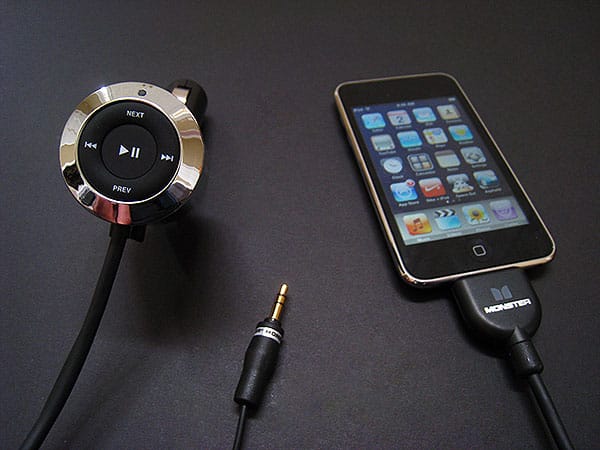
Of the accessories here, Monster’s iCarCharger 200 is the simplest: it is a black and silver plastic charging bulb with two cables running from its front bottom, one that connects to your car’s aux port, and the other coiled to connect to your iPod or iPhone.
Monster notes that the current version—sent to us in October—for whatever reason isn’t iPhone 3G-certified, but it’s supposedly ready for the original iPhone.

On the front of the charger is a set of five buttons to change tracks, playlists, or play/pause status on the connected device. While we initially weren’t thrilled by Monster’s approach to cabling, which appeared to place two long, non-detachable cables in a configuration that cluttered our vehicle’s center console, we found that the auxiliary cable could actually be wound up and secreted inside the iCarCharger 200’s charging bulb in a slide-out compartment behind its control buttons. This smart idea left us with only the coiling Dock Connector cable to contend with, and though it isn’t the best-looking or smallest cable of the bunch, its ability to expand or stay coiled definitely has its advantages.
Unfortunately, our testing revealed that iCarCharger 200 was unquestionably the worst-sounding auxiliary accessory of the bunch. Whether it was connected to an iPod or iPhone, it put out the highest level of audio interference—enough to be very obvious at even normal listening levels—and the interference was even worse when connected to the iPhone. Two listeners agreed that the interference was awful with an iPhone and bad with an iPod, overlapping music even when it wasn’t quiet or silent.

Overall, our current recommendations regarding auxiliary iPod car audio accessories are as follows.











